A Kiwi Pick
Save products and buy together with friends.
Was ist A Kiwi Pick?
A Kiwi Pick ist eine Chrome-Erweiterung, die von Kiwidrop entwickelt wurde, und ihr Hauptmerkmal ist "Save products and buy together with friends.".
Erweiterungsscreenshots


A Kiwi Pick-Erweiterungs-CRX-Datei herunterladen
Laden Sie A Kiwi Pick-Erweiterungsdateien im crx-Format herunter, installieren Sie Chrome-Erweiterungen manuell im Browser oder teilen Sie die crx-Dateien mit Freunden, um Chrome-Erweiterungen einfach zu installieren.
Anleitung zur Verwendung der Erweiterung
                        Curate and inspire your style easily, and we'll magically find products for your boutique from factories around the world.

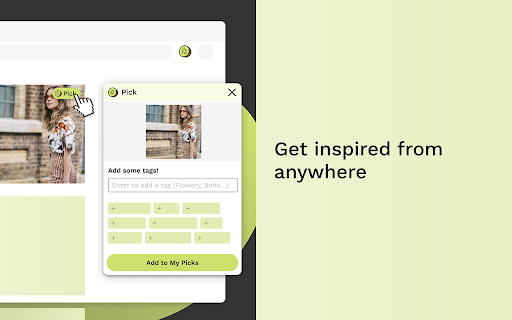
PICK - Use "Pick Kiwi" button to save and organize styles, ideas from images, listing detailed pages all over the web.

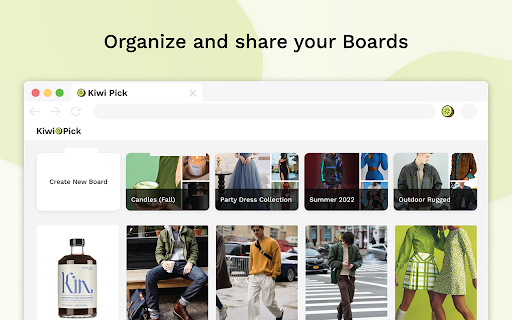
ORGANZE - Organize and keep track of everything creative - your mood, idea,  inspirations in the board for your community

SHARE - Share with your audience to get feedback and pre-order

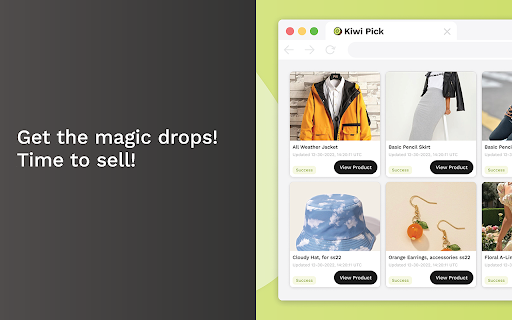
DROP - Wait for surprising drop your product upon request

Discover more of what you liked on KiwiDrop

To start picking, log in or sign up for a free account!
We'd love to hear your feedback at [email protected]
Grundlegende Informationen zur Erweiterung
| Name |  A Kiwi Pick A Kiwi Pick |
| ID | cmgglgjgcgmhjcmlkbcfannfenmhfmdh |
| Offizielle URL | https://chromewebstore.google.com/detail/a-kiwi-pick/cmgglgjgcgmhjcmlkbcfannfenmhfmdh |
| Beschreibung | Save products and buy together with friends. |
| Dateigröße | 607 KB |
| Installationsanzahl | 22 |
| Aktuelle Version | 3.3.7 |
| Letztes Update | 2022-12-13 |
| Veröffentlichungsdatum | 2021-07-10 |
| Bewertung | 5.00/5 Insgesamt 5 Bewertungen |
| Entwickler | Kiwidrop |
| [email protected] | |
| Zahlungsart | free |
| Erweiterungswebsite | https://www.pickkiwi.com/ |
| URL der Datenschutzrichtlinien-Seite | https://www.pickkiwi.com/privacy.html |
| Unterstützte Sprachen | en-US |
| manifest.json | |
{
    "update_url": "https:\/\/clients2.google.com\/service\/update2\/crx",
    "name": "A Kiwi Pick",
    "description": "Save products and buy together with friends.",
    "version": "3.3.7",
    "manifest_version": 2,
    "icons": {
        "16": "img\/icon16.png",
        "48": "img\/icon48.png",
        "128": "img\/icon128.png"
    },
    "content_scripts": [
        {
            "matches": [
                "*:\/\/*\/*"
            ],
            "js": [
                "lib\/vue.js",
                "lib\/elementUI.js",
                "lib\/jq.js",
                "lib\/axios.js",
                "lib\/vue-tags-input.js",
                "lib\/vue-country-intl.min.js",
                "parser\/setCurrentSite.js",
                "parser\/parserMethods.js",
                "parser\/parser_cloud_collect.js",
                "parser\/parser_cloud_list.js",
                "parser\/parser_cloud.js",
                "parser\/parser.js",
                "ui\/login.js",
                "ui\/support.js",
                "ui\/notSupport.js",
                "ui\/pickNotSupport.js",
                "ui\/multiple.js",
                "main.js"
            ],
            "css": [
                "css\/elementUI.css",
                "css\/vue-country-intl.css",
                "css\/plugIn.css",
                "css\/login.css",
                "css\/pickNotSupport.css",
                "css\/multiple.css"
            ],
            "run_at": "document_end"
        }
    ],
    "background": {
        "scripts": [
            "lib\/axios.js",
            "background\/parser_cloud_headers.js",
            "background\/background.js"
        ]
    },
    "browser_action": {
        "default_popup": ""
    },
    "permissions": [
        "https:\/\/click.simba.taobao.com\/*",
        "https:\/\/itemcdn.tmall.com\/*",
        "https:\/\/dscnew.taobao.com\/*",
        "https:\/\/descnew.taobao.com\/*",
        "https:\/\/www.alibaba.com\/*"
    ],
    "web_accessible_resources": [
        "iframes\/*.html",
        "css\/fonts\/*.ttf",
        "css\/fonts\/*.woff"
    ]
} | |