Xpress Sign-On Extension CROMA
This extension acts as a Form fill and password manager.
Was ist Xpress Sign-On Extension CROMA?
Xpress Sign-On Extension CROMA ist eine Chrome-Erweiterung, die von Ilantus Technologies entwickelt wurde, und ihr Hauptmerkmal ist "This extension acts as a Form fill and password manager.".
Erweiterungsscreenshots

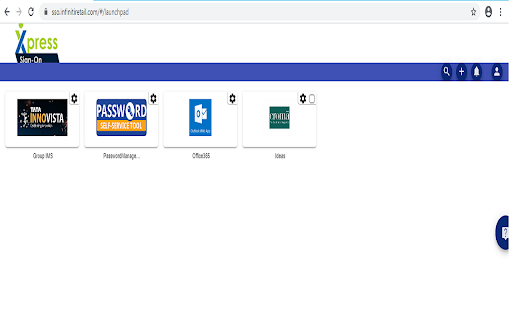
Xpress Sign-On Extension CROMA-Erweiterungs-CRX-Datei herunterladen
Laden Sie Xpress Sign-On Extension CROMA-Erweiterungsdateien im crx-Format herunter, installieren Sie Chrome-Erweiterungen manuell im Browser oder teilen Sie die crx-Dateien mit Freunden, um Chrome-Erweiterungen einfach zu installieren.
Anleitung zur Verwendung der Erweiterung
                        This extension acts as form filling username and password for Single Sign On requirements. The extension belongs to CROMA Production
Dec-2018
URL: https://sso.infinitiretail.com
Version : 7.8
Published Date : 17-FEB-2021
Grundlegende Informationen zur Erweiterung
| Name |  Xpress Sign-On Extension CROMA Xpress Sign-On Extension CROMA |
| ID | cngodoeanflglpcllhnlcohpgejhglfk |
| Offizielle URL | https://chromewebstore.google.com/detail/xpress-sign-on-extension/cngodoeanflglpcllhnlcohpgejhglfk |
| Beschreibung | This extension acts as a Form fill and password manager. |
| Dateigröße | 166 KB |
| Installationsanzahl | 96 |
| Aktuelle Version | 7.8 |
| Letztes Update | 2021-02-19 |
| Veröffentlichungsdatum | 2018-12-18 |
| Entwickler | Ilantus Technologies |
| [email protected] | |
| Zahlungsart | free |
| Erweiterungswebsite | https://www.ilantus.com |
| Hilfeseite URL | https://productsupport.ilantus.com |
| URL der Datenschutzrichtlinien-Seite | https://www.ilantusproducts.com/privacy-policy |
| Unterstützte Sprachen | en |
| manifest.json | |
{
    "background": {
        "scripts": [
            "jquery.js",
            "background.js",
            "popup.html",
            "croma.html"
        ]
    },
    "browser_action": {
        "default_icon": "icon.png",
        "default_title": "Xpress Sign-On"
    },
    "content_scripts": [
        {
            "all_frames": true,
            "js": [
                "signon.js"
            ],
            "matches": [
                "http:\/\/*\/*",
                "https:\/\/*\/*",
                "file:\/\/\/*"
            ],
            "run_at": "document_start"
        },
        {
            "all_frames": true,
            "js": [
                "popup.js",
                "jquery.js"
            ],
            "matches": [
                "http:\/\/*\/*",
                "https:\/\/*\/*"
            ],
            "run_at": "document_start"
        }
    ],
    "content_security_policy": "script-src 'self' 'unsafe-eval'; object-src 'self'",
    "description": "This extension acts as a Form fill and password manager.",
    "icons": {
        "128": "favicon128.png",
        "16": "favicon16.png",
        "32": "favicon32.png",
        "48": "favicon48.png"
    },
    "key": "MIIBIjANBgkqhkiG9w0BAQEFAAOCAQ8AMIIBCgKCAQEAm7kXL1G5pt69DedgQqk0TKopvgJBWdWiWsqSaZNFe8zfU4quzYOnRWqH9\/ugzY17I8elAzPO6WOt56D4mfAmmJhAOFlrhSunUSQlYlZUJ5K7kcEoOUc8XGcBhkpXvJBtec5rscTaPrjz87jrZqZfrXTRgMNiXU0emcC1BkxJzAp0iFvwDKcYnQTKX21R38Q26uOIwXNasOuhcpzC2ajdrZ\/ihjlWxEpyZsQorzASySBuTLp+jiIQnlThj1l7hTQEfaP7t8qj25IciQfez5KaprhPM0SzeT99OM5LveEJhednP5Tg4efcmbH5qefhasbdXT0i58IyGkdDjbjJ53MU+QIDAQAB",
    "manifest_version": 2,
    "name": "Xpress Sign-On Extension CROMA",
    "permissions": [
        "storage",
        "activeTab",
        "http:\/\/*\/*",
        "https:\/\/*\/*"
    ],
    "update_url": "https:\/\/clients2.google.com\/service\/update2\/crx",
    "version": "7.8",
    "web_accessible_resources": [
        "signon.js",
        "popup.html",
        "popup.js",
        "loading.gif",
        "images\/content-loader.GIF"
    ]
} | |