FM Event Timers
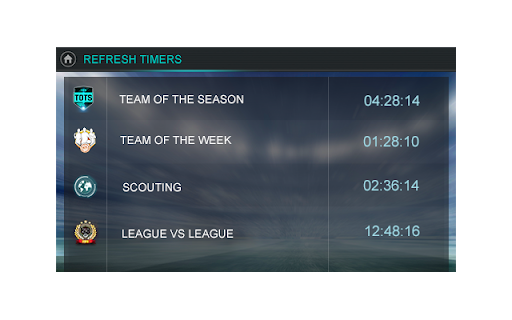
Follow the event expire timers and don't miss any of it.
Was ist FM Event Timers?
FM Event Timers ist eine Chrome-Erweiterung, die von dlivingstone entwickelt wurde, und ihr Hauptmerkmal ist "Follow the event expire timers and don't miss any of it.".
Erweiterungsscreenshots
FM Event Timers-Erweiterungs-CRX-Datei herunterladen
Laden Sie FM Event Timers-Erweiterungsdateien im crx-Format herunter, installieren Sie Chrome-Erweiterungen manuell im Browser oder teilen Sie die crx-Dateien mit Freunden, um Chrome-Erweiterungen einfach zu installieren.
Anleitung zur Verwendung der Erweiterung
                        Fifa Mobile events timers extension. You can always check for it and never miss any.

CHANGELOG:

v1.3.2
- Remove totw timer
- Add retro ad timer
- Refresh UI
_____

v1.3.1
- Now you can set target amount of points you want to get
_____

v1.3.0
- Arcade event calculator added
- Removed push notifications for timers
_____

v1.2.5
- Added option to change time left notification
_____

v1.1.5
- Notification need you interaction now, so you will not miss any of it
_____
Grundlegende Informationen zur Erweiterung
| Name |  FM Event Timers FM Event Timers |
| ID | copijlhgbjhpbpbgbhnoapibhapoldbf |
| Offizielle URL | https://chromewebstore.google.com/detail/fm-event-timers/copijlhgbjhpbpbgbhnoapibhapoldbf |
| Beschreibung | Follow the event expire timers and don't miss any of it. |
| Dateigröße | 1.27 MB |
| Installationsanzahl | 116 |
| Aktuelle Version | 1.3.2 |
| Letztes Update | 2021-05-27 |
| Veröffentlichungsdatum | 2018-09-20 |
| Bewertung | 4.71/5 Insgesamt 7 Bewertungen |
| Entwickler | dlivingstone |
| [email protected] | |
| Zahlungsart | free |
| Unterstützte Sprachen | en |
| manifest.json | |
{
    "update_url": "https:\/\/clients2.google.com\/service\/update2\/crx",
    "name": "FM Event Timers",
    "version": "1.3.2",
    "description": "Follow the event expire timers and don't miss any of it.",
    "background": {
        "scripts": [
            "js\/jquery-2.1.1.min.js",
            "js\/background.js",
            "js\/moment-with-locales.min.js",
            "js\/events.js"
        ],
        "persistent": true
    },
    "permissions": [
        "storage",
        "alarms",
        "notifications"
    ],
    "options_page": "options.html",
    "browser_action": {
        "default_popup": "popup.html",
        "default_icon": {
            "16": "images\/icon-16.png",
            "32": "images\/icon-32.png",
            "48": "images\/icon-48.png",
            "128": "images\/icon-128.png"
        }
    },
    "icons": {
        "16": "images\/icon-16.png",
        "32": "images\/icon-32.png",
        "48": "images\/icon-48.png",
        "128": "images\/icon-128.png"
    },
    "externally_connectable": {
        "matches": [
            "*:\/\/185.52.3.15\/*"
        ]
    },
    "manifest_version": 2,
    "content_security_policy": "script-src 'self' 'unsafe-eval'; object-src 'self'"
} | |