Many Tabs Resolver
1-Click to download images, files, or copy all opened addresses.
Was ist Many Tabs Resolver?
Many Tabs Resolver ist eine Chrome-Erweiterung, die von TaufikNur Production entwickelt wurde, und ihr Hauptmerkmal ist "1-Click to download images, files, or copy all opened addresses.".
Erweiterungsscreenshots
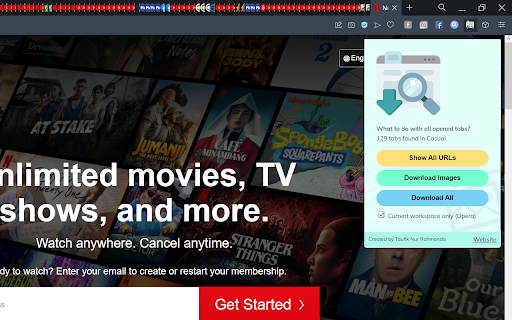
Many Tabs Resolver-Erweiterungs-CRX-Datei herunterladen
Laden Sie Many Tabs Resolver-Erweiterungsdateien im crx-Format herunter, installieren Sie Chrome-Erweiterungen manuell im Browser oder teilen Sie die crx-Dateien mit Freunden, um Chrome-Erweiterungen einfach zu installieren.
Anleitung zur Verwendung der Erweiterung
                        A chrome extension that helps you to copy or download all URLs which opened in separate tabs at once.

1. Copy all opened URLs
You can view list of all opened tab URLs, sort them, and copy them all to clipboard. In Opera you can show and copy URLs from the active workspace only.

2. Mass download images
You can open URLs or images which you want to download in new tab as many as you wish before actually mass download them.

3. Mass download files
Not only images, you can also download all files like PDFs or anything which opened in separate tabs.
Grundlegende Informationen zur Erweiterung
| Name |  Many Tabs Resolver Many Tabs Resolver |
| ID | dcclalmghnccnfbbeeaonadppojjokhj |
| Offizielle URL | https://chromewebstore.google.com/detail/many-tabs-resolver/dcclalmghnccnfbbeeaonadppojjokhj |
| Beschreibung | 1-Click to download images, files, or copy all opened addresses. |
| Dateigröße | 115 KB |
| Installationsanzahl | 109 |
| Aktuelle Version | 0.0.4 |
| Letztes Update | 2022-07-28 |
| Veröffentlichungsdatum | 2022-07-12 |
| Bewertung | 3.00/5 Insgesamt 3 Bewertungen |
| Entwickler | TaufikNur Production |
| [email protected] | |
| Zahlungsart | free |
| Unterstützte Sprachen | en |
| manifest.json | |
{
    "update_url": "https:\/\/clients2.google.com\/service\/update2\/crx",
    "manifest_version": 3,
    "name": "Many Tabs Resolver",
    "version": "0.0.4",
    "description": "1-Click to download images, files, or copy all opened addresses.",
    "author": "Taufik Nur Rahmanda",
    "permissions": [
        "tabs"
    ],
    "host_permissions": [
        "*:\/\/*\/*"
    ],
    "action": {
        "default_title": "Many Tabs Resolver - What to do with yout tabs?",
        "default_popup": "popup.html",
        "default_icon": {
            "16": "icons\/icon16.png",
            "24": "icons\/icon24.png",
            "32": "icons\/icon32.png"
        }
    },
    "icons": {
        "16": "icons\/icon16.png",
        "48": "icons\/icon48.png",
        "128": "icons\/icon128.png"
    },
    "background": {
        "service_worker": "background.js"
    }
} | |