S3.Translator
Translation of selected text, introduced by a phrase or a fully web-site from any language to any language
Was ist S3.Translator?
S3.Translator ist eine Chrome-Erweiterung, die von http://www.s3blog.org entwickelt wurde, und ihr Hauptmerkmal ist "Translation of selected text, introduced by a phrase or a fully web-site from any language to any language".
Erweiterungsscreenshots



S3.Translator-Erweiterungs-CRX-Datei herunterladen
Laden Sie S3.Translator-Erweiterungsdateien im crx-Format herunter, installieren Sie Chrome-Erweiterungen manuell im Browser oder teilen Sie die crx-Dateien mit Freunden, um Chrome-Erweiterungen einfach zu installieren.
Anleitung zur Verwendung der Erweiterung
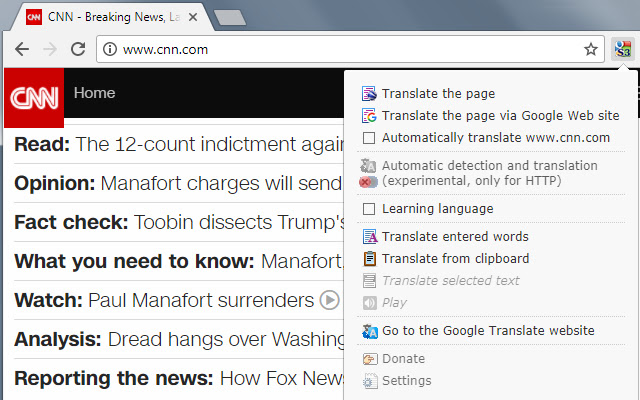
                        S3.Translator adds the power of Google Translate’s automatic translations to your browser!
It supports translation of selected text, entered phrase or whole webpage between any of 100+ languages.

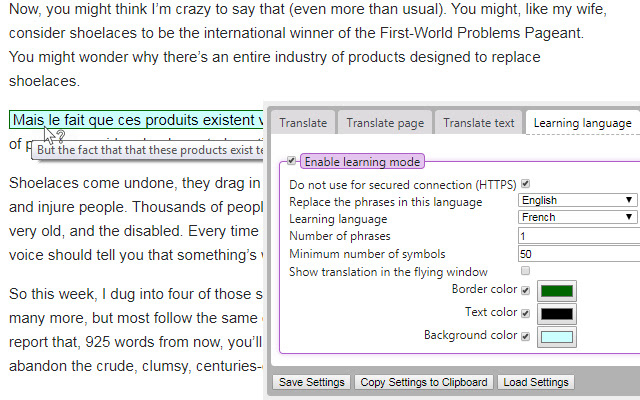
New Feature: Language learning!

----------------------
Translate Limitations:
----------------------
1. Not processed some sites from mozilla.org and google.com
2. Not processed on sites that do not have pages, for example error 404 (page not found)
3. Not processed on internal Firefox and GoogleChrome pages, for example about:addons , about:config , chrome://extensions/ , chrome://settings/ , etc.
4. Not processed on the extensions pages "moz-extension://...." , "chrome-extension://...."

----------------------
Collection of statistics:
----------------------
If user agree, then the extension may collect non-personalized browsing history.
Such statistics are needed to improve this extension - based on domain names, a map of work priorities will be drawn up in which area it is necessary to add efforts to make the extension better.
We don't collect cookies, password, e-mails or any other confidential info.
Only the domains (not full URLs) of the web-sites visited and nothing else!

----------------------
The extension uses the Google translation public API http://translate.google.com/ and therefore it have more than 100 languages which you can use for quick translation.

Also, the extension able to auto-detect the language of the original text.

There are a lot of simple and complex extensions for Firefox browser but they all have same problem: when translating, the format of selected text is lost, while S3.Translator retains the HTML formatting of web pages.

I hope that this extension will be very useful for you.

----------------------
Hint!
----------------------
* Press "Ctrl" + "Translate full page" - for translate full page via Google Web site
* Automatic translation algorithm when source and target languages are the same (en->en, fr->fr, ru->ru, etc.)
** launch a translation.
** if both languages (source and target) are the same, the add-on checks the target one and if it is not the default translation language, it then translates to it.
** if it is the default translation language, the add-on checks that "Language Learning" is enabled, if it is and the source language is the same as the studied one (in the settings: "replace phrase in this language"), it then translates to the studied language.
** if it doesn't match neither point 2 nor point 3, then it is left as is: en->en, fr->fr, ru->ru, etc.
Grundlegende Informationen zur Erweiterung
| Name |  S3.Translator S3.Translator |
| ID | debnnjfbneojbmioajinefnflopdohjk |
| Offizielle URL | https://chrome.google.com/webstore/detail/s3translator/debnnjfbneojbmioajinefnflopdohjk |
| Beschreibung | Translation of selected text, introduced by a phrase or a fully web-site from any language to any language |
| Dateigröße | 358 KB |
| Installationsanzahl | 41,594 |
| Aktuelle Version | 6.29 |
| Letztes Update | 2022-09-07 |
| Veröffentlichungsdatum | 2019-02-16 |
| Bewertung | 4.52/5 Insgesamt 275 Bewertungen |
| Entwickler | http://www.s3blog.org |
| [email protected] | |
| Zahlungsart | free |
| Erweiterungswebsite | http://www.s3blog.org/s3translator.html |
| URL der Datenschutzrichtlinien-Seite | http://www.s3blog.org/screengrab/privacy.html |
| Unterstützte Sprachen | de,en,fr,nl,ca,es,it,pl,pt-BR,sk,sl,cs,ru,uk,zh-CN,zh-TW,ja,ko |
| manifest.json | |
{
"update_url": "https:\/\/clients2.google.com\/service\/update2\/crx",
"manifest_version": 2,
"name": "__MSG_extension_name__",
"short_name": "__MSG_extension_name__",
"description": "__MSG_extension_description__",
"author": "Oleksandr Popov",
"homepage_url": "https:\/\/www.s3blog.org\/s3translator.html",
"version": "6.29",
"minimum_chrome_version": "45",
"default_locale": "en",
"applications": {
"gecko": {
"id": "s3@translator"
}
},
"icons": {
"16": "skin\/s3gt_logo_16.png",
"32": "skin\/s3gt_logo_32.png",
"48": "skin\/s3gt_logo_48.png"
},
"browser_action": {
"default_title": "__MSG_extension_name__",
"default_icon": "skin\/s3gt_logo_16.png",
"default_popup": "content\/popup.html"
},
"background": {
"page": "content\/background.html"
},
"options_ui": {
"page": "content\/options.html",
"chrome_style": false,
"open_in_tab": true
},
"content_scripts": [
{
"js": [
"\/content\/tab_loader.js"
],
"matches": [
" | |