Stock Market Right-Click
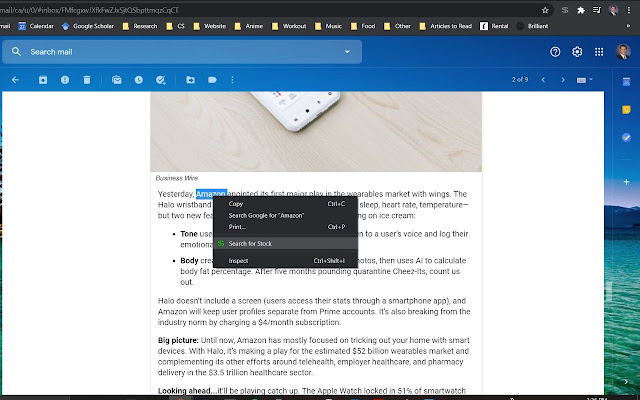
Right click on selected text to be given an option to look up the stock.
Was ist Stock Market Right-Click?
Stock Market Right-Click ist eine Chrome-Erweiterung, die von dalton.cole entwickelt wurde, und ihr Hauptmerkmal ist "Right click on selected text to be given an option to look up the stock.".
Erweiterungsscreenshots

Stock Market Right-Click-Erweiterungs-CRX-Datei herunterladen
Laden Sie Stock Market Right-Click-Erweiterungsdateien im crx-Format herunter, installieren Sie Chrome-Erweiterungen manuell im Browser oder teilen Sie die crx-Dateien mit Freunden, um Chrome-Erweiterungen einfach zu installieren.
Anleitung zur Verwendung der Erweiterung
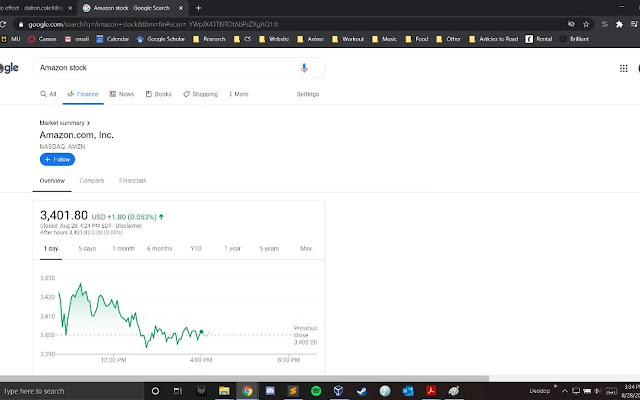
                        Select some text, right click, click on "Search for Stock" and done! A new tab will open with the Google Finance page info of the highlighted stock. Great for quickly viewing the stock price and chart for a given company.

I developed this extension because I read a lot of news articles on stocks and thought "I wonder how this stock has been doing". Selecting, copying, opening a new tab, and pasting got to be too much of a chore. This cuts my stock lookup time in half!
Grundlegende Informationen zur Erweiterung
| Name |  Stock Market Right-Click Stock Market Right-Click |
| ID | dgnpkmbeakjmhiopbkjdhobccihdipja |
| Offizielle URL | https://chrome.google.com/webstore/detail/stock-market-right-click/dgnpkmbeakjmhiopbkjdhobccihdipja |
| Beschreibung | Right click on selected text to be given an option to look up the stock. |
| Dateigröße | 20 KB |
| Installationsanzahl | 31 |
| Aktuelle Version | 1.0 |
| Letztes Update | 2021-02-09 |
| Veröffentlichungsdatum | 2020-08-30 |
| Bewertung | 5.00/5 Insgesamt 1 Bewertungen |
| Entwickler | dalton.cole |
| [email protected] | |
| Zahlungsart | free |
| Unterstützte Sprachen | en |
| manifest.json | |
{
    "update_url": "https:\/\/clients2.google.com\/service\/update2\/crx",
    "name": "Stock Market Right-Click",
    "version": "1.0",
    "description": "Right click on selected text to be given an option to look up the stock.",
    "manifest_version": 2,
    "permissions": [
        "contextMenus",
        "tabs"
    ],
    "icons": {
        "16": "images\/dollar_16.png",
        "32": "images\/dollar_32.png",
        "48": "images\/dollar_48.png",
        "128": "images\/dollar_128.png"
    },
    "background": {
        "scripts": [
            "background.js"
        ]
    }
} | |