YouTube Comment Filter
Allows you to filter out Youtube spam.
Was ist YouTube Comment Filter?
YouTube Comment Filter ist eine Chrome-Erweiterung, die von averyboyd2 entwickelt wurde, und ihr Hauptmerkmal ist "Allows you to filter out Youtube spam.".
Erweiterungsscreenshots
YouTube Comment Filter-Erweiterungs-CRX-Datei herunterladen
Laden Sie YouTube Comment Filter-Erweiterungsdateien im crx-Format herunter, installieren Sie Chrome-Erweiterungen manuell im Browser oder teilen Sie die crx-Dateien mit Freunden, um Chrome-Erweiterungen einfach zu installieren.
Anleitung zur Verwendung der Erweiterung
                        YouTube comments can be very annoying and these comments can overrun a discussion thread.
But YouTube's comment reporting is too dependent on the community's idea of what spam is. What users consider to be spam is different from person to person, so there should be a way to filter out what you think is spam for yourself.

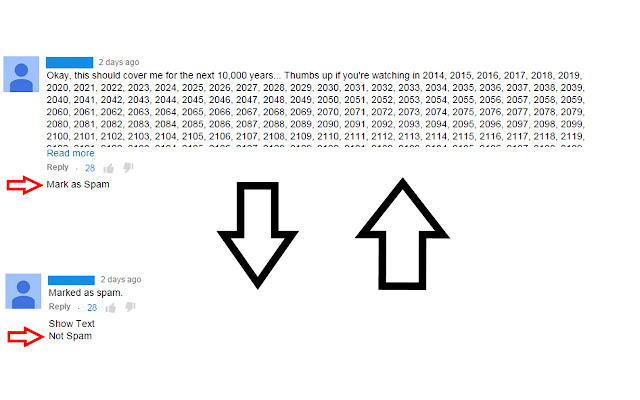
This extension is a spam filter for YouTube comments just like any e-mail service would have. It will learn what you consider to be spam and hide any spam it finds from you.

Mark comments as spam as you see fit and unmark any comments you feel were undeservingly marked as spam by clicking on the text as shown.
Grundlegende Informationen zur Erweiterung
| Name |  YouTube Comment Filter YouTube Comment Filter |
| ID | dhanbbkjemobhmgfldpcaegfhcibknbd |
| Offizielle URL | https://chrome.google.com/webstore/detail/youtube-comment-filter/dhanbbkjemobhmgfldpcaegfhcibknbd |
| Beschreibung | Allows you to filter out Youtube spam. |
| Dateigröße | 131 KB |
| Installationsanzahl | 72 |
| Aktuelle Version | 1.1.3 |
| Letztes Update | 2015-03-28 |
| Veröffentlichungsdatum | 2015-03-28 |
| Bewertung | 2.00/5 Insgesamt 4 Bewertungen |
| Entwickler | averyboyd2 |
| Zahlungsart | free |
| Unterstützte Sprachen | en |
| manifest.json | |
{
    "update_url": "https:\/\/clients2.google.com\/service\/update2\/crx",
    "manifest_version": 2,
    "name": "YouTube Comment Filter",
    "description": "Allows you to filter out Youtube spam.",
    "version": "1.1.3",
    "icons": {
        "128": "FilTube128.png",
        "48": "FilTube48.png"
    },
    "options_page": "options.html",
    "background": {
        "scripts": [
            "background.js"
        ]
    },
    "content_scripts": [
        {
            "matches": [
                "https:\/\/apis.google.com\/*",
                "https:\/\/www.youtube.com\/*"
            ],
            "js": [
                "jquery.min.js",
                "editor.js"
            ],
            "run_at": "document_end",
            "all_frames": true
        }
    ]
} | |