Chrome Robot
Writes Selenium automated tests for the Robot Framework
Was ist Chrome Robot?
Chrome Robot ist eine Chrome-Erweiterung, die von João Carloto entwickelt wurde, und ihr Hauptmerkmal ist "Writes Selenium automated tests for the Robot Framework".
Erweiterungsscreenshots
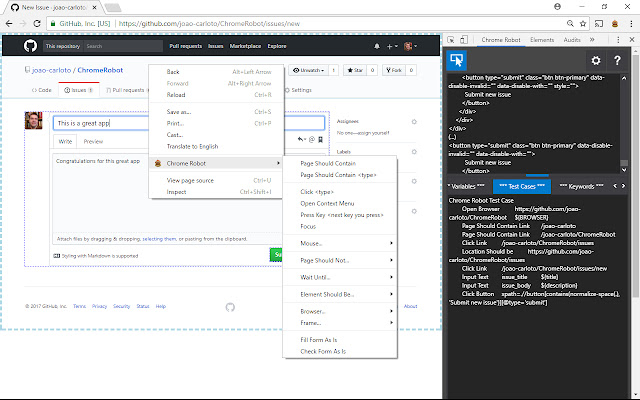


Chrome Robot-Erweiterungs-CRX-Datei herunterladen
Laden Sie Chrome Robot-Erweiterungsdateien im crx-Format herunter, installieren Sie Chrome-Erweiterungen manuell im Browser oder teilen Sie die crx-Dateien mit Freunden, um Chrome-Erweiterungen einfach zu installieren.
Anleitung zur Verwendung der Erweiterung
                        Chrome Robot will boost your test automation productivity by helping you create high level custom keywords in an efficient manner.

Here are some of the features:
- Bulk selection of elements and creation of test steps in an adaptative way.
- Filling and verification of forms based on their current state.
- Easy preference definition for the page element locators.
- Element localization thru automatically generated XPath, based on an element's own text or text of a nearby element.
- Automatic creation of variables based on the value of inputs.
- Test script download, so you can run it directly or incorporate the code on your test automation project.
Grundlegende Informationen zur Erweiterung
| Name |  Chrome Robot Chrome Robot |
| ID | dihdbpkpgdkioobahfpnkondnekhbmlo |
| Offizielle URL | https://chrome.google.com/webstore/detail/dihdbpkpgdkioobahfpnkondnekhbmlo |
| Beschreibung | Writes Selenium automated tests for the Robot Framework |
| Dateigröße | 1.1 MB |
| Installationsanzahl | 2,517 |
| Aktuelle Version | 0.0.5 |
| Letztes Update | 2021-12-30 |
| Veröffentlichungsdatum | 2019-05-26 |
| Bewertung | 5.00/5 Insgesamt 5 Bewertungen |
| Entwickler | João Carloto |
| [email protected] | |
| Zahlungsart | free |
| Erweiterungswebsite | https://github.com/joao-carloto/ChromeRobot |
| Hilfeseite URL | https://github.com/joao-carloto/ChromeRobot/issues |
| Unterstützte Sprachen | en |
| manifest.json | |
{
    "update_url": "https:\/\/clients2.google.com\/service\/update2\/crx",
    "name": "Chrome Robot",
    "version": "0.0.5",
    "description": "Writes Selenium automated tests for the Robot Framework",
    "default_locale": "en",
    "devtools_page": "devtools.html",
    "background": {
        "scripts": [
            "background.js"
        ]
    },
    "permissions": [
        "tabs",
        "storage",
        "contextMenus",
        "http:\/\/*\/*",
        "https:\/\/*\/*",
        "*:\/\/*\/*"
    ],
    "icons": {
        "16": "gui\/skin\/icon16.png",
        "48": "gui\/skin\/icon48.png",
        "128": "gui\/skin\/icon128.png"
    },
    "browser_action": {
        "default_icon": "gui\/skin\/icon16.png",
        "default_popup": "gui\/redirect_popup.html",
        "default_title": "Chrome Robot"
    },
    "commands": {
        "toggle-select": {
            "suggested_key": {
                "default": "Alt+Shift+Z",
                "windows": "Alt+Shift+Z",
                "mac": "Alt+Shift+Z"
            },
            "description": "Toggles select mode"
        }
    },
    "content_security_policy": "script-src 'self' https:\/\/ssl.google-analytics.com; object-src 'self'",
    "manifest_version": 2
} | |