Evolution Simulation
Simulate Evolution By Observing Natural Selection Over Generations Of Simulated Organisms!
Was ist Evolution Simulation?
Evolution Simulation ist eine Chrome-Erweiterung, die von Finan Gammell entwickelt wurde, und ihr Hauptmerkmal ist "Simulate Evolution By Observing Natural Selection Over Generations Of Simulated Organisms!".
Erweiterungsscreenshots
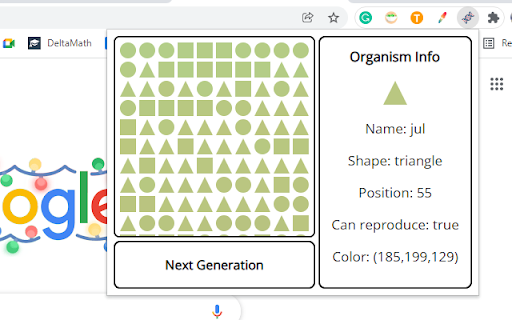
Evolution Simulation-Erweiterungs-CRX-Datei herunterladen
Laden Sie Evolution Simulation-Erweiterungsdateien im crx-Format herunter, installieren Sie Chrome-Erweiterungen manuell im Browser oder teilen Sie die crx-Dateien mit Freunden, um Chrome-Erweiterungen einfach zu installieren.
Anleitung zur Verwendung der Erweiterung
                        *This extension creates simulated "organisms" with traits
*Shape and color are heritable traits
*Depending on the selection criteria, certain "organisms" have a better chance of "reproduction" *This causes heritable traits that are more favorable to the selection criteria to occur more often (Natural selection)
*Natural selection is the process by which Evolution occurs, so this extension allows users to better understand how and why Evolution takes place
Grundlegende Informationen zur Erweiterung
| Name |  Evolution Simulation Evolution Simulation |
| ID | edeghoiegfbmioabkkfccdghamfgcnmp |
| Offizielle URL | https://chromewebstore.google.com/detail/evolution-simulation/edeghoiegfbmioabkkfccdghamfgcnmp |
| Beschreibung | Simulate Evolution By Observing Natural Selection Over Generations Of Simulated Organisms! |
| Dateigröße | 67.78 KB |
| Installationsanzahl | 31 |
| Aktuelle Version | 1.0.0 |
| Letztes Update | 2021-12-14 |
| Veröffentlichungsdatum | 2021-12-13 |
| Bewertung | 3.00/5 Insgesamt 1 Bewertungen |
| Entwickler | Finan Gammell |
| [email protected] | |
| Zahlungsart | free |
| Unterstützte Sprachen | en |
| manifest.json | |
{
    "update_url": "https:\/\/clients2.google.com\/service\/update2\/crx",
    "manifest_version": 2,
    "name": "Evolution Simulation",
    "description": "Simulate Evolution By Observing Natural Selection Over Generations Of Simulated Organisms!",
    "version": "1.0.0",
    "icons": {
        "128": "gene_logo_128.png"
    },
    "browser_action": {
        "default_icon": "gene_logo.png",
        "default_popup": "popup.html"
    }
} | |