Notifications for Spotify
Add notifications and controls to open.spotify.com
Was ist Notifications for Spotify?
Notifications for Spotify ist eine Chrome-Erweiterung, die von Skylark95 entwickelt wurde, und ihr Hauptmerkmal ist "Add notifications and controls to open.spotify.com".
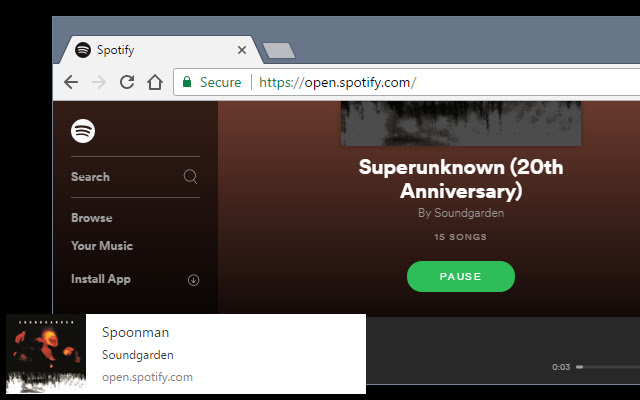
Erweiterungsscreenshots

Notifications for Spotify-Erweiterungs-CRX-Datei herunterladen
Laden Sie Notifications for Spotify-Erweiterungsdateien im crx-Format herunter, installieren Sie Chrome-Erweiterungen manuell im Browser oder teilen Sie die crx-Dateien mit Freunden, um Chrome-Erweiterungen einfach zu installieren.
Anleitung zur Verwendung der Erweiterung
                        The browser tab for open.spotify.com must remain open for notifications to appear.

As of version v0.4.0 a browser action icon will also show the currently playing song with track controls when clicked.

=== FEATURES ===

WEB NOTIFICATIONS FOR CURRENT SONG:
• Show web notification with song title, artist, and album art
• Notification is shown when open.spotify.com is opened and when song changes

BROWSER ACTION WITH SONG PREVIEW AND CONTROLS
• Browser action icon will show currently playing song with controls to play/pause/change track
• Clicking links in the browser action popup window will focus the Spotify tab and show the album or artist clicked

KEYBOARD SHORTCUTS
• Ctrl+Shift+S: Show browser action with song preview
• Ctrl+Shift+Space: Toggle Play/Pause for current song from anywhere in the browser
• Ctrl+Shift+X: Show notification for current song from anywhere in the browser
• Keyboard shortcuts may be changed on the chrome://extensions/ page by strolling to the bottom of the page and clicking "Keyboard Shortcuts"

PLEASE REPORT BUGS OR FEATURES REQUESTS ON GITHUB. I don't regularly check comments on the web store.
https://github.com/Skylark95/spotify-notifications

Recent Changes:
v0.4.0:
• Feature: Add track controls to browser action
• Feature: Add links to browser action to jump to album or artist
• Feature: Add browser keyboard shortcut to show browser action (default: Ctrl+Shift+S)
• Feature: Add browser keyboard shortcut play/pause track from any tab (default: Ctrl+Shift+Space)
Feature: Add browser keyboard shortcut show notification from any tab (default: Ctrl+Shift+X)
• Bugfix: Don't show multiple notifications if rapidly changing track
• Bugfix: Fix browser action doesn't work if notifications are not granted

v0.3.1:
• Bugfix: Fix cover art scaling in browser action popup
• Security: Replace innerHTML calls with textContent

v0.3.0:
• Feature: Implement browser action to show currently playing song

v0.2.0:
• Performance: Replace recursive setTimeout call with MutationObserver
Grundlegende Informationen zur Erweiterung
| Name |  Notifications for Spotify Notifications for Spotify |
| ID | filocihllcicedfecomcdlilalmcfohi |
| Offizielle URL | https://chrome.google.com/webstore/detail/notifications-for-spotify/filocihllcicedfecomcdlilalmcfohi |
| Beschreibung | Add notifications and controls to open.spotify.com |
| Dateigröße | 15.47 KB |
| Installationsanzahl | 102 |
| Aktuelle Version | 0.4.0 |
| Letztes Update | 2017-06-28 |
| Veröffentlichungsdatum | 2017-06-28 |
| Bewertung | 2.67/5 Insgesamt 3 Bewertungen |
| Entwickler | Skylark95 |
| [email protected] | |
| Zahlungsart | free |
| Erweiterungswebsite | https://github.com/Skylark95/spotify-notifications |
| Hilfeseite URL | https://github.com/Skylark95/spotify-notifications/blob/master/README.md |
| Unterstützte Sprachen | en |
| manifest.json | |
{
    "update_url": "https:\/\/clients2.google.com\/service\/update2\/crx",
    "name": "Notifications for Spotify",
    "version": "0.4.0",
    "manifest_version": 2,
    "minimum_chrome_version": "49",
    "description": "Add notifications and controls to open.spotify.com",
    "homepage_url": "https:\/\/github.com\/Skylark95\/spotify-notifications",
    "icons": {
        "16": "icons\/icon16.png",
        "48": "icons\/icon48.png",
        "128": "icons\/icon128.png"
    },
    "permissions": [
        "storage"
    ],
    "content_scripts": [
        {
            "matches": [
                "https:\/\/open.spotify.com\/*"
            ],
            "js": [
                "src\/inject\/spotify-notifications.js"
            ],
            "run_at": "document_end"
        }
    ],
    "background": {
        "scripts": [
            "src\/bg\/background.js"
        ],
        "persistent": false
    },
    "browser_action": {
        "default_icon": "icons\/icon19.png",
        "default_title": "Notifications for Spotify",
        "default_popup": "src\/browser-action\/browser-action.html"
    },
    "commands": {
        "_execute_browser_action": {
            "suggested_key": {
                "default": "Ctrl+Shift+S"
            }
        },
        "spotify-notifications-play-pause": {
            "suggested_key": {
                "default": "Ctrl+Shift+Space"
            },
            "description": "Toggle Play\/Pause track"
        },
        "spotify-notifications-show-notification": {
            "suggested_key": {
                "default": "Ctrl+Shift+X"
            },
            "description": "Show Notification"
        }
    }
} | |
![Now Playing Notifier for Spotify [unofficial]](https://lh3.googleusercontent.com/tWy6Q6dK6DXt5dLvzed-p2oZ1-fRqk-cmE3O0yTSVvvQ5qh8iztGfEcYTTqXr2CV4WGasdR8S6OX2yQz7xGcfv7N)