Kudos Extension
Extension to send Kudos
Was ist Kudos Extension?
Kudos Extension ist eine Chrome-Erweiterung, die von Kudos Inc. entwickelt wurde, und ihr Hauptmerkmal ist "Extension to send Kudos".
Erweiterungsscreenshots

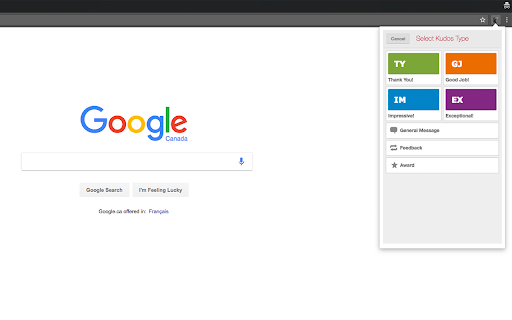
Kudos Extension-Erweiterungs-CRX-Datei herunterladen
Laden Sie Kudos Extension-Erweiterungsdateien im crx-Format herunter, installieren Sie Chrome-Erweiterungen manuell im Browser oder teilen Sie die crx-Dateien mit Freunden, um Chrome-Erweiterungen einfach zu installieren.
Anleitung zur Verwendung der Erweiterung
                        Send meaningful recognition to your peers right from your toolbar.

With the Chrome add-on, now you can give Kudos in seconds - right from your toolbar.

View your Kudos feeds and access everyone in your Kudos directory. Even switch easily between your Kudos accounts without ever opening a new tab.

Kudos is a robust employee recognition system and private social network that enhances team communication, collaboration, appreciation, and rewards. www.kudosnow.com
Grundlegende Informationen zur Erweiterung
| Name |  Kudos Extension Kudos Extension |
| ID | fjcggnmhpdcdbmffeediibifphpnnhhb |
| Offizielle URL | https://chromewebstore.google.com/detail/kudos-extension/fjcggnmhpdcdbmffeediibifphpnnhhb |
| Beschreibung | Extension to send Kudos |
| Dateigröße | 54.98 KB |
| Installationsanzahl | 442 |
| Aktuelle Version | 4.5 |
| Letztes Update | 2017-12-11 |
| Veröffentlichungsdatum | 2017-12-11 |
| Bewertung | 4.20/5 Insgesamt 5 Bewertungen |
| Entwickler | Kudos Inc. |
| [email protected] | |
| Zahlungsart | free |
| Erweiterungswebsite | http://www.kudosnow.com |
| Hilfeseite URL | http://support.kudosnow.com/home |
| Unterstützte Sprachen | en |
| manifest.json | |
{
    "update_url": "https:\/\/clients2.google.com\/service\/update2\/crx",
    "name": "Kudos Extension",
    "version": "4.5",
    "manifest_version": 2,
    "description": "Extension to send Kudos",
    "browser_action": {
        "default_icon": "icon.png",
        "default_popup": "kudos.html"
    },
    "icons": {
        "128": "icon128.png",
        "48": "icon48.png",
        "38": "icon38.png",
        "32": "icon32.png",
        "19": "icon19.png",
        "16": "icon16.png"
    },
    "permissions": [
        "http:\/\/api.flickr.com\/"
    ]
} | |