Right Click URL Shortener
Right click and get shortened URLs for the page you're on, links, images & video/audio clips.
Was ist Right Click URL Shortener?
Right Click URL Shortener ist eine Chrome-Erweiterung, die von http://grandadevans.com entwickelt wurde, und ihr Hauptmerkmal ist "Right click and get shortened URLs for the page you're on, links, images & video/audio clips.".
Erweiterungsscreenshots


Right Click URL Shortener-Erweiterungs-CRX-Datei herunterladen
Laden Sie Right Click URL Shortener-Erweiterungsdateien im crx-Format herunter, installieren Sie Chrome-Erweiterungen manuell im Browser oder teilen Sie die crx-Dateien mit Freunden, um Chrome-Erweiterungen einfach zu installieren.
Anleitung zur Verwendung der Erweiterung
                        ====================================
A Chrome extension to shorten URLs
====================================

This page is to support and compliment my Google Chrome extension to shorten URLs.

It allows you to obtain a short URL for the curent page as well as allowing you to right click on a link, image, video or audio click and obtain a shortened URL from the GEWD.co URL shortening Service with options to:

1. Copy the shortened link to the clipboard
2. Copy the link and close the notification popup

====================================
How to use the Chrome extension to shorten URLs
====================================

To get the short URL for the current page

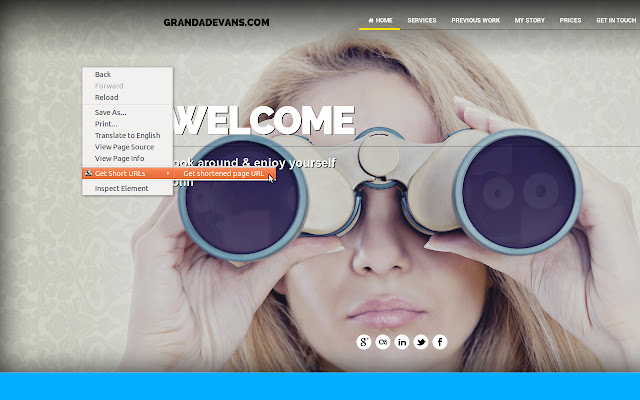
To get a short URL for the current page all you have to do is right click anywhere in the current page, hover over “Get Short URLs” and select “Get shortened page URL”.

To get the short URL for an image, video, link or audio clip

To use the extension simply right click on a link, image, video or piece of audio and select “Get shortened URL”.

In either of the above cases you will then be presented with a notification box with your new URL as well as options to copy the link and copy the link then close the notification box.

====================================
TO DO
====================================


* Include the ability to test the shortened link out
* Maybe integrate the popular shortening apps
* Cache the links so that they are available for later use, available when off-line and sync's across devices.

====================================
Privacy
====================================

I am using an analytics program so that I can track the usage but the analytics program WILL NOT store your links.

Your links WILL be stored in a centralised database as will all URL shorteners. This is an essential part of the process and it is not possible without the links being stored.

I hope this of use to you. I know that I will be using it daily.

Enjoy,

John Evans
Grundlegende Informationen zur Erweiterung
| Name |  Right Click URL Shortener Right Click URL Shortener |
| ID | fnokdkaalmphihgjimabiedajkbfpjlg |
| Offizielle URL | https://chrome.google.com/webstore/detail/right-click-url-shortener/fnokdkaalmphihgjimabiedajkbfpjlg |
| Beschreibung | Right click and get shortened URLs for the page you're on, links, images & video/audio clips. |
| Dateigröße | 5.26 MB |
| Installationsanzahl | 243 |
| Aktuelle Version | 2 |
| Letztes Update | 2013-12-05 |
| Veröffentlichungsdatum | 2013-12-05 |
| Bewertung | 1.00/5 Insgesamt 5 Bewertungen |
| Entwickler | http://grandadevans.com |
| Zahlungsart | free |
| Erweiterungswebsite | http://grandadevans.com/resources/chrome-extension-to-shorten-urls/ |
| Hilfeseite URL | http://grandadevans.com/resources/chrome-extension-to-shorten-urls/ |
| Unterstützte Sprachen | en-GB |
| manifest.json | |
{
    "update_url": "https:\/\/clients2.google.com\/service\/update2\/crx",
    "name": "Right Click URL Shortener",
    "version": "2",
    "manifest_version": 2,
    "description": "Right click and get shortened URLs for the page you're on, links, images & video\/audio clips.",
    "icons": {
        "16": "img\/Internet-url-icon-16px.png",
        "48": "img\/Internet-url-icon-48px.png",
        "128": "img\/Internet-url-icon-128px.png"
    },
    "background": {
        "scripts": [
            "js\/background.js"
        ]
    },
    "content_security_policy": "script-src 'self' https:\/\/ssl.google-analytics.com; object-src 'self'",
    "permissions": [
        "contextMenus",
        "notifications",
        "http:\/\/gewd.co\/*"
    ],
    "web_accessible_resources": [
        "css\/notification.css",
        "html\/background.html",
        "html\/notification.html",
        "img\/Internet-url-icon-16px.png",
        "img\/Internet-url-icon-48px.png",
        "img\/Internet-url-icon-64px.png",
        "img\/Internet-url-icon-128px.png",
        "js\/background.js",
        "js\/notification.js"
    ]
} | |