EasyMap
Easily get directions to any address on a page!
Was ist EasyMap?
EasyMap ist eine Chrome-Erweiterung, die von jchernus entwickelt wurde, und ihr Hauptmerkmal ist "Easily get directions to any address on a page!".
Erweiterungsscreenshots
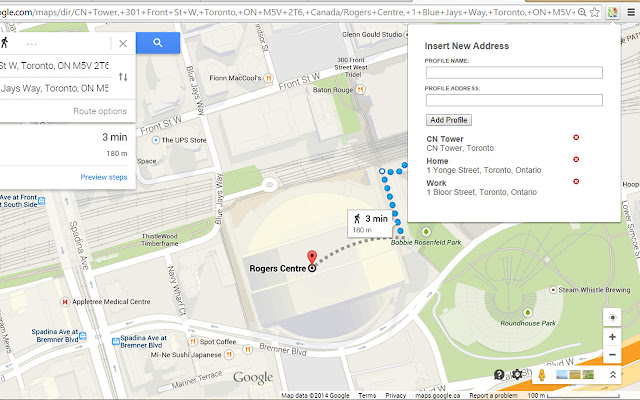

EasyMap-Erweiterungs-CRX-Datei herunterladen
Laden Sie EasyMap-Erweiterungsdateien im crx-Format herunter, installieren Sie Chrome-Erweiterungen manuell im Browser oder teilen Sie die crx-Dateien mit Freunden, um Chrome-Erweiterungen einfach zu installieren.
Anleitung zur Verwendung der Erweiterung
                        Simply highlight the address (for example, on Craigslist), right click, and choose where you want your directions to be from: your current location or a saved address.

Developed by J Chernushevich, R Shah, B Komer, M Unger for a Facebook Hackathon.
Grundlegende Informationen zur Erweiterung
| Name |  EasyMap EasyMap |
| ID | gdhkngibdllfjhciaobdcmeabafencdm |
| Offizielle URL | https://chrome.google.com/webstore/detail/easymap/gdhkngibdllfjhciaobdcmeabafencdm |
| Beschreibung | Easily get directions to any address on a page! |
| Dateigröße | 98.3 KB |
| Installationsanzahl | 29 |
| Aktuelle Version | 1.0.0 |
| Letztes Update | 2014-09-22 |
| Veröffentlichungsdatum | 2014-09-22 |
| Bewertung | 5.00/5 Insgesamt 3 Bewertungen |
| Entwickler | jchernus |
| Zahlungsart | free |
| Unterstützte Sprachen | en-US |
| manifest.json | |
{
    "update_url": "https:\/\/clients2.google.com\/service\/update2\/crx",
    "name": "EasyMap",
    "version": "1.0.0",
    "manifest_version": 2,
    "description": "Easily get directions to any address on a page!",
    "icons": {
        "128": "icon.png"
    },
    "background": {
        "scripts": [
            "popup.js"
        ]
    },
    "content_scripts": [
        {
            "matches": [
                "http:\/\/*\/*"
            ],
            "js": [
                "popup.js"
            ],
            "run_at": "document_end"
        }
    ],
    "permissions": [
        "tabs",
        "contextMenus",
        "geolocation",
        "https:\/\/maps.google.com\/*",
        "https:\/\/maps.googleapis.com\/*"
    ],
    "browser_action": {
        "default_icon": "menuIcon.png",
        "default_popup": "popup.html"
    },
    "content_security_policy": "default-src 'none'; style-src 'self'; script-src 'self'; connect-src https:\/\/maps.googleapis.com; img-src https:\/\/maps.google.com"
} | |