Tomato Pie
A new UI for Pomodoro Technique. Peek into your working status with ease
Was ist Tomato Pie?
Tomato Pie ist eine Chrome-Erweiterung, die von http://t9t.io entwickelt wurde, und ihr Hauptmerkmal ist "A new UI for Pomodoro Technique. Peek into your working status with ease".
Erweiterungsscreenshots
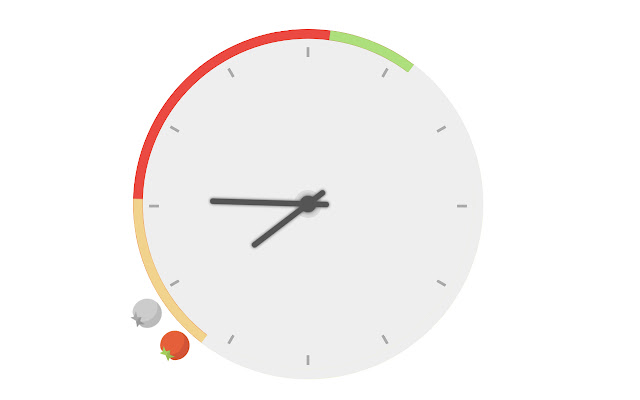


Tomato Pie-Erweiterungs-CRX-Datei herunterladen
Laden Sie Tomato Pie-Erweiterungsdateien im crx-Format herunter, installieren Sie Chrome-Erweiterungen manuell im Browser oder teilen Sie die crx-Dateien mit Freunden, um Chrome-Erweiterungen einfach zu installieren.
Anleitung zur Verwendung der Erweiterung
                        Features
- start new tomato from TODO
- red part: 25 minutes for one tomato
- green part: 5 minutes for rest
- show tomatoes of last 12 hours on clock
- view tomato history on calendar
- override default page for new tab
- indicate time on the extension icon
- get notifications when a tomato is finished

Source code and more introductions:

- https://github.com/t9tio/tomato-pie
Grundlegende Informationen zur Erweiterung
| Name |  Tomato Pie Tomato Pie |
| ID | gffgechdocgfajkbpinmjjjlkjfjampi |
| Offizielle URL | https://chrome.google.com/webstore/detail/tomato-pie/gffgechdocgfajkbpinmjjjlkjfjampi |
| Beschreibung | A new UI for Pomodoro Technique. Peek into your working status with ease |
| Dateigröße | 68.03 KB |
| Installationsanzahl | 1,000 |
| Aktuelle Version | 2.8 |
| Letztes Update | 2019-10-22 |
| Veröffentlichungsdatum | 2019-10-22 |
| Bewertung | 4.27/5 Insgesamt 11 Bewertungen |
| Entwickler | http://t9t.io |
| [email protected] | |
| Zahlungsart | free |
| Erweiterungswebsite | https://github.com/t9tio/tomato-pie |
| Hilfeseite URL | https://github.com/t9tio/tomato-pie/issues |
| Unterstützte Sprachen | en-US |
| manifest.json | |
{
    "update_url": "https:\/\/clients2.google.com\/service\/update2\/crx",
    "manifest_version": 2,
    "author": "timqian",
    "homepage_url": "https:\/\/github.com\/t9tio\/tomato-pie",
    "name": "Tomato Pie",
    "description": "A new UI for Pomodoro Technique. Peek into your working status with ease",
    "version": "2.8",
    "icons": {
        "128": "assets\/tomato.png"
    },
    "browser_action": {
        "default_icon": "assets\/tomato.png"
    },
    "permissions": [
        "tabs",
        "storage",
        "notifications",
        "background"
    ],
    "background": {
        "scripts": [
            "background.js"
        ]
    },
    "chrome_url_overrides": {
        "newtab": "index.html"
    }
} | |