Colorify
Changes the hue of words to the color they're naming.
Was ist Colorify?
Colorify ist eine Chrome-Erweiterung, die von https://jamesmit.dev entwickelt wurde, und ihr Hauptmerkmal ist "Changes the hue of words to the color they're naming.".
Erweiterungsscreenshots
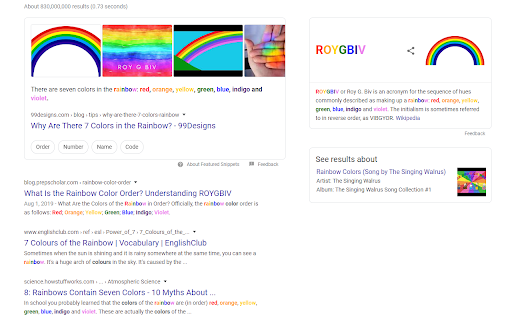
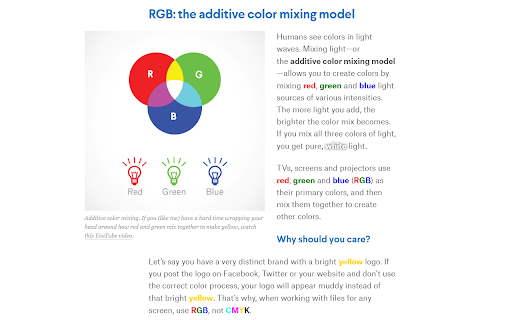
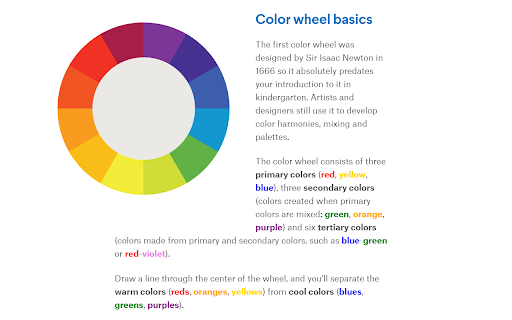
Colorify-Erweiterungs-CRX-Datei herunterladen
Laden Sie Colorify-Erweiterungsdateien im crx-Format herunter, installieren Sie Chrome-Erweiterungen manuell im Browser oder teilen Sie die crx-Dateien mit Freunden, um Chrome-Erweiterungen einfach zu installieren.
Anleitung zur Verwendung der Erweiterung
                        Does visiting websites make you feel like a character in The Giver? Let this extension be a token of salvation!

For any word which names a color, the hue of that word will automatically be changed to match the color it's naming.


Major Version History:
- 2.0.0: Performance update & upgrading to the 3rd generation of Google Extension's manifest system.
- 1.0.0: Replace manual search functionality with Mark.js, add contrast detection for accessibility, & expand color dictionary to every CSS-named color.
- 0.1.2: Search HTML as a string, ignoring attribute values and injecting stylized words where words naming colors existed.
Grundlegende Informationen zur Erweiterung
| Name |  Colorify Colorify |
| ID | gkfgdccfjiaokigodbfmgbdifbemopdb |
| Offizielle URL | https://chromewebstore.google.com/detail/colorify/gkfgdccfjiaokigodbfmgbdifbemopdb |
| Beschreibung | Changes the hue of words to the color they're naming. |
| Dateigröße | 27.63 KB |
| Installationsanzahl | 18 |
| Aktuelle Version | 2.0.0 |
| Letztes Update | 2023-03-21 |
| Veröffentlichungsdatum | 2020-07-01 |
| Entwickler | https://jamesmit.dev |
| [email protected] | |
| Zahlungsart | free |
| Erweiterungswebsite | https://github.com/JamesMitofsky/Colorify-Extension |
| Unterstützte Sprachen | en |
| manifest.json | |
{
"update_url": "https:\/\/clients2.google.com\/service\/update2\/crx",
"name": "Colorify",
"version": "2.0.0",
"manifest_version": 3,
"description": "Changes the hue of words to the color they're naming.",
"author": "James Tedesco",
"icons": {
"16": "icons\/icon16.png",
"48": "icons\/icon48.png",
"128": "icons\/icon128.png"
},
"content_scripts": [
{
"matches": [
" | |