Tab Grouper
Group tabs for one-click access! Copy all open tabs to clipboard with a single click.
Was ist Tab Grouper?
Tab Grouper ist eine Chrome-Erweiterung, die von lerxst entwickelt wurde, und ihr Hauptmerkmal ist "Group tabs for one-click access! Copy all open tabs to clipboard with a single click.".
Erweiterungsscreenshots
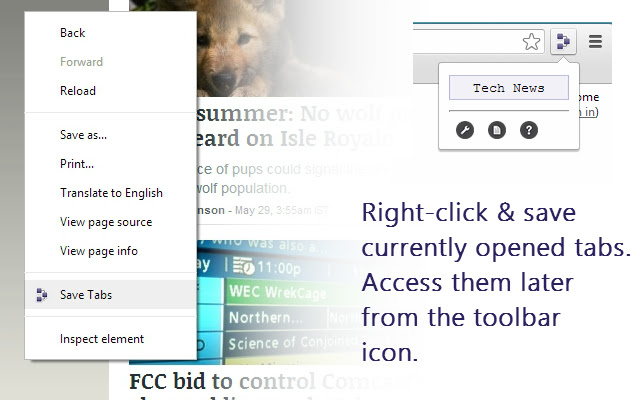


Tab Grouper-Erweiterungs-CRX-Datei herunterladen
Laden Sie Tab Grouper-Erweiterungsdateien im crx-Format herunter, installieren Sie Chrome-Erweiterungen manuell im Browser oder teilen Sie die crx-Dateien mit Freunden, um Chrome-Erweiterungen einfach zu installieren.
Anleitung zur Verwendung der Erweiterung
                        Save currently opened tabs for accessing later. Save any number of groups with any number of tabs!

• To save a set of tabs :
1. Right-click anywhere on the webpage and click 'Save Tabs' in the context menu.
2. Enter the group name and click 'Ok' to save.
(Keyboard shortcut : 'Shift+Ctrl+m'. Modify shortcut combinations in Tools->Extensions)

• Click on the TabGrouper icon in the toolbar to access the saved groups. Use the TabGrouper options to manage groups.

• In the TabGrouper popup, use the clipboard icon to copy all the open tabs and their URLs to the clipboard.
Grundlegende Informationen zur Erweiterung
| Name |  Tab Grouper Tab Grouper |
| ID | glfmdmkkhokfolknaabkokpcibhlagen |
| Offizielle URL | https://chrome.google.com/webstore/detail/tab-grouper/glfmdmkkhokfolknaabkokpcibhlagen |
| Beschreibung | Group tabs for one-click access! Copy all open tabs to clipboard with a single click. |
| Dateigröße | 91.91 KB |
| Installationsanzahl | 824 |
| Aktuelle Version | 0.9.4 |
| Letztes Update | 2015-03-12 |
| Veröffentlichungsdatum | 2015-03-12 |
| Bewertung | 3.93/5 Insgesamt 14 Bewertungen |
| Entwickler | lerxst |
| [email protected] | |
| Zahlungsart | free |
| Unterstützte Sprachen | en |
| manifest.json | |
{
    "update_url": "http:\/\/clients2.google.com\/service\/update2\/crx",
    "manifest_version": 2,
    "name": "Tab Grouper",
    "version": "0.9.4",
    "description": "Group tabs for one-click access! Copy all open tabs to clipboard with a single click.",
    "background": {
        "scripts": [
            "bginit.js"
        ],
        "persistent": false
    },
    "options_page": "options.html",
    "browser_action": {
        "default_popup": "popup.html",
        "default_icon": "\/images\/icon48.png",
        "default_title": "TabGrouper"
    },
    "commands": {
        "toggle-feature": {
            "suggested_key": {
                "default": "Ctrl+Shift+T"
            },
            "description": "Save the current group of tabs."
        }
    },
    "icons": {
        "16": "\/images\/icon16.png",
        "48": "\/images\/icon48.png",
        "128": "\/images\/icon128.png"
    },
    "permissions": [
        "tabs",
        "contextMenus",
        "notifications",
        "storage"
    ],
    "content_security_policy": "script-src 'self' https:\/\/ssl.google-analytics.com; object-src 'self'"
} | |