Subs Translate
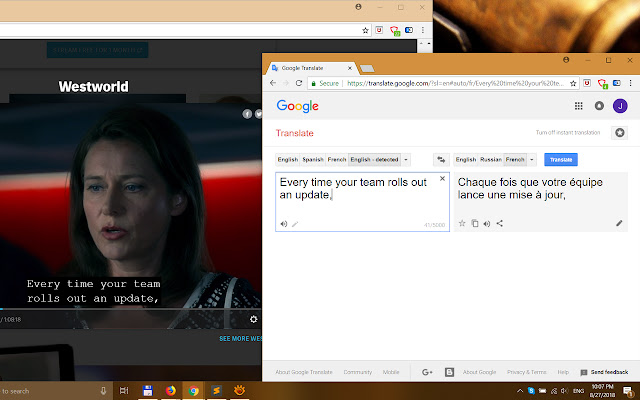
Captures and translates subtitles directly from a webpage for online video services such as Netflix, HBO, YouTube and Amazon Video.
Was ist Subs Translate?
Subs Translate ist eine Chrome-Erweiterung, die von cLe0 entwickelt wurde, und ihr Hauptmerkmal ist "Captures and translates subtitles directly from a webpage for online video services such as Netflix, HBO, YouTube and Amazon Video.".
Erweiterungsscreenshots
Subs Translate-Erweiterungs-CRX-Datei herunterladen
Laden Sie Subs Translate-Erweiterungsdateien im crx-Format herunter, installieren Sie Chrome-Erweiterungen manuell im Browser oder teilen Sie die crx-Dateien mit Freunden, um Chrome-Erweiterungen einfach zu installieren.
Anleitung zur Verwendung der Erweiterung
                        Subs Translate extension gets subtitles directly from HTML. Click on the icon opens the translator service in the new tab. To change target language (russian by default), replace "ru" inside the translator URL to language you need (de, fr, es, etc.).
To configure other online video service you need set up the custom subtitles container selector value on the options page. Make sure that the parent container specified in the selector is always present in the page code, otherwise the extension icon will be inactive.
Sometimes Google Translate translates text in upper case from English to some languages (such as Russian) incorrectly. In this case, you may need using option "Convert to lower case before translating" (see add-on options).
Good luck!

Расширение Subs Translate извлекает субтитры непосредственно из HTML. Нажмите на иконку, чтобы открыть перевод в новой вкладке. Чтобы изменить целевой язык перевода (по умолчанию русский), замените «ru» внутри URL-адреса переводчика на нужный вам язык (de, fr, es и т. д.).
Чтобы настроить другой сервис онлайн-видео, необходимо задать значение "Custom subtitles container selector" на странице параметров. При этом убедитесь, что родительский контейнер, указанный в селекторе, всегда присутствует в коде страницы, иначе иконка расширения будет неактивна.
Иногда Google Translate неправильно переводит текст в верхнем регистре с английского на некоторые языки (например, русский). В этом случае Вам может помочь опция «Convert to lower case before translating» (см. настройки расширения).
Удачи!
Grundlegende Informationen zur Erweiterung
| Name |  Subs Translate Subs Translate |
| ID | gnpddaeoofhcpmcfbgndngijoniopcjn |
| Offizielle URL | https://chrome.google.com/webstore/detail/subs-translate/gnpddaeoofhcpmcfbgndngijoniopcjn |
| Beschreibung | Captures and translates subtitles directly from a webpage for online video services such as Netflix, HBO, YouTube and Amazon Video. |
| Dateigröße | 28.68 KB |
| Installationsanzahl | 3,000 |
| Aktuelle Version | 1.2.2 |
| Letztes Update | 2018-12-05 |
| Veröffentlichungsdatum | 2018-12-05 |
| Bewertung | 2.88/5 Insgesamt 8 Bewertungen |
| Entwickler | cLe0 |
| [email protected] | |
| Zahlungsart | free |
| Unterstützte Sprachen | en |
| manifest.json | |
{
"update_url": "https:\/\/clients2.google.com\/service\/update2\/crx",
"manifest_version": 2,
"name": "Subs Translate",
"version": "1.2.2",
"author": "cLe0",
"description": "Captures and translates subtitles directly from a webpage for online video services such as Netflix, HBO, YouTube and Amazon Video.",
"icons": {
"16": "images\/st-icon-16.png",
"48": "images\/st-icon-48.png",
"128": "images\/st-icon-128.png"
},
"browser_action": {
"default_icon": {
"19": "images\/st-icon-16.png",
"38": "images\/st-icon-48.png"
},
"default_title": "Subs Translate"
},
"background": {
"scripts": [
"st-options-helper.js",
"st-background.js"
]
},
"options_ui": {
"page": "st-options.html",
"open_in_tab": true
},
"permissions": [
" | |