Meet Camera & Mic Controller
This extension enables you to map global keyboard shortcuts to mute and unmute your Hangouts Meet camera and microphone.
Was ist Meet Camera & Mic Controller?
Meet Camera & Mic Controller ist eine Chrome-Erweiterung, die von tehgregzzorz entwickelt wurde, und ihr Hauptmerkmal ist "This extension enables you to map global keyboard shortcuts to mute and unmute your Hangouts Meet camera and microphone.".
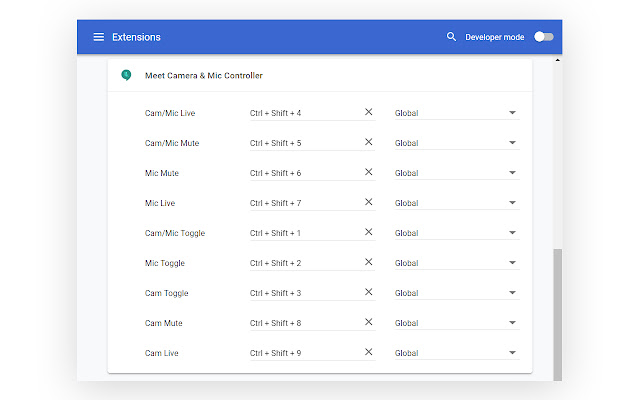
Erweiterungsscreenshots
Meet Camera & Mic Controller-Erweiterungs-CRX-Datei herunterladen
Laden Sie Meet Camera & Mic Controller-Erweiterungsdateien im crx-Format herunter, installieren Sie Chrome-Erweiterungen manuell im Browser oder teilen Sie die crx-Dateien mit Freunden, um Chrome-Erweiterungen einfach zu installieren.
Anleitung zur Verwendung der Erweiterung
                        Use keyboard shortcuts to control Meet from anywhere on your system, even when Chrome is in the background. Turn off your mic and or camera easily!

To setup your custom shortcuts, install the extension then visit: chrome://extensions/shortcuts. Be sure to select the "global" option next to each shortcut to enable them system-wide.

After installing or updating, please quit then restart Chrome for full functionality.

Available commands:
Cam/Mic Live
Cam/Mic Mute
Cam/Mic Toggle
Mic Live
Mic Mute
Mic Toggle
Cam Live
Cam Mute
Cam Toggle
Join/Rejoin Call *NEW*
Leave Call *NEW!*
Grundlegende Informationen zur Erweiterung
| Name |  Meet Camera & Mic Controller Meet Camera & Mic Controller |
| ID | hcjndjhcoobheldhofoegnmhkcihphbn |
| Offizielle URL | https://chrome.google.com/webstore/detail/meet-camera-mic-controlle/hcjndjhcoobheldhofoegnmhkcihphbn |
| Beschreibung | This extension enables you to map global keyboard shortcuts to mute and unmute your Hangouts Meet camera and microphone. |
| Dateigröße | 20.74 KB |
| Installationsanzahl | 26 |
| Aktuelle Version | 1.5 |
| Letztes Update | 2019-06-05 |
| Veröffentlichungsdatum | 2019-06-05 |
| Bewertung | 1.00/5 Insgesamt 1 Bewertungen |
| Entwickler | tehgregzzorz |
| Zahlungsart | free |
| Unterstützte Sprachen | en |
| manifest.json | |
{
    "update_url": "https:\/\/clients2.google.com\/service\/update2\/crx",
    "manifest_version": 2,
    "name": "Meet Camera & Mic Controller",
    "version": "1.5",
    "description": "This extension enables you to map global keyboard shortcuts to mute and unmute your Hangouts Meet camera and microphone.",
    "icons": {
        "128": "assets\/img\/icon.png"
    },
    "permissions": [
        "tabs"
    ],
    "commands": {
        "1_toggle": {
            "suggested_key": {
                "default": "Ctrl+Shift+1"
            },
            "global": true,
            "description": "Cam\/Mic Toggle"
        },
        "2_toggleMicrophone": {
            "suggested_key": {
                "default": "Ctrl+Shift+2"
            },
            "global": true,
            "description": "Mic Toggle"
        },
        "3_toggleWebcam": {
            "suggested_key": {
                "default": "Ctrl+Shift+3"
            },
            "global": true,
            "description": "Cam Toggle"
        },
        "4_microphoneOn": {
            "global": true,
            "description": "Mic Live"
        },
        "5_microphoneOff": {
            "global": true,
            "description": "Mic Mute"
        },
        "6_webcamOn": {
            "global": true,
            "description": "Cam Live"
        },
        "7_webcamOff": {
            "global": true,
            "description": "Cam Mute"
        },
        "8_allOn": {
            "global": true,
            "description": "Cam\/Mic Live"
        },
        "9_allOff": {
            "global": true,
            "description": "Cam\/Mic Mute"
        },
        "9y_joinCall": {
            "suggested_key": {
                "default": "Ctrl+Shift+9"
            },
            "global": true,
            "description": "Join\/Rejoin Call"
        },
        "9z_leaveCall": {
            "suggested_key": {
                "default": "Ctrl+Shift+0"
            },
            "global": true,
            "description": "Leave Call"
        }
    },
    "content_scripts": [
        {
            "js": [
                "assets\/js\/update.js"
            ],
            "matches": [
                "https:\/\/meet.google.com\/*"
            ]
        }
    ],
    "background": {
        "scripts": [
            "assets\/js\/background.js"
        ],
        "persistent": false
    }
} | |