Close This Tab
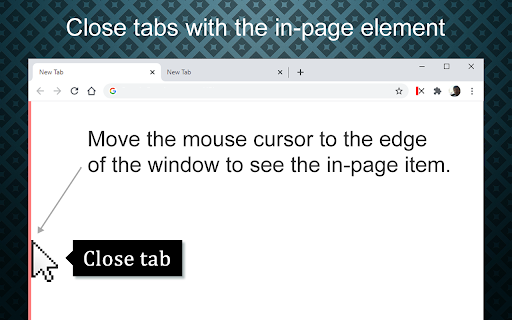
Easily close tabs with the in-page border element.
Was ist Close This Tab?
Close This Tab ist eine Chrome-Erweiterung, die von bulent entwickelt wurde, und ihr Hauptmerkmal ist "Easily close tabs with the in-page border element.".
Erweiterungsscreenshots

Close This Tab-Erweiterungs-CRX-Datei herunterladen
Laden Sie Close This Tab-Erweiterungsdateien im crx-Format herunter, installieren Sie Chrome-Erweiterungen manuell im Browser oder teilen Sie die crx-Dateien mit Freunden, um Chrome-Erweiterungen einfach zu installieren.
Anleitung zur Verwendung der Erweiterung
                        More easy and fast way to close tabs.

Allows you to easily close tabs with the in-page border element.


Features:
----------------
• You can close the active tab by clicking to the selected in-page border element.
• In-page element only appears when you move the mouse cursor to the selected edge.
• You can change the features of the in-page element, like hover color, thickness, click event type and position.
• Use toolbar icon or context menu to close tabs.


Limitations:
--------------------
Since Chrome is not allowing, we can't add in-page element into the following pages:
chrome:// - chrome-extension:// - chrome-devtools:// - view-source: - data: - chrome.google.com/webstore/ - New tab page.

But, toolbar icon and context menu options will continue to work on all pages without any limitation.


Note on permissions:
-----------------------------------
• "Read and change all your data on the websites you visit" - That is necessary to insert In-Page element into pages. I do not read your data from any website, nor do i modify it.


Changelog:
-------------------
v3.0.x
New features:
• New add-on features for bottom and right positions.
• Tooltips now customizable.
• In-page element opacity feature.
• Right-click on the selected edge, shows selected options.
• Context menu options added.
• Auto maxizing new windows feature added.
• Toolbar icon popup page added.

Updates:
• Settings page redesigned.
• In-page element positions restructured.
• New toolbar icon images available.

v2.0.x
New features:
• New in-page closer positions added.
• You can change thickness of the in-page element.
• Toolbar icon is added. Clicking to the toolbar icon will close the active tab.
• You can change the toolbar icon image.
• Multi language support is added, so please help to translate.
• Preferences synced with Chrome (if signed in).

Updates:
• Renamed to 'Close This Tab'.
• New Options/Settings page.
• Injecting the element into dynamically loaded pages.

v1.0
• Initial version
Grundlegende Informationen zur Erweiterung
| Name |  Close This Tab Close This Tab |
| ID | hdoplfhlfoagdghmfamhnakmjjffeila |
| Offizielle URL | https://chromewebstore.google.com/detail/close-this-tab/hdoplfhlfoagdghmfamhnakmjjffeila |
| Beschreibung | Easily close tabs with the in-page border element. |
| Dateigröße | 237 KB |
| Installationsanzahl | 3,224 |
| Aktuelle Version | 3.0.6 |
| Letztes Update | 2021-04-26 |
| Veröffentlichungsdatum | 2017-07-27 |
| Bewertung | 4.69/5 Insgesamt 64 Bewertungen |
| Entwickler | bulent |
| [email protected] | |
| Zahlungsart | free |
| Unterstützte Sprachen | en,tr,es,pt-BR,pt-PT |
| manifest.json | |
{
"update_url": "https:\/\/clients2.google.com\/service\/update2\/crx",
"author": "[email protected]",
"manifest_version": 2,
"name": "__MSG_extName__",
"version": "3.0.6",
"default_locale": "en",
"description": "__MSG_extDesc__",
"background": {
"scripts": [
"eventPage.js"
],
"persistent": true
},
"browser_action": {
"default_icon": {
"16": "img\/ctt_toolbar_icon_1.png",
"32": "img\/ctt_toolbar_icon_1_32.png"
},
"default_title": "__MSG_extDefaultTitle__"
},
"content_scripts": [
{
"matches": [
" | |