Sitecore Icon Search
Sitecore Icon Search Chrome Extension
Was ist Sitecore Icon Search?
Sitecore Icon Search ist eine Chrome-Erweiterung, die von https://sitecoreicons.com entwickelt wurde, und ihr Hauptmerkmal ist "Sitecore Icon Search Chrome Extension".
Erweiterungsscreenshots
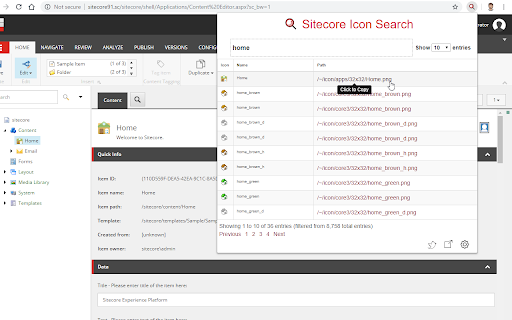

Sitecore Icon Search-Erweiterungs-CRX-Datei herunterladen
Laden Sie Sitecore Icon Search-Erweiterungsdateien im crx-Format herunter, installieren Sie Chrome-Erweiterungen manuell im Browser oder teilen Sie die crx-Dateien mit Freunden, um Chrome-Erweiterungen einfach zu installieren.
Anleitung zur Verwendung der Erweiterung
                        The Sitecore Icon Search Google Chrome extension is a converted version of the Sitecore Icon Search Web App. It assists developers to search and add Sitecore icons without ever leaving the tab.

1) Navigate to a template or item and click the Icon field.
2) Click the Sitecore Icon Search extension icon.
3) Search and click the icon link you want to use.


The extension automatically:

- Enables the Standard Fields checkbox under the Views tab in the Ribbon (if it's not already enabled).

-Sets the Icon field under the Appearance section to the selected icon (user does not need to select the Icon field).  A copy of the selected icon's relative path will still be copied to the clipboard.

-Saves the item.
Grundlegende Informationen zur Erweiterung
| Name |  Sitecore Icon Search Sitecore Icon Search |
| ID | hepjmecgoeldpcjmoajnlndefojbjhio |
| Offizielle URL | https://chromewebstore.google.com/detail/sitecore-icon-search/hepjmecgoeldpcjmoajnlndefojbjhio |
| Beschreibung | Sitecore Icon Search Chrome Extension |
| Dateigröße | 541 KB |
| Installationsanzahl | 538 |
| Aktuelle Version | 3.0.1 |
| Letztes Update | 2022-07-20 |
| Veröffentlichungsdatum | 2019-01-02 |
| Bewertung | 5.00/5 Insgesamt 2 Bewertungen |
| Entwickler | https://sitecoreicons.com |
| [email protected] | |
| Zahlungsart | free |
| Erweiterungswebsite | https://sitecoregabe.com |
| Hilfeseite URL | https://streza.dev |
| Unterstützte Sprachen | en |
| manifest.json | |
{
    "update_url": "https:\/\/clients2.google.com\/service\/update2\/crx",
    "name": "Sitecore Icon Search",
    "version": "3.0.1",
    "manifest_version": 3,
    "description": "Sitecore Icon Search Chrome Extension",
    "options_ui": {
        "page": "options.html",
        "open_in_tab": false
    },
    "icons": {
        "16": "icons\/icon-16.png",
        "128": "icons\/icon-128.png"
    },
    "permissions": [
        "storage",
        "activeTab",
        "scripting"
    ],
    "host_permissions": [
        "https:\/\/sitecoreicons.com\/"
    ],
    "action": {
        "default_icon": {
            "19": "icons\/icon-16.png",
            "38": "icons\/icon-32.png"
        },
        "default_title": "Sitecore Icon Search",
        "default_popup": "popup.html"
    }
} | |