RAWG Toolkit
Helps you use RAWG efficiently.
Was ist RAWG Toolkit?
RAWG Toolkit ist eine Chrome-Erweiterung, die von OREL entwickelt wurde, und ihr Hauptmerkmal ist "Helps you use RAWG efficiently.".
Erweiterungsscreenshots

RAWG Toolkit-Erweiterungs-CRX-Datei herunterladen
Laden Sie RAWG Toolkit-Erweiterungsdateien im crx-Format herunter, installieren Sie Chrome-Erweiterungen manuell im Browser oder teilen Sie die crx-Dateien mit Freunden, um Chrome-Erweiterungen einfach zu installieren.
Anleitung zur Verwendung der Erweiterung
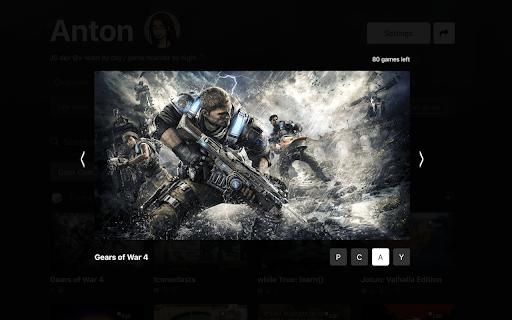
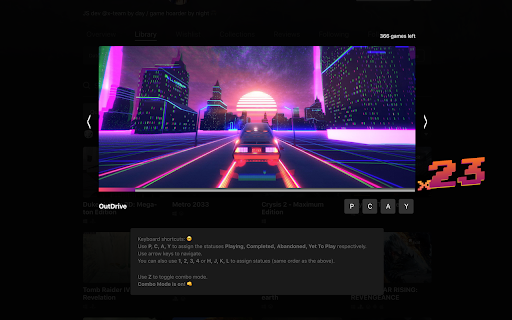
                        This extension adds a very handy "gallery view" for all your "owned" and unsorted games so you can get rid of that annoying "Time to Tidy Up" sign and finally sort all of your games in their respective categories.

Changelog:

v1.7: Removed the 🎲
- The updated RAWG design made it impossible to fit the dice. Press F

v1.6: Fixes and Fallbacks
- All the modules are now toggleable through options menu
- Added defaults for options, so you won't lose the things you already had

v1.5: Options 🎛
- Added an options menu located under your profile popup. Look for "Toolkit Settings" over there.

v1.4: Random Games 🎲
- Added "pick a random game" buttons to main page and specific game pages.
On the main page - look for a "or pick a random one" sign in the big searchbar.
On the game page - look for a "go to a random game" sign above the game title

v1.3: Minor fixes

v1.2 : Omnibox and Game Releases
- Added an "rg" omnibox prefix. Just type "rg" in a new tab's search bar and press "tab" to launch the extension. Then you can type your request to quickly search for a game on RAWG.
- Added a notification checker that will notify you with a desktop push if a new game from your wishlist was released. This is turned on by default atm, I'm working on a better options menu.

v1.1 Added combo mode! Every time you sort a game - you get a combo counter to go up! Let's see how fast and for how long can you keep it up! (Tweet the highest you get @orels1_)
This is an opt-out feature: press Z to disable.
Grundlegende Informationen zur Erweiterung
| Name |  RAWG Toolkit RAWG Toolkit |
| ID | hhjibfjhfjoledimkkafjammfkoekhmi |
| Offizielle URL | https://chromewebstore.google.com/detail/rawg-toolkit/hhjibfjhfjoledimkkafjammfkoekhmi |
| Beschreibung | Helps you use RAWG efficiently. |
| Dateigröße | 50.92 KB |
| Installationsanzahl | 26 |
| Aktuelle Version | 1.7 |
| Letztes Update | 2019-01-31 |
| Veröffentlichungsdatum | 2019-01-31 |
| Bewertung | 5.00/5 Insgesamt 4 Bewertungen |
| Entwickler | OREL |
| Zahlungsart | free |
| Erweiterungswebsite | https://github.com/orels1/rawg-toolkit |
| Hilfeseite URL | https://twitter.com/orels1_ |
| Unterstützte Sprachen | en |
| manifest.json | |
{
    "update_url": "https:\/\/clients2.google.com\/service\/update2\/crx",
    "manifest_version": 2,
    "name": "RAWG Toolkit",
    "description": "Helps you use RAWG efficiently.",
    "version": "1.7",
    "icons": {
        "16": "icon.jpg",
        "48": "icon.jpg",
        "128": "icon.jpg"
    },
    "browser_action": {
        "default_icon": {
            "16": "icon.jpg",
            "24": "icon.jpg",
            "32": "icon.jpg"
        }
    },
    "omnibox": {
        "keyword": "rg"
    },
    "background": {
        "scripts": [
            "bg.js",
            "omnibox.js"
        ],
        "persistent": true
    },
    "content_scripts": [
        {
            "matches": [
                "*:\/\/*.rawg.io\/*",
                "*:\/\/rawg.io\/*"
            ],
            "js": [
                "vue.js",
                "content.js",
                "components\/cleanup.js",
                "components\/random.js",
                "components\/options.js"
            ],
            "css": [
                "components\/cleanup.css",
                "components\/random.css",
                "components\/options.css"
            ]
        }
    ],
    "permissions": [
        "activeTab",
        "notifications",
        "webNavigation",
        "storage",
        "*:\/\/*.rawg.io\/"
    ]
} | |