ChatGPT Secure
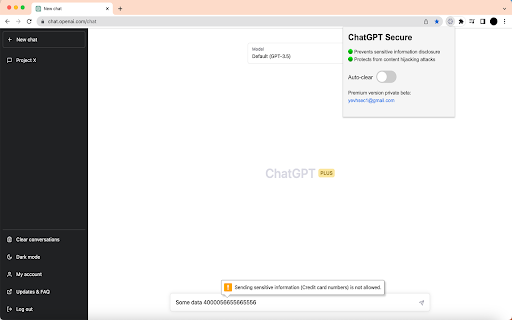
Prevents sensitive information disclosure and protects from content hijacking attack on https://chat.openai.com/
Was ist ChatGPT Secure?
ChatGPT Secure ist eine Chrome-Erweiterung, die von Yevhenii Molchanov entwickelt wurde, und ihr Hauptmerkmal ist "Prevents sensitive information disclosure and protects from content hijacking attack on https://chat.openai.com/".
Erweiterungsscreenshots
ChatGPT Secure-Erweiterungs-CRX-Datei herunterladen
Laden Sie ChatGPT Secure-Erweiterungsdateien im crx-Format herunter, installieren Sie Chrome-Erweiterungen manuell im Browser oder teilen Sie die crx-Dateien mit Freunden, um Chrome-Erweiterungen einfach zu installieren.
Anleitung zur Verwendung der Erweiterung
                        ChatGPT Secure is designed to protect users from the potential copy-pasting of sensitive information to ChatGPT. Also, it prevents potential content hijacking attacks via prompt injection.

If you have any feedback or suggestions feel free to contact me via [email protected]
Grundlegende Informationen zur Erweiterung
| Name |  ChatGPT Secure ChatGPT Secure |
| ID | hodneljnifpbcnhmlommhmmpoknlioil |
| Offizielle URL | https://chromewebstore.google.com/detail/chatgpt-secure/hodneljnifpbcnhmlommhmmpoknlioil |
| Beschreibung | Prevents sensitive information disclosure and protects from content hijacking attack on https://chat.openai.com/ |
| Dateigröße | 17.64 KB |
| Installationsanzahl | 88 |
| Aktuelle Version | 1.0 |
| Letztes Update | 2023-05-05 |
| Veröffentlichungsdatum | 2023-03-28 |
| Bewertung | 5.00/5 Insgesamt 7 Bewertungen |
| Entwickler | Yevhenii Molchanov |
| [email protected] | |
| Zahlungsart | free |
| Unterstützte Sprachen | en |
| manifest.json | |
{
    "update_url": "https:\/\/clients2.google.com\/service\/update2\/crx",
    "manifest_version": 3,
    "name": "ChatGPT Secure",
    "version": "1.0",
    "description": "Prevents sensitive information disclosure and protects from content hijacking attack on https:\/\/chat.openai.com\/",
    "permissions": [
        "storage"
    ],
    "action": {
        "default_popup": "popup.html",
        "default_icon": {
            "16": "icon16x16.png",
            "48": "icon32x32.png",
            "128": "icon150x150.png"
        }
    },
    "icons": {
        "16": "icon16x16.png",
        "48": "icon32x32.png",
        "128": "icon150x150.png"
    },
    "content_scripts": [
        {
            "matches": [
                "https:\/\/chat.openai.com\/*"
            ],
            "js": [
                "content.js"
            ],
            "css": [
                "style.css"
            ]
        }
    ]
} | |