AwayTab - Travel Backgrounds
Discover amazing places to travel to in every new tab you open.
Was ist AwayTab - Travel Backgrounds?
AwayTab - Travel Backgrounds ist eine Chrome-Erweiterung, die von champagne entwickelt wurde, und ihr Hauptmerkmal ist "Discover amazing places to travel to in every new tab you open.".
Erweiterungsscreenshots




AwayTab - Travel Backgrounds-Erweiterungs-CRX-Datei herunterladen
Laden Sie AwayTab - Travel Backgrounds-Erweiterungsdateien im crx-Format herunter, installieren Sie Chrome-Erweiterungen manuell im Browser oder teilen Sie die crx-Dateien mit Freunden, um Chrome-Erweiterungen einfach zu installieren.
Anleitung zur Verwendung der Erweiterung
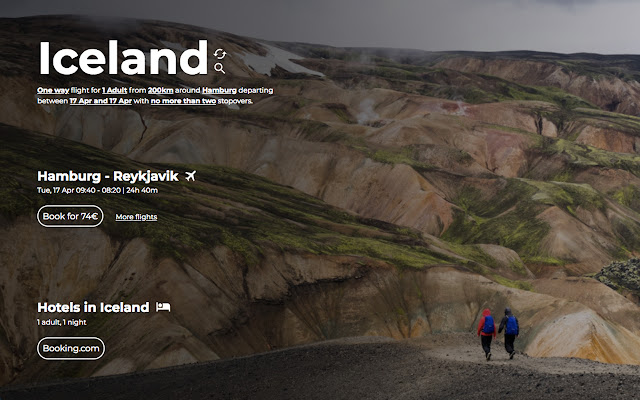
                        With every time you open a new tab, you'll be presented with a stunning image of a new destination, along with the cheapest flights from your area.

It's the perfect way to get inspired, plan your next adventure, and start dreaming of your next great escape!

Away features 40+ Destinations!
Grundlegende Informationen zur Erweiterung
| Name |  AwayTab - Travel Backgrounds AwayTab - Travel Backgrounds |
| ID | homnophpjlhlpaglnfpomcambjmgceem |
| Offizielle URL | https://chrome.google.com/webstore/detail/awaytab-travel-background/homnophpjlhlpaglnfpomcambjmgceem |
| Beschreibung | Discover amazing places to travel to in every new tab you open. |
| Dateigröße | 44.94 KB |
| Installationsanzahl | 274 |
| Aktuelle Version | 1.1.2 |
| Letztes Update | 2024-03-04 |
| Veröffentlichungsdatum | 2018-04-26 |
| Bewertung | 4.56/5 Insgesamt 9 Bewertungen |
| Entwickler | champagne |
| [email protected] | |
| Zahlungsart | in_app |
| Erweiterungswebsite | https://awaytab.com |
| Unterstützte Sprachen | en |
| manifest.json | |
{
    "update_url": "https:\/\/clients2.google.com\/service\/update2\/crx",
    "name": "AwayTab - Travel Backgrounds",
    "manifest_version": 3,
    "short_name": "AwayTab",
    "description": "Discover amazing places to travel to in every new tab you open.",
    "version": "1.1.2",
    "default_locale": "en",
    "chrome_url_overrides": {
        "newtab": "index.html"
    },
    "background": {
        "service_worker": "js\/background.js"
    },
    "permissions": [
        "geolocation",
        "storage"
    ],
    "icons": {
        "128": "img\/icon.png"
    },
    "action": {
        "default_icon": {
            "128": "img\/icon.png"
        }
    }
} | |