Screen Capture to Video File
This recorder is a free recorder that can capture content of screen, individual windows or tabs. Save the video to Google Drive.
Was ist Screen Capture to Video File?
Screen Capture to Video File ist eine Chrome-Erweiterung, die von Smart Software entwickelt wurde, und ihr Hauptmerkmal ist "This recorder is a free recorder that can capture content of screen, individual windows or tabs. Save the video to Google Drive.".
Erweiterungsscreenshots
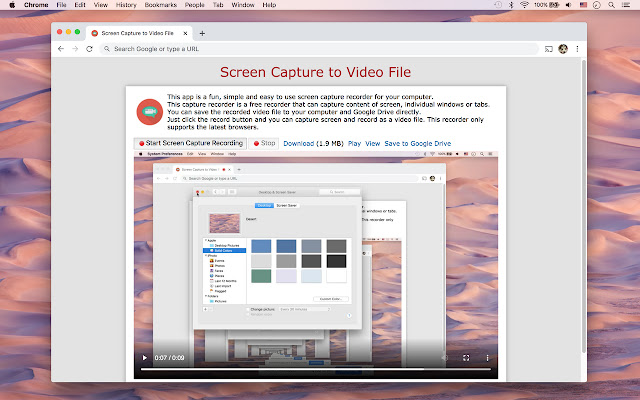
Screen Capture to Video File-Erweiterungs-CRX-Datei herunterladen
Laden Sie Screen Capture to Video File-Erweiterungsdateien im crx-Format herunter, installieren Sie Chrome-Erweiterungen manuell im Browser oder teilen Sie die crx-Dateien mit Freunden, um Chrome-Erweiterungen einfach zu installieren.
Anleitung zur Verwendung der Erweiterung
                        This app is a fun, simple and easy to use screen capture recorder for your computer.
This capture recorder is a free recorder that can capture content of screen, individual windows or tabs.
You can save the recorded video file to your computer and Google Drive directly.
Just click the record button and you can capture screen and record as a video file.
This recorder only supports the latest browsers.
Grundlegende Informationen zur Erweiterung
| Name |  Screen Capture to Video File Screen Capture to Video File |
| ID | icoloanbecehinobmflpeglknkplbfbm |
| Offizielle URL | https://chrome.google.com/webstore/detail/screen-capture-to-video-f/icoloanbecehinobmflpeglknkplbfbm |
| Beschreibung | This recorder is a free recorder that can capture content of screen, individual windows or tabs. Save the video to Google Drive. |
| Dateigröße | 30.62 KB |
| Installationsanzahl | 1,931 |
| Aktuelle Version | 1.0.1.2 |
| Letztes Update | 2020-10-16 |
| Veröffentlichungsdatum | 2020-10-16 |
| Bewertung | 3.52/5 Insgesamt 106 Bewertungen |
| Entwickler | Smart Software |
| [email protected] | |
| Zahlungsart | free |
| Erweiterungswebsite | https://imclient.herokuapp.com/screencapture/ |
| URL der Datenschutzrichtlinien-Seite | http://iblogbox.com/chrome/tos.php |
| Unterstützte Sprachen | en-US |
| manifest.json | |
{
    "background": {
        "page": "background.html"
    },
    "default_locale": "en_US",
    "description": "__MSG_ext_description__",
    "icons": {
        "128": "images\/icon128.png",
        "16": "images\/icon16.png"
    },
    "browser_action": {
        "default_icon": "images\/icon32.png",
        "default_title": "__MSG_ext_name__"
    },
    "name": "__MSG_ext_name__",
    "permissions": [],
    "update_url": "http:\/\/clients2.google.com\/service\/update2\/crx",
    "manifest_version": 2,
    "minimum_chrome_version": "18.0.0.0",
    "version": "1.0.1.2"
} | |