Book Sheep
Allow sending ebook on b-ok.cc to your Kindle automatically
Was ist Book Sheep?
Book Sheep ist eine Chrome-Erweiterung, die von https://rarebit.io entwickelt wurde, und ihr Hauptmerkmal ist "Allow sending ebook on b-ok.cc to your Kindle automatically".
Erweiterungsscreenshots
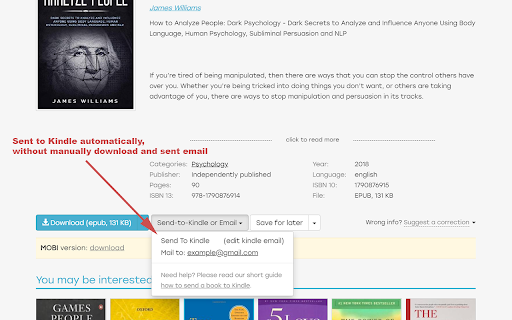
Book Sheep-Erweiterungs-CRX-Datei herunterladen
Laden Sie Book Sheep-Erweiterungsdateien im crx-Format herunter, installieren Sie Chrome-Erweiterungen manuell im Browser oder teilen Sie die crx-Dateien mit Freunden, um Chrome-Erweiterungen einfach zu installieren.
Anleitung zur Verwendung der Erweiterung
                        Allow sending ebook on b-ok.cc to your Kindle automatically.
No more downloading and sending manually by hand.

All is taken care of by Book Sheep.
Usage:
1. Go to https://b-ok.cc and search for your favorite book.
2. Click on "Sent to Kindle" button.
3. Wait and enjoy reading on your Kindle device.

Have fun reading!!!
Grundlegende Informationen zur Erweiterung
| Name |  Book Sheep Book Sheep |
| ID | ikpmdhikhljdfgccfidgcbdfmdechaap |
| Offizielle URL | https://chromewebstore.google.com/detail/book-sheep/ikpmdhikhljdfgccfidgcbdfmdechaap |
| Beschreibung | Allow sending ebook on b-ok.cc to your Kindle automatically |
| Dateigröße | 103 KB |
| Installationsanzahl | 21 |
| Aktuelle Version | 1.0.0 |
| Letztes Update | 2020-06-03 |
| Veröffentlichungsdatum | 2020-04-24 |
| Entwickler | https://rarebit.io |
| [email protected] | |
| Zahlungsart | free |
| Erweiterungswebsite | https://rarebit.io |
| Hilfeseite URL | https://rarebit.io/contact |
| URL der Datenschutzrichtlinien-Seite | https://rarebit.io/privacy-policy |
| Unterstützte Sprachen | en |
| manifest.json | |
{
    "update_url": "https:\/\/clients2.google.com\/service\/update2\/crx",
    "name": "Book Sheep",
    "version": "1.0.0",
    "description": "Allow sending ebook on b-ok.cc to your Kindle automatically",
    "manifest_version": 2,
    "content_scripts": [
        {
            "matches": [
                "https:\/\/b-ok.cc\/*"
            ],
            "css": [
                "content.css"
            ],
            "js": [
                "content.js"
            ]
        }
    ],
    "background": {
        "scripts": [
            "background.js"
        ],
        "persistent": false
    },
    "permissions": [
        "http:\/\/*.zlibcdn.com\/",
        "https:\/\/api.mailgun.net\/"
    ],
    "icons": {
        "16": "icon16x16.png",
        "48": "icon48x48.png",
        "128": "icon128x128.png"
    }
} | |