Kokoni
Save a file to your favorite place
Was ist Kokoni?
Kokoni ist eine Chrome-Erweiterung, die von http://appsweets.net entwickelt wurde, und ihr Hauptmerkmal ist "Save a file to your favorite place".
Erweiterungsscreenshots
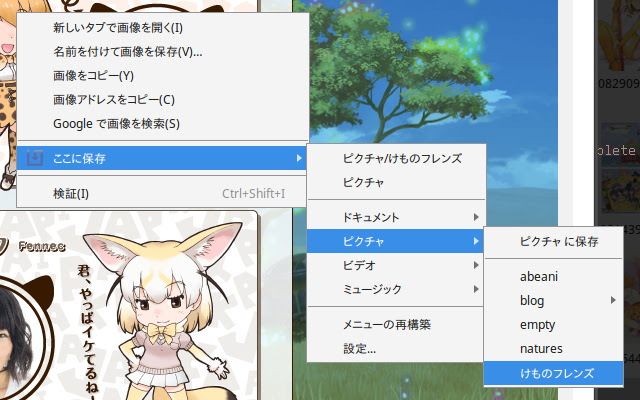

Kokoni-Erweiterungs-CRX-Datei herunterladen
Laden Sie Kokoni-Erweiterungsdateien im crx-Format herunter, installieren Sie Chrome-Erweiterungen manuell im Browser oder teilen Sie die crx-Dateien mit Freunden, um Chrome-Erweiterungen einfach zu installieren.
Anleitung zur Verwendung der Erweiterung
                        Kokoni extends the context menu and downloads images and links directly to your favorite places.
This extension was inspired by "Save file to" in Firefox.

To make Kokoni work, LFO (Local File Operator Library) extension is needed. Please install from  and configure it.

For detailed installation instructions, please see https://appsweets.net/kokoni/
Grundlegende Informationen zur Erweiterung
| Name |  Kokoni Kokoni |
| ID | jblddojmjdpfeplbfbofdhchpdeacocl |
| Offizielle URL | https://chrome.google.com/webstore/detail/kokoni/jblddojmjdpfeplbfbofdhchpdeacocl |
| Beschreibung | Save a file to your favorite place |
| Dateigröße | 48.13 KB |
| Installationsanzahl | 37 |
| Aktuelle Version | 2.1.1 |
| Letztes Update | 2022-06-28 |
| Veröffentlichungsdatum | 2017-04-02 |
| Bewertung | 3.00/5 Insgesamt 2 Bewertungen |
| Entwickler | http://appsweets.net |
| [email protected] | |
| Zahlungsart | free |
| Unterstützte Sprachen | en,ja |
| manifest.json | |
{
    "update_url": "https:\/\/clients2.google.com\/service\/update2\/crx",
    "manifest_version": 3,
    "name": "__MSG_name__",
    "short_name": "__MSG_name__",
    "version": "2.1.1",
    "version_name": "2.1.1",
    "default_locale": "en",
    "description": "__MSG_description__",
    "permissions": [
        "alarms",
        "contextMenus",
        "downloads",
        "downloads.shelf",
        "notifications",
        "storage"
    ],
    "homepage_url": "https:\/\/appsweets.net\/",
    "background": {
        "service_worker": "background.js",
        "type": "module"
    },
    "icons": {
        "16": "icon\/icon016.png",
        "48": "icon\/icon048.png",
        "128": "icon\/icon128.png"
    },
    "options_ui": {
        "page": "options.html",
        "open_in_tab": false
    }
} | |