Tab Stack
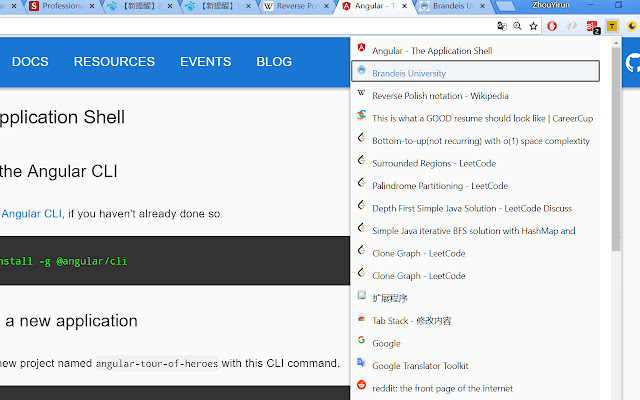
Quickly switch between recent tabs in the activated order, like ALT + TAB in Windows
Was ist Tab Stack?
Tab Stack ist eine Chrome-Erweiterung, die von nemesisper entwickelt wurde, und ihr Hauptmerkmal ist "Quickly switch between recent tabs in the activated order, like ALT + TAB in Windows".
Erweiterungsscreenshots
Tab Stack-Erweiterungs-CRX-Datei herunterladen
Laden Sie Tab Stack-Erweiterungsdateien im crx-Format herunter, installieren Sie Chrome-Erweiterungen manuell im Browser oder teilen Sie die crx-Dateien mit Freunden, um Chrome-Erweiterungen einfach zu installieren.
Anleitung zur Verwendung der Erweiterung
                        Mimic the function of Alt + Tab in Windows or Command + Tab in MacOS to manage tabs.

- Use Alt + 1 (Option + 1 in MacOS) to open the extension. The extension shows the tab list according to the order they activated. So you can easily switch between most recently activated tabs by using shortcuts.

- While you are selecting tab you want to jump to, keep Alt (Option) down.

- Up/ Down arrow to select tab in tab list, hit Enter or just release Alt (Option) to jump to the tab you selected.

- If you decide to stay in current tab, simply use Alt + 1 (Option + 1) to close the extension.

2018.07.11 - Add scrolling function of key Q and W, same as up/down arrow key.
Grundlegende Informationen zur Erweiterung
| Name |  Tab Stack Tab Stack |
| ID | jipfnojdidlbelcajjonblnmmbcjnbpk |
| Offizielle URL | https://chrome.google.com/webstore/detail/tab-stack/jipfnojdidlbelcajjonblnmmbcjnbpk |
| Beschreibung | Quickly switch between recent tabs in the activated order, like ALT + TAB in Windows |
| Dateigröße | 429 KB |
| Installationsanzahl | 36 |
| Aktuelle Version | 1.0 |
| Letztes Update | 2018-09-05 |
| Veröffentlichungsdatum | 2018-09-05 |
| Bewertung | 1.00/5 Insgesamt 2 Bewertungen |
| Entwickler | nemesisper |
| [email protected] | |
| Zahlungsart | free |
| Erweiterungswebsite | https://github.com/yirunzhou/Tab-Stack |
| Unterstützte Sprachen | en |
| manifest.json | |
{
    "update_url": "https:\/\/clients2.google.com\/service\/update2\/crx",
    "name": "Tab Stack",
    "version": "1.0",
    "description": "Quickly switch between recent tabs in the activated order, like ALT + TAB in Windows",
    "manifest_version": 2,
    "permissions": [
        "activeTab",
        "tabs",
        "storage"
    ],
    "background": {
        "scripts": [
            "background.js"
        ]
    },
    "browser_action": {
        "default_popup": "popup.html",
        "default_icon": {
            "128": "images\/tab_stack_128.png"
        }
    },
    "commands": {
        "_execute_browser_action": {
            "suggested_key": {
                "default": "Alt+1"
            }
        }
    }
} | |