CarJongg - Mahjong with Cars
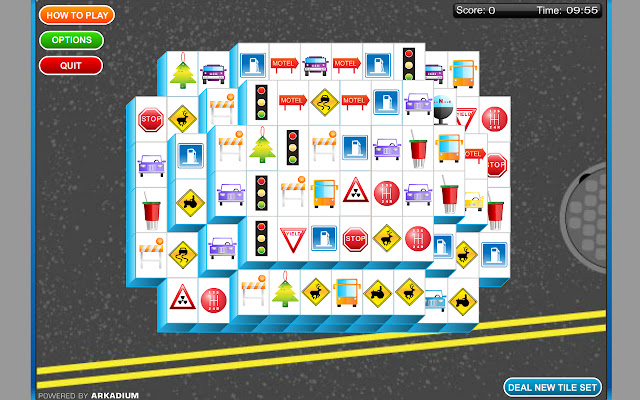
How quickly can you clear each tile set? Match road signs and traffic lights.
Was ist CarJongg - Mahjong with Cars?
CarJongg - Mahjong with Cars ist eine Chrome-Erweiterung, die von Costel Ivu entwickelt wurde, und ihr Hauptmerkmal ist "How quickly can you clear each tile set? Match road signs and traffic lights.".
Erweiterungsscreenshots


CarJongg - Mahjong with Cars-Erweiterungs-CRX-Datei herunterladen
Laden Sie CarJongg - Mahjong with Cars-Erweiterungsdateien im crx-Format herunter, installieren Sie Chrome-Erweiterungen manuell im Browser oder teilen Sie die crx-Dateien mit Freunden, um Chrome-Erweiterungen einfach zu installieren.
Anleitung zur Verwendung der Erweiterung
                        Mahjong is a game that comes in many forms but never have you seen it quite like this.

Matching road signs and traffic lights is every driver's dream and the Car-Jongg makes it a reality. How quickly can you clear each tile set?
Grundlegende Informationen zur Erweiterung
| Name |  CarJongg - Mahjong with Cars CarJongg - Mahjong with Cars |
| ID | jmnpeahpkgiibjiipekllmipipmppgeo |
| Offizielle URL | https://chrome.google.com/webstore/detail/carjongg-mahjong-with-car/jmnpeahpkgiibjiipekllmipipmppgeo |
| Beschreibung | How quickly can you clear each tile set? Match road signs and traffic lights. |
| Dateigröße | 172 KB |
| Installationsanzahl | 1,000 |
| Aktuelle Version | 0.0.1.28 |
| Letztes Update | 2016-12-26 |
| Veröffentlichungsdatum | 2016-12-26 |
| Bewertung | 4.04/5 Insgesamt 26 Bewertungen |
| Entwickler | Costel Ivu |
| Zahlungsart | free |
| Unterstützte Sprachen | id,ms,de,en,en-GB,en-US,fil,fr,nl,no,vi,tr,da,es,es-419,it,pl,pt-BR,pt-PT,fi,sv,cs,el,ru,uk,hi,th,zh-CN,zh-TW,ja,ko |
| manifest.json | |
{
    "update_url": "http:\/\/clients2.google.com\/service\/update2\/crx",
    "name": "__MSG_appName__",
    "description": "__MSG_appDesc__",
    "default_locale": "en",
    "version": "0.0.1.28",
    "offline_enabled": true,
    "manifest_version": 2,
    "browser_action": {
        "default_title": "__MSG_appName__",
        "default_icon": {
            "19": "icon19.png",
            "38": "icon38.png"
        },
        "default_popup": "popup.html"
    },
    "icons": {
        "16": "icon16.png",
        "48": "icon48.png",
        "128": "icon128.png"
    }
} | |