Aero Tab
Chrome extension that groups tabs together by domain
Was ist Aero Tab?
Aero Tab ist eine Chrome-Erweiterung, die von recto.ralph entwickelt wurde, und ihr Hauptmerkmal ist "Chrome extension that groups tabs together by domain".
Erweiterungsscreenshots
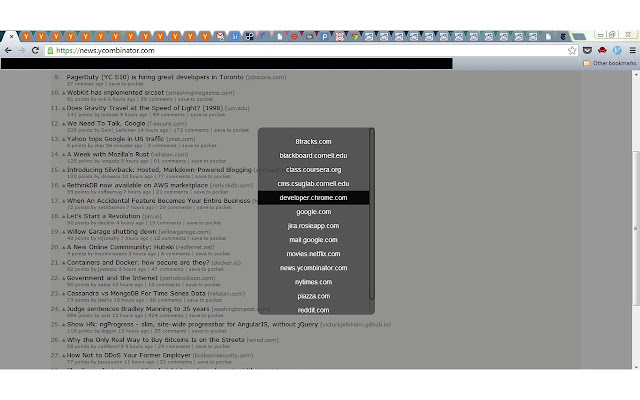


Aero Tab-Erweiterungs-CRX-Datei herunterladen
Laden Sie Aero Tab-Erweiterungsdateien im crx-Format herunter, installieren Sie Chrome-Erweiterungen manuell im Browser oder teilen Sie die crx-Dateien mit Freunden, um Chrome-Erweiterungen einfach zu installieren.
Anleitung zur Verwendung der Erweiterung
                        TO USE: Hit Ctrl+Shift+Q (or Command+Shift+Q for Mac). You can change this keybind in the Chrome Extensions Page, all the way down the bottom where it says "Keyboard Shortcuts".

This extension groups your tabs together by domain so that you can still see their titles even if you have 50 tabs or reddit or Hacker News open. Inspired by the Window 7 Aero taskbar (hence the name).
Grundlegende Informationen zur Erweiterung
| Name |  Aero Tab Aero Tab |
| ID | jpmehnjljnjpkamhgbikgfcmlboholhg |
| Offizielle URL | https://chrome.google.com/webstore/detail/aero-tab/jpmehnjljnjpkamhgbikgfcmlboholhg |
| Beschreibung | Chrome extension that groups tabs together by domain |
| Dateigröße | 123 KB |
| Installationsanzahl | 152 |
| Aktuelle Version | 1.1 |
| Letztes Update | 2013-08-21 |
| Veröffentlichungsdatum | 2013-08-21 |
| Bewertung | 1.80/5 Insgesamt 5 Bewertungen |
| Entwickler | recto.ralph |
| Zahlungsart | free |
| Erweiterungswebsite | https://github.com/ralphrecto/aero-tab |
| Unterstützte Sprachen | en-US |
| manifest.json | |
{
"update_url": "https:\/\/clients2.google.com\/service\/update2\/crx",
"manifest_version": 2,
"name": "Aero Tab",
"description": "Chrome extension that groups tabs together by domain",
"version": "1.1",
"icons": {
"16": "icons\/logo16.png",
"48": "icons\/logo48.png",
"128": "icons\/logo128.png"
},
"permissions": [
"tabs",
" | |