Journal access through HKU library
A simple chrome extension that let you access journal through HKU library resources (HKU ID needed).
Was ist Journal access through HKU library?
Journal access through HKU library ist eine Chrome-Erweiterung, die von junyichen entwickelt wurde, und ihr Hauptmerkmal ist "A simple chrome extension that let you access journal through HKU library resources (HKU ID needed).".
Erweiterungsscreenshots


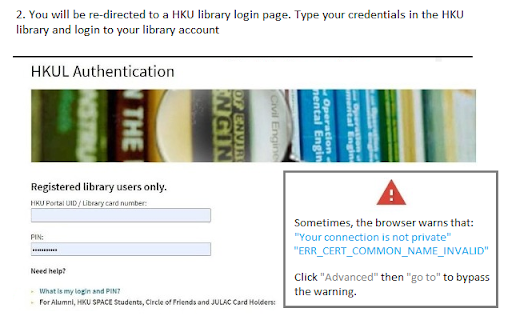
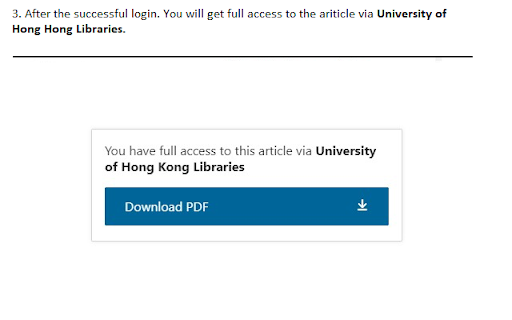
Journal access through HKU library-Erweiterungs-CRX-Datei herunterladen
Laden Sie Journal access through HKU library-Erweiterungsdateien im crx-Format herunter, installieren Sie Chrome-Erweiterungen manuell im Browser oder teilen Sie die crx-Dateien mit Freunden, um Chrome-Erweiterungen einfach zu installieren.
Anleitung zur Verwendung der Erweiterung
An extension that redirect you from the journal page to the HKU library portal. You need to login the HKU library. The extension will automatically parse the current URL of the current paper page to the HKU library address. Grundlegende Informationen zur Erweiterung
| Name |  Journal access through HKU library Journal access through HKU library |
| ID | lcnnijjgcjfpcfjgnahbcpapbmkiceld |
| Offizielle URL | https://chromewebstore.google.com/detail/journal-access-through-hk/lcnnijjgcjfpcfjgnahbcpapbmkiceld |
| Beschreibung | A simple chrome extension that let you access journal through HKU library resources (HKU ID needed). |
| Dateigröße | 47.64 KB |
| Installationsanzahl | 135 |
| Aktuelle Version | 0.0.1 |
| Letztes Update | 2021-09-02 |
| Veröffentlichungsdatum | 2021-08-04 |
| Entwickler | junyichen |
| [email protected] | |
| Zahlungsart | free |
| Unterstützte Sprachen | en-US |
| manifest.json | |
{
    "update_url": "https:\/\/clients2.google.com\/service\/update2\/crx",
    "manifest_version": 2,
    "name": "Journal access through HKU library",
    "short_name": "HKULibJ",
    "description": "A simple chrome extension that let you access journal through HKU library resources (HKU ID needed).",
    "version": "0.0.1",
    "minimum_chrome_version": "38",
    "permissions": [
        "contextMenus",
        "tabs"
    ],
    "icons": {
        "16": "assets\/icon16.png",
        "128": "assets\/icon128.png"
    },
    "background": {
        "page": "background.html"
    }
} | |