Goose
Inspect Google Analytics payloads and highlight clickable elements
Was ist Goose?
Goose ist eine Chrome-Erweiterung, die von neporozhniy entwickelt wurde, und ihr Hauptmerkmal ist "Inspect Google Analytics payloads and highlight clickable elements".
Erweiterungsscreenshots
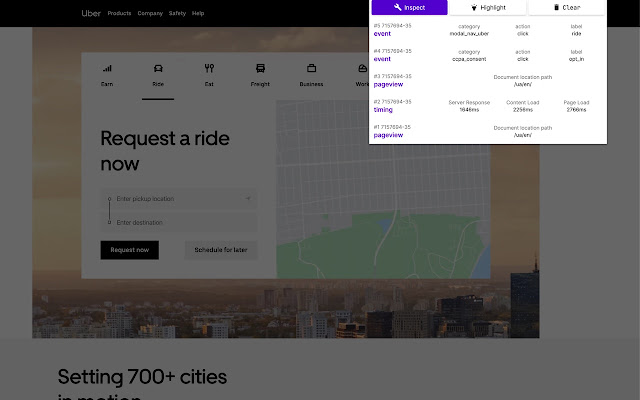


Goose-Erweiterungs-CRX-Datei herunterladen
Laden Sie Goose-Erweiterungsdateien im crx-Format herunter, installieren Sie Chrome-Erweiterungen manuell im Browser oder teilen Sie die crx-Dateien mit Freunden, um Chrome-Erweiterungen einfach zu installieren.
Anleitung zur Verwendung der Erweiterung
                        Logs payload data to popup.

In addition, it provides highlighting DOM nodes:

1. Add data-analytics-click="event_category|event_action|event_label" attribute to tags, which on click send event to google analytics
2. Add JS code to handle clicks on these tags, eg: https://github.com/bravecow/goose/blob/master/click.js
3. Click Highlight button
Grundlegende Informationen zur Erweiterung
| Name |  Goose Goose |
| ID | ljbmomkmbpbfcplcakpknmllhkcbkecc |
| Offizielle URL | https://chrome.google.com/webstore/detail/goose/ljbmomkmbpbfcplcakpknmllhkcbkecc |
| Beschreibung | Inspect Google Analytics payloads and highlight clickable elements |
| Dateigröße | 52.62 KB |
| Installationsanzahl | 132 |
| Aktuelle Version | 1.1 |
| Letztes Update | 2020-04-05 |
| Veröffentlichungsdatum | 2020-04-05 |
| Bewertung | 5.00/5 Insgesamt 1 Bewertungen |
| Entwickler | neporozhniy |
| Zahlungsart | free |
| Erweiterungswebsite | https://github.com/bravecow/goose |
| Unterstützte Sprachen | en-US |
| manifest.json | |
{
    "update_url": "https:\/\/clients2.google.com\/service\/update2\/crx",
    "name": "Goose",
    "version": "1.1",
    "description": "Inspect Google Analytics payloads and highlight clickable elements",
    "permissions": [
        "tabs",
        "activeTab",
        "webRequest",
        "*:\/\/www.google-analytics.com\/",
        "*:\/\/stats.g.doubleclick.net\/"
    ],
    "background": {
        "scripts": [
            "background.js"
        ],
        "persistent": true
    },
    "browser_action": {
        "default_popup": "popup.html",
        "default_icon": {
            "32": "icon32.png"
        }
    },
    "icons": {
        "16": "icon16.png",
        "48": "icon48.png",
        "128": "icon128.png"
    },
    "manifest_version": 2
} | |