Emacs shortcuts IME
US keyboard with emacs shortcut
Was ist Emacs shortcuts IME?
Emacs shortcuts IME ist eine Chrome-Erweiterung, die von Unknown entwickelt wurde, und ihr Hauptmerkmal ist "US keyboard with emacs shortcut".
Erweiterungsscreenshots

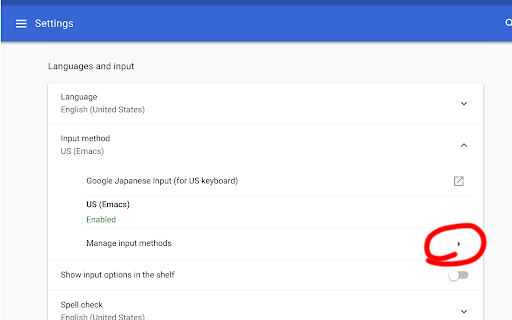

Emacs shortcuts IME-Erweiterungs-CRX-Datei herunterladen
Laden Sie Emacs shortcuts IME-Erweiterungsdateien im crx-Format herunter, installieren Sie Chrome-Erweiterungen manuell im Browser oder teilen Sie die crx-Dateien mit Freunden, um Chrome-Erweiterungen einfach zu installieren.
Anleitung zur Verwendung der Erweiterung
                        Enable emacs like keybinds on ChromeOS using shortcuts

1. Install This IME
2. Select US(Emacs) Keyboard
3. Set shortcuts on chrome://extensions/shortcuts

Source code is available on https://github.com/OTL/emacs_shortcuts_ime
Grundlegende Informationen zur Erweiterung
| Name |  Emacs shortcuts IME Emacs shortcuts IME |
| ID | mkegpdcnenfnhenaliggngipehndddne |
| Offizielle URL | https://chromewebstore.google.com/detail/emacs-shortcuts-ime/mkegpdcnenfnhenaliggngipehndddne |
| Beschreibung | US keyboard with emacs shortcut |
| Dateigröße | 26.64 KB |
| Installationsanzahl | 481 |
| Aktuelle Version | 0.0.3 |
| Letztes Update | 2018-08-14 |
| Veröffentlichungsdatum | 2018-08-13 |
| Bewertung | 3.67/5 Insgesamt 3 Bewertungen |
| Entwickler | Unknown |
| Zahlungsart | free |
| Erweiterungswebsite | https://github.com/OTL/emacs_shortcuts_ime |
| Hilfeseite URL | https://github.com/OTL/emacs_shortcuts_ime/issues |
| Unterstützte Sprachen | en-US |
| manifest.json | |
{
    "update_url": "https:\/\/clients2.google.com\/service\/update2\/crx",
    "name": "Emacs shortcuts IME",
    "version": "0.0.3",
    "manifest_version": 2,
    "description": "US keyboard with emacs shortcut",
    "background": {
        "scripts": [
            "main.js"
        ]
    },
    "permissions": [
        "input"
    ],
    "commands": {
        "00-up": {
            "description": "Go Up (Ctrl+P)"
        },
        "01-down": {
            "description": "Go Down (Ctrl+N)"
        },
        "02-left": {
            "description": "Go Left (Ctrl+B)",
            "suggested_key": {
                "default": "Ctrl+B"
            }
        },
        "03-right": {
            "description": "Go Right (Crtl+F)"
        },
        "10-home": {
            "description": "Go Home (Ctrl+A)"
        },
        "11-end": {
            "description": "Go End (Ctrl+E)",
            "suggested_key": {
                "default": "Ctrl+E"
            }
        },
        "20-delete": {
            "description": "Delete (Ctrl+D)"
        },
        "30-backspace": {
            "description": "Backspace (Ctrl+H)"
        },
        "40-enter": {
            "description": "Enter (Ctrl+M)",
            "suggested_key": {
                "default": "Ctrl+M"
            }
        },
        "50-killend": {
            "description": "Kill line (Ctrl-K)"
        },
        "60-cut": {
            "description": "Cut (Ctrl+W)"
        },
        "61-paste": {
            "description": "Paste (Ctrl+Y)",
            "suggested_key": {
                "default": "Ctrl+Y"
            }
        },
        "90-original-ctrl-f": {
            "description": "Original Ctrl+F (not working)"
        }
    },
    "browser_action": {
        "default_popup": "popup.html"
    },
    "icons": {
        "16": "icons\/16.png",
        "48": "icons\/48.png",
        "128": "icons\/128.png"
    },
    "input_components": [
        {
            "name": "US (Emacs)",
            "type": "ime",
            "id": "us_emacs_shourtcuts",
            "description": "US keyboard with emacs shortcut",
            "language": "en-US",
            "layouts": [
                "us"
            ]
        }
    ]
} | |