Meeting URL Extractor on Calendar
Copies only the Google Meet URL from Google Calendar without any extra information by right-clicking once.
Was ist Meeting URL Extractor on Calendar?
Meeting URL Extractor on Calendar ist eine Chrome-Erweiterung, die von takahirostone entwickelt wurde, und ihr Hauptmerkmal ist "Copies only the Google Meet URL from Google Calendar without any extra information by right-clicking once.".
Erweiterungsscreenshots

Meeting URL Extractor on Calendar-Erweiterungs-CRX-Datei herunterladen
Laden Sie Meeting URL Extractor on Calendar-Erweiterungsdateien im crx-Format herunter, installieren Sie Chrome-Erweiterungen manuell im Browser oder teilen Sie die crx-Dateien mit Freunden, um Chrome-Erweiterungen einfach zu installieren.
Anleitung zur Verwendung der Erweiterung
                        You copy not only the Google Meet URL, but also extra information such as phone numbers when you use the default copy button on Google Calendar. This extension eliminates that frustration.

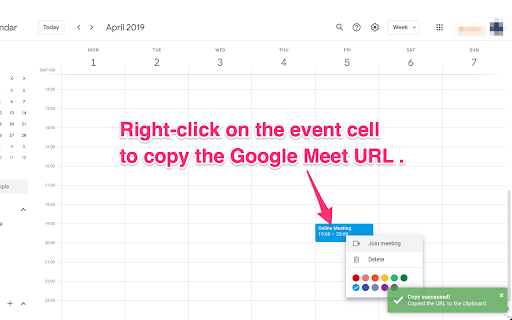
Right-click on the event cell on the calendar or on the \"Join with Google Meet\" button to copy only the Google Meet URL to the clipboard.


- See screenshot for getting how to use.
- A green toast appears in the lower right corner of the window when copying succeeds.
- Copying fails when the window does not focused (another window is used). Focus on the window and try again when a red toast appears in the lower right corner.


- jQuery 3.6.1 (https://jquery.com/download/)
- toastr (https://codeseven.github.io/toastr/)


- ICOON MONO (https://icooon-mono.com/)


- extension-meet-url-extractor (https://github.com/takahirostone/extension-meet-url-extractor)
Grundlegende Informationen zur Erweiterung
| Name |  Meeting URL Extractor on Calendar Meeting URL Extractor on Calendar |
| ID | mlemdblfhpkkmabeegnifhnhedhclhln |
| Offizielle URL | https://chromewebstore.google.com/detail/meeting-url-extractor-on/mlemdblfhpkkmabeegnifhnhedhclhln |
| Beschreibung | Copies only the Google Meet URL from Google Calendar without any extra information by right-clicking once. |
| Dateigröße | 108 KB |
| Installationsanzahl | 268 |
| Aktuelle Version | 1.0.2 |
| Letztes Update | 2023-01-05 |
| Veröffentlichungsdatum | 2022-11-29 |
| Entwickler | takahirostone |
| [email protected] | |
| Zahlungsart | free |
| Unterstützte Sprachen | en,ja |
| manifest.json | |
{
    "update_url": "https:\/\/clients2.google.com\/service\/update2\/crx",
    "name": "__MSG_extName__",
    "version": "1.0.2",
    "manifest_version": 3,
    "description": "__MSG_extDescription__",
    "default_locale": "en",
    "icons": {
        "16": "icon\/icon_16.png",
        "48": "icon\/icon_48.png",
        "128": "icon\/icon_128.png"
    },
    "content_scripts": [
        {
            "matches": [
                "https:\/\/calendar.google.com\/calendar\/*"
            ],
            "js": [
                "js\/jquery-3.6.1.min.js",
                "js\/toastr.min.js",
                "js\/content.js"
            ],
            "css": [
                "css\/toastr.min.css"
            ]
        }
    ],
    "action": {
        "default_title": "__MSG_extName__",
        "default_popup": "html\/popup.html",
        "default_icon": {
            "16": "icon\/icon_16.png",
            "48": "icon\/icon_48.png",
            "128": "icon\/icon_128.png"
        }
    }
} | |