Grid View For Google Meet (fixed)
Adds a toggle to use a grid layout in Google Meets and more advanced features
Was ist Grid View For Google Meet (fixed)?
Grid View For Google Meet (fixed) ist eine Chrome-Erweiterung, die von http://1bestlinks.net entwickelt wurde, und ihr Hauptmerkmal ist "Adds a toggle to use a grid layout in Google Meets and more advanced features".
Erweiterungsscreenshots


Grid View For Google Meet (fixed)-Erweiterungs-CRX-Datei herunterladen
Laden Sie Grid View For Google Meet (fixed)-Erweiterungsdateien im crx-Format herunter, installieren Sie Chrome-Erweiterungen manuell im Browser oder teilen Sie die crx-Dateien mit Freunden, um Chrome-Erweiterungen einfach zu installieren.
Anleitung zur Verwendung der Erweiterung
                        Add a toggle button to use grid layouts in Google Meets

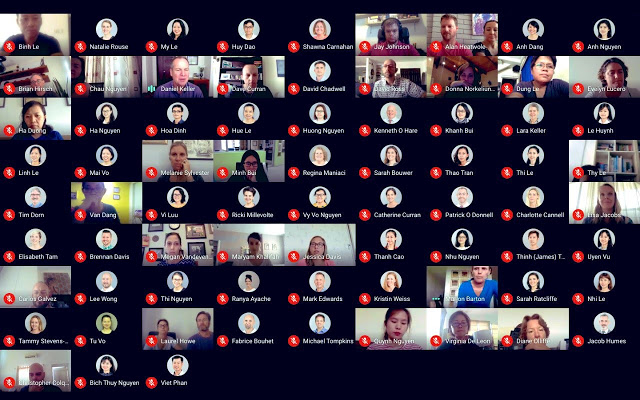
This extension adds a button to the top right bar (next to chat and a list of participants) to enable grid view in Google Meets. The grid view provides participants with an equal size video for use in meetings without the main speaker (such as working in silent meetings at home).

This extension forces every participant's video to load when grid view is enabled, and can cause performance problems during extremely large meetings.

Includes plenty of options to enhance your meeting: include your own videos, highlight who is speaking, and hide participants without video!
--------------------------------------------------------------------------
The great extension by Chris Gamble suddenly stopped working in July.
We brought the extension back to life for a long time.

Now, a major update of Google Meet broke the interface with the native code, so we moved to a different approach. We plan to work on some of the features that millions of users loved.. stay tuned!
--------------------------------------------------------------------------
Privacy Policy
This extension does not track any user data, and therefore does not have a detailed privacy policy.
Grundlegende Informationen zur Erweiterung
| Name |  Grid View For Google Meet (fixed) Grid View For Google Meet (fixed) |
| ID | mpbkppagklacnhegdnhgijandjnfcfbo |
| Offizielle URL | https://chrome.google.com/webstore/detail/grid-view-for-google-meet/mpbkppagklacnhegdnhgijandjnfcfbo |
| Beschreibung | Adds a toggle to use a grid layout in Google Meets and more advanced features |
| Dateigröße | 236 KB |
| Installationsanzahl | 10,000 |
| Aktuelle Version | 1.0.2 |
| Letztes Update | 2021-03-25 |
| Veröffentlichungsdatum | 2020-11-02 |
| Bewertung | 1.88/5 Insgesamt 16 Bewertungen |
| Entwickler | http://1bestlinks.net |
| [email protected] | |
| Zahlungsart | free |
| URL der Datenschutzrichtlinien-Seite | http://1bestlinks.net/page/privacy-policy |
| Unterstützte Sprachen | id,ms,de,en,fil,fr,nl,no,vi,tr,ca,da,et,es,hr,it,lv,lt,hu,pl,ro,sk,sl,fi,sv,cs,el,sr,bg,ru,uk,hi,th,zh-CN,zh-TW,ja,ko |
| manifest.json | |
{
    "update_url": "https:\/\/clients2.google.com\/service\/update2\/crx",
    "manifest_version": 2,
    "name": "__MSG_AppName__",
    "description": "__MSG_AppDescription__",
    "default_locale": "en",
    "version": "1.0.2",
    "homepage_url": "http:\/\/1bestlinks.net\/",
    "icons": {
        "24": "icons\/icon-24.png",
        "32": "icons\/icon-32.png",
        "48": "icons\/icon-48.png",
        "128": "icons\/icon-128.png"
    },
    "browser_action": {
        "default_icon": {
            "24": "icons\/icon-24.png",
            "32": "icons\/icon-32.png",
            "48": "icons\/icon-48.png",
            "128": "icons\/icon-128.png"
        },
        "default_popup": "popup.html",
        "default_title": "Google Meet Grid View"
    },
    "background": {
        "scripts": [
            "install.js"
        ],
        "persistent": true
    },
    "content_scripts": [
        {
            "matches": [
                "https:\/\/meet.google.com\/*"
            ],
            "js": [
                "browser-polyfill.js",
                "content.js"
            ],
            "run_at": "document_idle"
        }
    ],
    "web_accessible_resources": [
        "grid.user.js"
    ]
} | |