Read to me
Browser extension for text to speech.
Was ist Read to me?
Read to me ist eine Chrome-Erweiterung, die von nGran entwickelt wurde, und ihr Hauptmerkmal ist "Browser extension for text to speech.".
Erweiterungsscreenshots


Read to me-Erweiterungs-CRX-Datei herunterladen
Laden Sie Read to me-Erweiterungsdateien im crx-Format herunter, installieren Sie Chrome-Erweiterungen manuell im Browser oder teilen Sie die crx-Dateien mit Freunden, um Chrome-Erweiterungen einfach zu installieren.
Anleitung zur Verwendung der Erweiterung
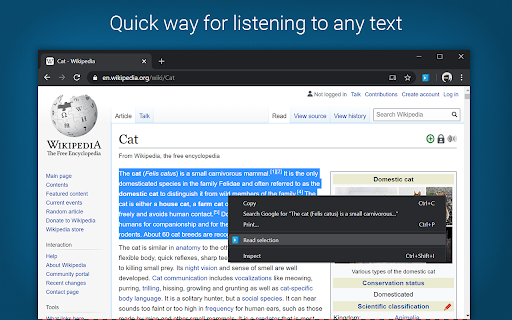
                        Listen to any text in your browser in a voice of your choice.

READ TO ME is a text to speech Chrome extension for reading out loud any text in your browser in many languages. The app makes listening to everything on your screen effortless with a functional smooth design and customizable options as a selection of male and female voices, voice pitch and reading speed.

Spoken text has several advantages over reading. The most obvious one is the option to multitask as your eyes and hands are free, but also it is considered that it can enhance comprehension. Listening is also great for those with disabilities or disadvantages that make reading either impossible or extremely difficult.
Grundlegende Informationen zur Erweiterung
| Name |  Read to me Read to me |
| ID | nalcmippmnicanikekphpdmmcgoojjlm |
| Offizielle URL | https://chromewebstore.google.com/detail/read-to-me/nalcmippmnicanikekphpdmmcgoojjlm |
| Beschreibung | Browser extension for text to speech. |
| Dateigröße | 758 KB |
| Installationsanzahl | 9,000 |
| Aktuelle Version | 1.1.0 |
| Letztes Update | 2020-04-24 |
| Veröffentlichungsdatum | 2020-04-20 |
| Bewertung | 1.86/5 Insgesamt 7 Bewertungen |
| Entwickler | nGran |
| [email protected] | |
| Zahlungsart | free |
| Unterstützte Sprachen | en |
| manifest.json | |
{
"update_url": "https:\/\/clients2.google.com\/service\/update2\/crx",
"manifest_version": 2,
"name": "Read to me",
"version": "1.1.0",
"description": "Browser extension for text to speech.",
"author": "Nikola Grancharov",
"permissions": [
"contextMenus",
"storage",
"tabs",
"https:\/\/*\/"
],
"icons": {
"16": "img\/logo_16x16.png",
"32": "img\/logo_32x32.png",
"48": "img\/logo_48x48.png",
"64": "img\/logo_64x64.png",
"128": "img\/logo_128x128.png"
},
"content_security_policy": "script-src 'self' https:\/\/ssl.google-analytics.com; object-src 'self'",
"content_scripts": [
{
"matches": [
" | |