Quick Search
Quick access to your links and a much required auto-save notepad while browsing. Also has an inbuilt basic calculator.
Was ist Quick Search?
Quick Search ist eine Chrome-Erweiterung, die von Pranav Acharya entwickelt wurde, und ihr Hauptmerkmal ist "Quick access to your links and a much required auto-save notepad while browsing. Also has an inbuilt basic calculator.".
Erweiterungsscreenshots

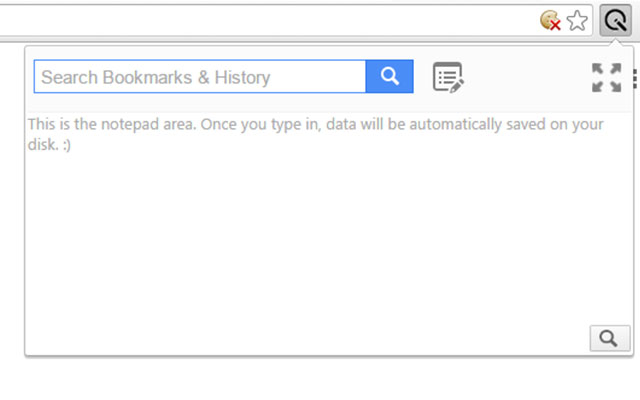

Quick Search-Erweiterungs-CRX-Datei herunterladen
Laden Sie Quick Search-Erweiterungsdateien im crx-Format herunter, installieren Sie Chrome-Erweiterungen manuell im Browser oder teilen Sie die crx-Dateien mit Freunden, um Chrome-Erweiterungen einfach zu installieren.
Anleitung zur Verwendung der Erweiterung
                        Features:

1.Quickly search your Bookmarks and History on the fly. Use arrow keys to select items from the list and use the buttons on top (open in new tab and copy links) to interact with the links. You can hold down ctrl/shift to select multiple links as well.

2. Autosave notepad. Type in and you are done.! You can save your reminders, links, some important numbers,etc. the  way you want. You can use the search notepad feature in case your notepad becomes too large. Also you can expand/collapse the notepad using the button on the top right

3. It has an inbuilt calculator. Type in an expression as follows
10*5
and hit ENTER. the result will be presented to you.

If you close the popup by mistake, you can reopen it to get the same state of the popup back!
Grundlegende Informationen zur Erweiterung
| Name |  Quick Search Quick Search |
| ID | nnedjieibfdfmnblgffblmlhilolclmj |
| Offizielle URL | https://chrome.google.com/webstore/detail/quick-search/nnedjieibfdfmnblgffblmlhilolclmj |
| Beschreibung | Quick access to your links and a much required auto-save notepad while browsing. Also has an inbuilt basic calculator. |
| Dateigröße | 28.24 KB |
| Installationsanzahl | 47 |
| Aktuelle Version | 1.0 |
| Letztes Update | 2016-06-29 |
| Veröffentlichungsdatum | 2016-06-29 |
| Bewertung | 5.00/5 Insgesamt 5 Bewertungen |
| Entwickler | Pranav Acharya |
| Zahlungsart | free |
| Unterstützte Sprachen | en |
| manifest.json | |
{
    "update_url": "https:\/\/clients2.google.com\/service\/update2\/crx",
    "name": "Quick Search",
    "short_name": "Quick Search",
    "version": "1.0",
    "manifest_version": 2,
    "description": "Quick access to your links and a much required auto-save notepad while browsing. Also has an inbuilt basic calculator.",
    "permissions": [
        "storage",
        "bookmarks",
        "history",
        "chrome:\/\/favicon\/",
        "tabs"
    ],
    "icons": {
        "16": "icon16.png",
        "32": "icon32.png",
        "48": "icon48.png",
        "128": "icon128.png"
    },
    "background": {
        "scripts": [
            "background.js"
        ]
    },
    "browser_action": {
        "default_popup": "index.html"
    }
} | |