DPlay Inventory
DPlay Inventory
Was ist DPlay Inventory?
DPlay Inventory ist eine Chrome-Erweiterung, die von DPlay Company entwickelt wurde, und ihr Hauptmerkmal ist "DPlay Inventory".
Erweiterungsscreenshots
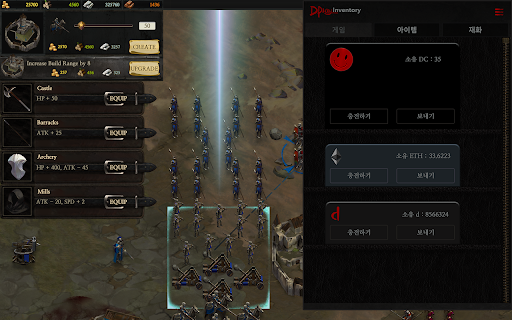
DPlay Inventory-Erweiterungs-CRX-Datei herunterladen
Laden Sie DPlay Inventory-Erweiterungsdateien im crx-Format herunter, installieren Sie Chrome-Erweiterungen manuell im Browser oder teilen Sie die crx-Dateien mit Freunden, um Chrome-Erweiterungen einfach zu installieren.
Anleitung zur Verwendung der Erweiterung
                        DPlay Inventory is an application managing the games, their items and assets purchased in DPlay. It is required to play the web games integrated with DPlay.

[Features]
• You can manage the games you bought in DPlay Store.
• You can manage the items in-game purchased in the games integrated with DPlay.
• You can manage DPlay Coin, which is the currency used in DPlay, d and Ether.
• You can change your guild’s name and your introduction.
• You can create or edit your guild.

Source code: https://github.com/DPlayGames/DPlayInventory
Inquiry: [email protected]
Grundlegende Informationen zur Erweiterung
| Name |  DPlay Inventory DPlay Inventory |
| ID | pfniidaegjlmhanjmilfjlcmfdeoigmf |
| Offizielle URL | https://chromewebstore.google.com/detail/dplay-inventory/pfniidaegjlmhanjmilfjlcmfdeoigmf |
| Beschreibung | DPlay Inventory |
| Dateigröße | 10.21 MB |
| Installationsanzahl | 71 |
| Aktuelle Version | 1.3 |
| Letztes Update | 2019-10-15 |
| Veröffentlichungsdatum | 2019-10-15 |
| Entwickler | DPlay Company |
| [email protected] | |
| Zahlungsart | free |
| Unterstützte Sprachen | en-US |
| manifest.json | |
{
    "update_url": "https:\/\/clients2.google.com\/service\/update2\/crx",
    "manifest_version": 2,
    "name": "DPlay Inventory",
    "version": "1.3",
    "description": "DPlay Inventory",
    "browser_action": {
        "default_popup": "index.html"
    },
    "icons": {
        "16": "icon16.png",
        "48": "icon48.png",
        "128": "icon128.png"
    },
    "permissions": [
        "storage",
        "tabs"
    ],
    "background": {
        "scripts": [
            "BACKGROUND.js"
        ]
    },
    "content_scripts": [
        {
            "js": [
                "CONTENT.js"
            ],
            "matches": [
                "file:\/\/*\/*",
                "http:\/\/*\/*",
                "https:\/\/*\/*"
            ],
            "run_at": "document_start",
            "all_frames": true
        }
    ]
} | |