Ally: Subtitles Anywhere
Auto-generated subtitles on any website.
Was ist Ally: Subtitles Anywhere?
Ally: Subtitles Anywhere ist eine Chrome-Erweiterung, die von http://ally.so entwickelt wurde, und ihr Hauptmerkmal ist "Auto-generated subtitles on any website.".
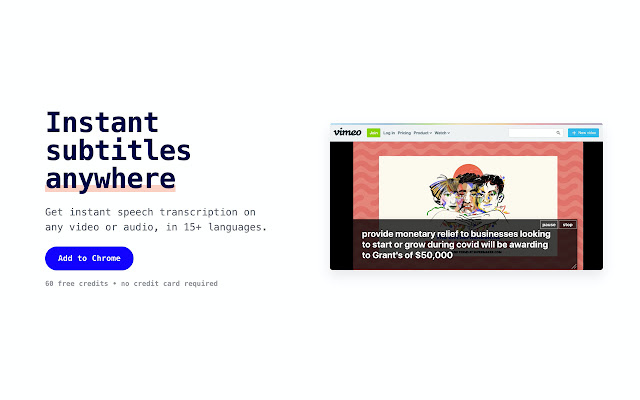
Erweiterungsscreenshots


Ally: Subtitles Anywhere-Erweiterungs-CRX-Datei herunterladen
Laden Sie Ally: Subtitles Anywhere-Erweiterungsdateien im crx-Format herunter, installieren Sie Chrome-Erweiterungen manuell im Browser oder teilen Sie die crx-Dateien mit Freunden, um Chrome-Erweiterungen einfach zu installieren.
Anleitung zur Verwendung der Erweiterung
                        **Audio content, accessible**

Whether you're hearing impaired or learning a new language, our chrome transcription plugin is here to help you understand and participate. We want to make audio accessible to anyone.

🎙Listen to podcasts via any web-based platform

🕹Watch and transcribe Twitch streams

📼Follow your favourite youtubers with better transcription

🌎Discover new content and creators from all over the world

🚨Stay up-to-date with real-time broadcasts and news

👭Become a part of new communities

❤️ Connect and find new friends with Ally community
Grundlegende Informationen zur Erweiterung
| Name |  Ally: Subtitles Anywhere Ally: Subtitles Anywhere |
| ID | plhklpdghdebjclpjemhmgeafnikiegl |
| Offizielle URL | https://chrome.google.com/webstore/detail/ally-subtitles-anywhere/plhklpdghdebjclpjemhmgeafnikiegl |
| Beschreibung | Auto-generated subtitles on any website. |
| Dateigröße | 365 KB |
| Installationsanzahl | 4,000 |
| Aktuelle Version | 1.0.0 |
| Letztes Update | 2021-06-18 |
| Veröffentlichungsdatum | 2020-08-05 |
| Bewertung | 3.26/5 Insgesamt 27 Bewertungen |
| Entwickler | http://ally.so |
| [email protected] | |
| Zahlungsart | free |
| Erweiterungswebsite | https://www.ally.so/ |
| Hilfeseite URL | https://www.ally.so/guide |
| URL der Datenschutzrichtlinien-Seite | http://stenomatic.ai/utility-legal-terms.html |
| Unterstützte Sprachen | en-US |
| manifest.json | |
{
    "update_url": "https:\/\/clients2.google.com\/service\/update2\/crx",
    "manifest_version": 2,
    "name": "Ally: Subtitles Anywhere",
    "version": "1.0.0",
    "description": "Auto-generated subtitles on any website.",
    "author": "Stenomatic.ai",
    "homepage_url": "https:\/\/www.ally.so",
    "icons": {
        "16": "images\/get_started16.png",
        "32": "images\/get_started32.png",
        "48": "images\/get_started48.png",
        "128": "images\/get_started128.png"
    },
    "permissions": [
        "activeTab",
        "declarativeContent",
        "storage",
        "tabCapture",
        "https:\/\/cc.stenomatic.com\/*"
    ],
    "background": {
        "scripts": [
            "browser-polyfill.min.js",
            "lib\/firebasejs\/7.15.4\/firebase-app.js",
            "lib\/firebasejs\/7.15.4\/firebase-auth.js",
            "init_firebase.js",
            "lib\/firebasejs\/ui\/4.5.1\/firebase-ui-auth.js",
            "services\/auth.service.js",
            "lib\/recorder.min.js",
            "services\/api.service.js",
            "workers\/linear16_pcm_worker.js",
            "workers\/opus_worker.js",
            "background.js"
        ],
        "persistent": false
    },
    "web_accessible_resources": [
        "images\/resize-bot-right.svg"
    ],
    "page_action": {
        "browser_style": true,
        "default_popup": "popup.html",
        "default_title": "Open Stenomatic closed captions interface",
        "default_icon": {
            "16": "images\/get_started16.png",
            "32": "images\/get_started32.png",
            "48": "images\/get_started48.png",
            "128": "images\/get_started128.png"
        },
        "show_matches": [
            "http:\/\/*\/*",
            "https:\/\/*\/*"
        ]
    },
    "content_security_policy": "script-src 'self' https:\/\/apis.google.com\/ https:\/\/gumroad.com\/js\/ https:\/\/assets.gumroad.com\/assets\/; object-src 'self'",
    "oauth2": {
        "client_id": "djgoeogfnlgipgocijdabhhnjcdmpgho",
        "scopes": [
            "https:\/\/www.googleapis.com\/auth\/userinfo.email"
        ]
    }
} | |