thanks.io
Easily send handwritten postcards, letters, and notecards through thanks.io
Was ist thanks.io?
thanks.io ist eine Chrome-Erweiterung, die von https://thanks.io entwickelt wurde, und ihr Hauptmerkmal ist "Easily send handwritten postcards, letters, and notecards through thanks.io".
Erweiterungsscreenshots
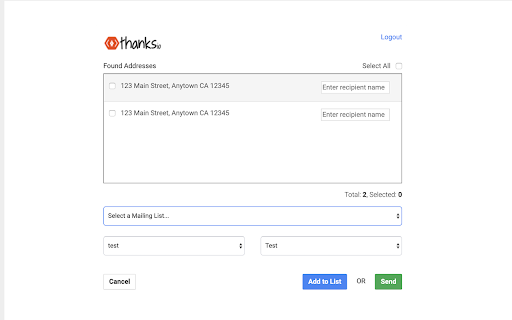

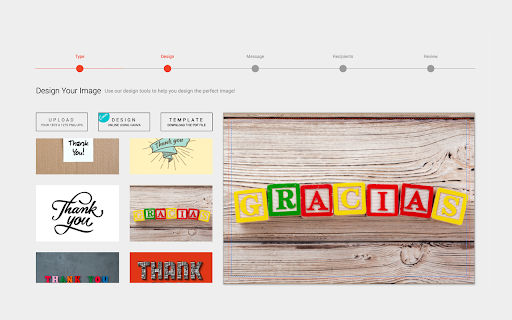


thanks.io-Erweiterungs-CRX-Datei herunterladen
Laden Sie thanks.io-Erweiterungsdateien im crx-Format herunter, installieren Sie Chrome-Erweiterungen manuell im Browser oder teilen Sie die crx-Dateien mit Freunden, um Chrome-Erweiterungen einfach zu installieren.
Anleitung zur Verwendung der Erweiterung
Thanks.io allows you to easily send postcards & letters to your contacts. Our chrome extension automatically finds addresses on websites you visit & allows you easy 1 click sending to those addresses. You can now also add these addresses to your mailing lists with this update. Grundlegende Informationen zur Erweiterung
| Name |  thanks.io thanks.io |
| ID | pmghhbcidenacjapeocgagkkaffnbfdd |
| Offizielle URL | https://chromewebstore.google.com/detail/thanksio/pmghhbcidenacjapeocgagkkaffnbfdd |
| Beschreibung | Easily send handwritten postcards, letters, and notecards through thanks.io |
| Dateigröße | 5.3 MB |
| Installationsanzahl | 674 |
| Aktuelle Version | 4.2 |
| Letztes Update | 2020-12-28 |
| Veröffentlichungsdatum | 2020-04-09 |
| Entwickler | https://thanks.io |
| [email protected] | |
| Zahlungsart | free |
| Erweiterungswebsite | https://thanks.io/ |
| Hilfeseite URL | http://help.thanks.io |
| URL der Datenschutzrichtlinien-Seite | https://www.thanks.io/policy |
| Unterstützte Sprachen | en |
| manifest.json | |
{
"update_url": "https:\/\/clients2.google.com\/service\/update2\/crx",
"manifest_version": 2,
"name": "thanks.io",
"description": "Easily send handwritten postcards, letters, and notecards through thanks.io",
"homepage_url": "https:\/\/thanks.io",
"version": "4.2",
"background": {
"persistent": false,
"scripts": [
"js\/jquery.min.js",
"js\/background.js"
]
},
"browser_action": {
"default_icon": "img\/icon.png",
"default_popup": "popup.html"
},
"icons": {
"16": "img\/icon16.png",
"48": "img\/icon48.png",
"128": "img\/icon128.png"
},
"permissions": [
"storage"
],
"content_scripts": [
{
"js": [
"js\/jquery.min.js",
"js\/content.js"
],
"css": [
"css\/content.css"
],
"run_at": "document_idle",
"all_frames": false,
"matches": [
" | |