ChRAM: Simple Browsing Data Cleaner
Clean Browsing Data with ChRAM
Was ist ChRAM: Simple Browsing Data Cleaner?
ChRAM: Simple Browsing Data Cleaner ist eine Chrome-Erweiterung, die von TabIt entwickelt wurde, und ihr Hauptmerkmal ist "Clean Browsing Data with ChRAM".
Erweiterungsscreenshots
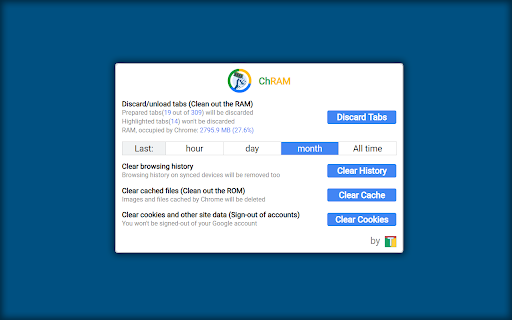
ChRAM: Simple Browsing Data Cleaner-Erweiterungs-CRX-Datei herunterladen
Laden Sie ChRAM: Simple Browsing Data Cleaner-Erweiterungsdateien im crx-Format herunter, installieren Sie Chrome-Erweiterungen manuell im Browser oder teilen Sie die crx-Dateien mit Freunden, um Chrome-Erweiterungen einfach zu installieren.
Anleitung zur Verwendung der Erweiterung
                        ###  CLEANING OPTIONS:  ###
# Discard/unload tabs (Clean out the RAM) : : Random-Access Memory(RAM), occupied by the Chrome's tabs will be cleared - loaded data, like images, videos, text, page structures will be removed from the RAM, while your sessions with cookies for the visited web-sites are kept. If you highlight(Ctrl+Click to select) tabs from various windows of Chrome, they will remain in the same state, as they were before.
# Clear browsing history : : Browsing history on synced devices will be removed too
# Clear cached files (Clean out the ROM) : : Images and files cached by Chrome will be deleted
# Clear cookies and other site data (Sign-out of accounts) : : You won't be signed-out of your Google account

ONE MORE THING:  For your convenience ShortCut 'Alt+PageUp' will take you to the previous Chrome window & 'Alt+PageDown' will take you to the next one. If not, try assigning them at chrome://extensions. You can also disable them there too.
Grundlegende Informationen zur Erweiterung
| Name |  ChRAM: Simple Browsing Data Cleaner ChRAM: Simple Browsing Data Cleaner |
| ID | pogibncdlnomiioielcgkhhgcmhokcma |
| Offizielle URL | https://chromewebstore.google.com/detail/chram-simple-browsing-dat/pogibncdlnomiioielcgkhhgcmhokcma |
| Beschreibung | Clean Browsing Data with ChRAM |
| Dateigröße | 120 KB |
| Installationsanzahl | 567 |
| Aktuelle Version | 4.1.3 |
| Letztes Update | 2022-02-12 |
| Veröffentlichungsdatum | 2019-02-25 |
| Bewertung | 4.71/5 Insgesamt 7 Bewertungen |
| Entwickler | TabIt |
| [email protected] | |
| Zahlungsart | free |
| Unterstützte Sprachen | en-US |
| manifest.json | |
{
    "update_url": "https:\/\/clients2.google.com\/service\/update2\/crx",
    "manifest_version": 2,
    "short_name": "ChRAM",
    "name": "ChRAM: Simple Browsing Data Cleaner",
    "version": "4.1.3",
    "description": "Clean Browsing Data with ChRAM",
    "offline_enabled": true,
    "icons": {
        "128": "images\/logo128.png",
        "48": "images\/logo48.png",
        "16": "images\/logo16.png"
    },
    "browser_action": {
        "default_title": "Clean Browsing Data with ChRAM",
        "default_popup": "\/index.html",
        "default_icon": {
            "128": "images\/logo128.png",
            "48": "images\/logo48.png",
            "16": "images\/logo16.png"
        }
    },
    "permissions": [
        "browsingData",
        "system.memory",
        "notifications",
        "management"
    ],
    "background": {
        "scripts": [
            "bg.js"
        ]
    },
    "commands": {
        "prev-window": {
            "suggested_key": {
                "default": "Alt+PageUp"
            },
            "description": "Open previous Chrome window"
        },
        "next-window": {
            "suggested_key": {
                "default": "Alt+PageDown"
            },
            "description": "Open next Chrome window"
        }
    }
} | |