Ditto
Paste CSS text styles from a webpage directly into Sketch.
Τι είναι το Ditto;
Το Ditto είναι ένα πρόσθετο Chrome που αναπτύχθηκε από τον Yana Gevorgyan, και η κύρια λειτουργία του είναι "Paste CSS text styles from a webpage directly into Sketch.".
Στιγμιότυπα Επέκτασης


Λήψη αρχείου CRX της επέκτασης Ditto
Λήψη αρχείων επέκτασης Ditto σε μορφή crx, εγκατάσταση των επεκτάσεων Chrome μη αυτόματα στον περιηγητή ή κοινοποίηση των αρχείων crx με φίλους για εύκολη εγκατάσταση των επεκτάσεων Chrome.
Οδηγίες Χρήσης της Επέκτασης
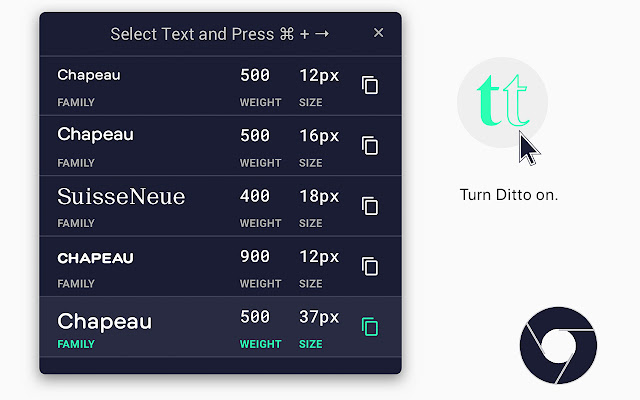
                        Ditto is a Chrome extension with a companion Sketch plugin that allows designers to copy CSS font styles from live websites and paste them directly into Sketch as Sketch styles.

INSTALLATION
Installing the Chrome Extension

Open Chrome.
1. Go to chrome://extensions
2. Toggle “Developer Mode” in the upper-right
3. Click “Load Unpacked”
4. Navigate to Downloads/ditto-master/chrome/assets
5. Click Open.
Voila, Ditto should be installed in Chrome. You should see a double-t icon in the extension menu.

Installing the Sketch Plugin
1. Go to Downloads/ditto-master/sketch/
2. Run ditto.sketchplugin__

Voila, Ditto should be installed in Sketch. You should see Ditto in the Plugins dropdown menu.


USAGE
Using the Chrome Extension
1. Go to a page that you want to copy styles from.
2. Click the gray raccoon head in the corner to activate the plugin. When activated, the double-t icon should be bright teal and an empty Clipboard History 3. modal should appear with instructions on what to do.
4. Select the text you would like to copy and press your desired shortcut. The default shortcut is Cmd + Right. I suggest you remap it to something better.

Notes about Chrome Extension Usage
- You can select multiple styles in the page, which will appear in the clipboard history. The pink highlight indicates what is currently copied to the clipboard.
- The Clipboard History exists as a way to put previously copied styles back into the clipboard.
- You can drag the Clipboard History in case it’s covering up some text!
- To copy a previously copied style, simply click on an item in the history that you want to copy. It should now be in your clipboard.
- The clipboard history is per-domain, which means that rei.com and rei.com/subpage/ will share the same clipboard.

Using the Sketch Plugin
1. While the CSS is copied to your clipboard, go to Sketch.
2. Have a text layer ready with some text that you want to re-style.
3. Select the text-layer.
4. Press Ctrl+Opt+V to style the text-layer with the styles in your clipboard. Again I suggest you remap this shortcut to something better.

Notes about Sketch Plugin Usage
-You may use the Plugins/Paste CSS Styles menu instead of the hotkey.

FONT PROPERTIES COPIED
Ditto is capable of copying the following styles from CSS into Sketch:
- font-size
- color
- line-height
- font-weight
- text-decoration
- font-family
- font-style
- letter-spacing
- text-transform
- font-variant
- text-shadow

CONTACT
Maintainer: Yana Gevorgyan at [email protected]
Initial Creator: Blake Quigley at [email protected]
Βασικές Πληροφορίες Επέκτασης
| Όνομα |  Ditto Ditto |
| ID | bkhljfnjkmbofjkmpalldbpnhnlefdje |
| Επίσημο URL | https://chrome.google.com/webstore/detail/ditto/bkhljfnjkmbofjkmpalldbpnhnlefdje |
| Περιγραφή | Paste CSS text styles from a webpage directly into Sketch. |
| Μέγεθος Αρχείου | 294 KB |
| Αριθμός Εγκαταστάσεων | 406 |
| Τρέχουσα Έκδοση | 2.2 |
| Τελευταία Ενημέρωση | 2020-06-26 |
| Ημερομηνία Δημοσίευσης | 2020-06-26 |
| Αξιολόγηση | 5.00/5 Συνολικά 2 Αξιολογήσεις |
| Προγραμματιστής | Yana Gevorgyan |
| Ηλεκτρονικό ταχυδρομείο | [email protected] |
| Τύπος Πληρωμής | free |
| Ιστότοπος Επέκτασης | https://ygev.github.io/ditto/ |
| Διεύθυνση URL της Σελίδας Βοήθειας | https://github.com/ygev/ditto |
| Υποστηριζόμενες Γλώσσες | en-US |
| manifest.json | |
{
"update_url": "https:\/\/clients2.google.com\/service\/update2\/crx",
"author": "Yana Gevorgyan",
"name": "Ditto",
"version": "2.2",
"description": "Paste CSS text styles from a webpage directly into Sketch.",
"permissions": [
"activeTab",
"tabs",
"storage",
"clipboardWrite",
"clipboardRead",
" | |