Custom Shortcuts
Browser keyboard shortcuts to anywhere at anytime
Τι είναι το Custom Shortcuts;
Το Custom Shortcuts είναι ένα πρόσθετο Chrome που αναπτύχθηκε από τον Hango Ventures, LLC, και η κύρια λειτουργία του είναι "Browser keyboard shortcuts to anywhere at anytime".
Στιγμιότυπα Επέκτασης
Λήψη αρχείου CRX της επέκτασης Custom Shortcuts
Λήψη αρχείων επέκτασης Custom Shortcuts σε μορφή crx, εγκατάσταση των επεκτάσεων Chrome μη αυτόματα στον περιηγητή ή κοινοποίηση των αρχείων crx με φίλους για εύκολη εγκατάσταση των επεκτάσεων Chrome.
Οδηγίες Χρήσης της Επέκτασης
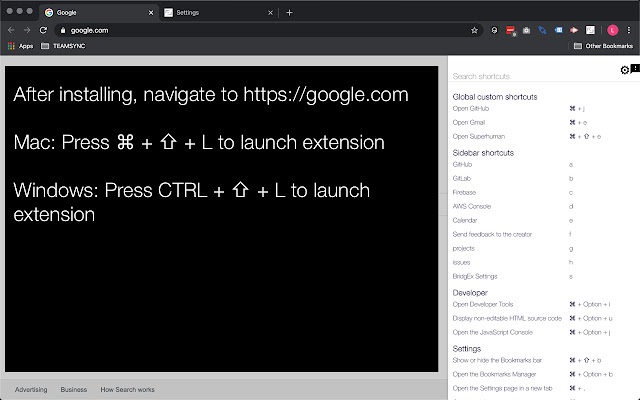
                        To get started, reload the browser and then press ⌘ + ⇧ + L on a Mac or CTRL + ⇧ + L on a Windows PC.

Create customized keyboard shortcuts that enable you to keep your hands on the keyboard and away from the mouse.  We are excited about this app and how it can make people more productive.  Please let us know your feedback!

Features:
- Easy to customize, simple layout for creating your shortcuts
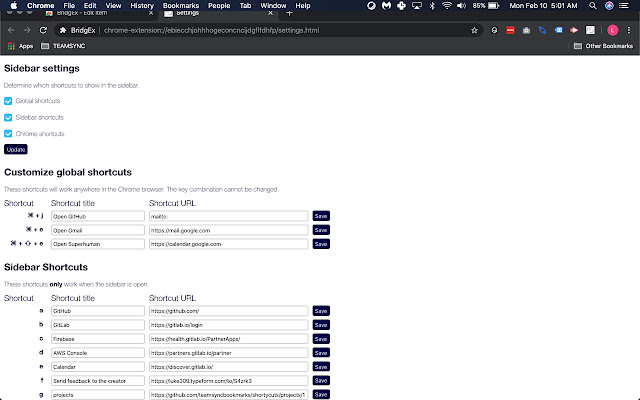
- Create three custom global hotkeys for Chrome that help you navigate to urls while in the browser
- Create up to 26 customer sidebar shortcuts that help you quickly navigate to your most used pages
- Quickly move focus back to important tabs by using the shortcut for the URL you'd like to move to
- Provides a reference for Google Chrome Shortcuts.

Email me lucas@hangoventures for ideas, comments, feedback.

v0.0.1 - initial upload
v0.0.2 - added customization / settings page to define hotkey shortcuts
v0.0.3 - improvements to user experience
v0.0.4 - bug fixes, added options in settings page to show / not show sections, UX improvements
v0.0.5 (20200213) - bug fixes, UI enhancements
v0.0.6 (20200222) - bug fixes, UI enhancements
v0.0.7 (20200225) - quickly add Sidebar Shortcut, added Google Analytics support
v0.1.0. (20220113) - add ability to save shortcuts to cloud
Βασικές Πληροφορίες Επέκτασης
| Όνομα |  Custom Shortcuts Custom Shortcuts |
| ID | bomleickifcdlcdonchhdcgkajlnmkmk |
| Επίσημο URL | https://chrome.google.com/webstore/detail/custom-shortcuts/bomleickifcdlcdonchhdcgkajlnmkmk |
| Περιγραφή | Browser keyboard shortcuts to anywhere at anytime |
| Μέγεθος Αρχείου | 799 KB |
| Αριθμός Εγκαταστάσεων | 115 |
| Τρέχουσα Έκδοση | 0.1.01 |
| Τελευταία Ενημέρωση | 2022-01-16 |
| Ημερομηνία Δημοσίευσης | 2020-02-25 |
| Αξιολόγηση | 3.67/5 Συνολικά 3 Αξιολογήσεις |
| Προγραμματιστής | Hango Ventures, LLC |
| Ηλεκτρονικό ταχυδρομείο | [email protected] |
| Τύπος Πληρωμής | free |
| Υποστηριζόμενες Γλώσσες | en-US |
| manifest.json | |
{
"update_url": "https:\/\/clients2.google.com\/service\/update2\/crx",
"version": "0.1.01",
"name": "Custom Shortcuts",
"manifest_version": 3,
"description": "Browser keyboard shortcuts to anywhere at anytime",
"icons": {
"128": "img\/icon-128.png"
},
"oauth2": {
"client_id": "1007336827109-a56thooaajsmcmnmt9kug23uaf8nte6p.apps.googleusercontent.com",
"scopes": [
"https:\/\/www.googleapis.com\/auth\/userinfo.email"
]
},
"action": [],
"background": {
"service_worker": "background.bundle.js"
},
"web_accessible_resources": [
{
"resources": [
"inject.html",
"\/fonts\/*"
],
"matches": [
" | |