Flip Lichess Knights
Flip the direction of the knights on lichess.org
Τι είναι το Flip Lichess Knights;
Το Flip Lichess Knights είναι ένα πρόσθετο Chrome που αναπτύχθηκε από τον Sam Sweeney, και η κύρια λειτουργία του είναι "Flip the direction of the knights on lichess.org".
Στιγμιότυπα Επέκτασης
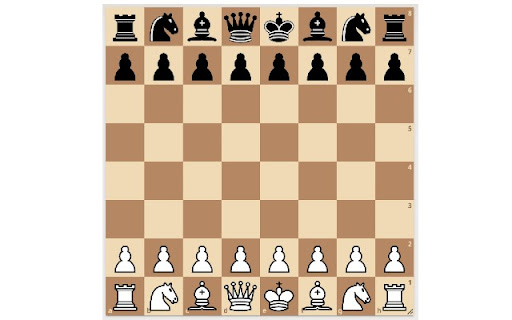
Λήψη αρχείου CRX της επέκτασης Flip Lichess Knights
Λήψη αρχείων επέκτασης Flip Lichess Knights σε μορφή crx, εγκατάσταση των επεκτάσεων Chrome μη αυτόματα στον περιηγητή ή κοινοποίηση των αρχείων crx με φίλους για εύκολη εγκατάσταση των επεκτάσεων Chrome.
Οδηγίες Χρήσης της Επέκτασης
Flip Lichess Knights allows you to customize your board UI when playing chess on lichess.org. By default knights on Lichess face to the right. Flip Lichess Knights allows you to toggle their direction, so they can face either to the right or to the left. Βασικές Πληροφορίες Επέκτασης
| Όνομα |  Flip Lichess Knights Flip Lichess Knights |
| ID | cdkfpbdifpndnncjmfciiphhfjjfbpad |
| Επίσημο URL | https://chromewebstore.google.com/detail/flip-lichess-knights/cdkfpbdifpndnncjmfciiphhfjjfbpad |
| Περιγραφή | Flip the direction of the knights on lichess.org |
| Μέγεθος Αρχείου | 30.63 KB |
| Αριθμός Εγκαταστάσεων | 38 |
| Τρέχουσα Έκδοση | 0.0.0.1 |
| Τελευταία Ενημέρωση | 2021-03-18 |
| Ημερομηνία Δημοσίευσης | 2021-03-18 |
| Προγραμματιστής | Sam Sweeney |
| Ηλεκτρονικό ταχυδρομείο | [email protected] |
| Τύπος Πληρωμής | free |
| Υποστηριζόμενες Γλώσσες | en |
| manifest.json | |
{
    "update_url": "https:\/\/clients2.google.com\/service\/update2\/crx",
    "name": "Flip Lichess Knights",
    "description": "Flip the direction of the knights on lichess.org",
    "version": "0.0.0.1",
    "manifest_version": 3,
    "background": {
        "service_worker": "background.js"
    },
    "content_scripts": [
        {
            "matches": [
                "https:\/\/*.lichess.org\/*"
            ],
            "js": [
                "flip-knights.js"
            ]
        }
    ],
    "action": {
        "default_popup": "popup.html",
        "default_icon": {
            "16": "icon16.png",
            "48": "icon48.png",
            "128": "icon128.png"
        }
    },
    "icons": {
        "16": "icon16.png",
        "48": "icon48.png",
        "128": "icon128.png"
    },
    "permissions": [
        "storage"
    ]
} | |