Shoppingo Shopping Assistant
The best way to save time and money while shopping online.
Τι είναι το Shoppingo Shopping Assistant;
Το Shoppingo Shopping Assistant είναι ένα πρόσθετο Chrome που αναπτύχθηκε από τον http://getshoppingo.com, και η κύρια λειτουργία του είναι "The best way to save time and money while shopping online.".
Στιγμιότυπα Επέκτασης
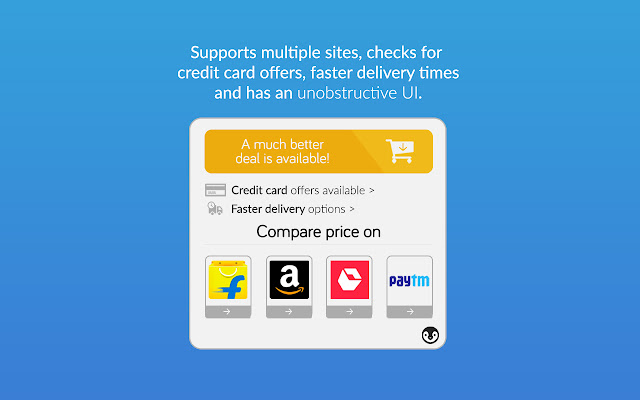

Λήψη αρχείου CRX της επέκτασης Shoppingo Shopping Assistant
Λήψη αρχείων επέκτασης Shoppingo Shopping Assistant σε μορφή crx, εγκατάσταση των επεκτάσεων Chrome μη αυτόματα στον περιηγητή ή κοινοποίηση των αρχείων crx με φίλους για εύκολη εγκατάσταση των επεκτάσεων Chrome.
Οδηγίες Χρήσης της Επέκτασης
                        Shoppingo Online Shopping Assistant helps you save time and money online, by getting the best prices across Amazon, Flipkart, among others, and helps you get your products delivered faster.

- We find the best prices, even if it's available right on the same website.
- We compare prices for you, so you don't have to!
- Can spare a few extra bucks for faster delivery? We'll show you which websites can get the product fastest to you!
- We'll scan for the latest offers on credit/debit cards, and let you know if you should use a specific one to get maximum benefits!
- Pingu lives in a small space on your shopping websites, and does not crowd and hinder your shopping experience by displaying overlays or popups.
- You can always click on the Pingu Button to know about the latest offers and deals across websites!
Βασικές Πληροφορίες Επέκτασης
| Όνομα |  Shoppingo Shopping Assistant Shoppingo Shopping Assistant |
| ID | cglgggloahballbnpiijijjjihmenjmb |
| Επίσημο URL | https://chrome.google.com/webstore/detail/shoppingo-shopping-assist/cglgggloahballbnpiijijjjihmenjmb |
| Περιγραφή | The best way to save time and money while shopping online. |
| Μέγεθος Αρχείου | 632 KB |
| Αριθμός Εγκαταστάσεων | 98 |
| Τρέχουσα Έκδοση | 2.1 |
| Τελευταία Ενημέρωση | 2017-05-06 |
| Ημερομηνία Δημοσίευσης | 2017-05-06 |
| Αξιολόγηση | 5.00/5 Συνολικά 10 Αξιολογήσεις |
| Προγραμματιστής | http://getshoppingo.com |
| Ηλεκτρονικό ταχυδρομείο | [email protected] |
| Τύπος Πληρωμής | free |
| Ιστότοπος Επέκτασης | https://www.getshoppingo.com |
| URL της Σελίδας Πολιτικής Απορρήτου | https://getshoppingo.com/privacy.html |
| Υποστηριζόμενες Γλώσσες | en |
| manifest.json | |
{
    "update_url": "https:\/\/clients2.google.com\/service\/update2\/crx",
    "name": "__MSG_appName__",
    "version": "2.1",
    "manifest_version": 2,
    "description": "__MSG_appDescription__",
    "icons": {
        "16": "icons\/icon-16.png",
        "128": "icons\/icon-128.png"
    },
    "default_locale": "en",
    "background": {
        "scripts": [
            "lib\/jquery-3.2.1.min.js",
            "background.js"
        ]
    },
    "permissions": [
        "tabs",
        "storage",
        "notifications",
        "activeTab",
        "http:\/\/*\/*",
        "https:\/\/*\/*"
    ],
    "content_security_policy": "script-src 'self' https:\/\/cdn.mxpnl.com; object-src 'self'",
    "web_accessible_resources": [
        "icons\/fonts\/*"
    ],
    "content_scripts": [
        {
            "matches": [
                "http:\/\/*\/*",
                "https:\/\/*\/*"
            ],
            "js": [
                "lib\/base64.js",
                "analytics.js",
                "templates.js",
                "pinguUtils.js",
                "comparison.js",
                "amazon.js",
                "flipkart.js",
                "snapdeal.js",
                "main.js"
            ],
            "css": [
                "pingu.css"
            ],
            "run_at": "document_end",
            "all_frames": false
        }
    ],
    "browser_action": {
        "default_icon": {
            "19": "icons\/icon-19.png",
            "38": "icons\/icon-38.png"
        },
        "default_title": "Shoppingo Shopping Assistant"
    }
} | |