Encrypto-Blog Reader
Decryption extension for Google Chrome.
Τι είναι το Encrypto-Blog Reader;
Το Encrypto-Blog Reader είναι ένα πρόσθετο Chrome που αναπτύχθηκε από τον Jamhead, και η κύρια λειτουργία του είναι "Decryption extension for Google Chrome.".
Στιγμιότυπα Επέκτασης
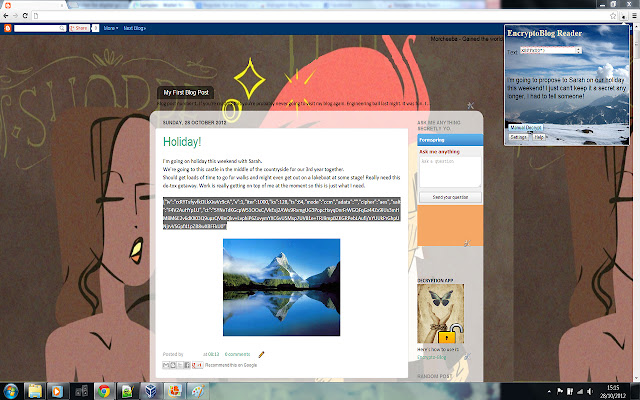
Λήψη αρχείου CRX της επέκτασης Encrypto-Blog Reader
Λήψη αρχείων επέκτασης Encrypto-Blog Reader σε μορφή crx, εγκατάσταση των επεκτάσεων Chrome μη αυτόματα στον περιηγητή ή κοινοποίηση των αρχείων crx με φίλους για εύκολη εγκατάσταση των επεκτάσεων Chrome.
Οδηγίες Χρήσης της Επέκτασης
                        For use in conjunction with:
https://chrome.google.com/webstore/detail/encrypto-blog-writer/abdogbkdaofidplnchileepabhimdnod

- Decrypt easily messages shared with the "Encrypto-Blog Writer" extension
- No signing up required!
- Simple, quick and easy to use!

How to use:
Step 1: Get a password.
Your userID is in the settings page. Send this to whoever sent you encrypted messages and they'll give you a password for it! Simples!

Step 2: Decrypt a message.
Just copy and paste the encrypted message into the text area and click decrypt!
Βασικές Πληροφορίες Επέκτασης
| Όνομα |  Encrypto-Blog Reader Encrypto-Blog Reader |
| ID | codjdpidpokicflnohcfdjfcanliipoe |
| Επίσημο URL | https://chrome.google.com/webstore/detail/encrypto-blog-reader/codjdpidpokicflnohcfdjfcanliipoe |
| Περιγραφή | Decryption extension for Google Chrome. |
| Μέγεθος Αρχείου | 182 KB |
| Αριθμός Εγκαταστάσεων | 18 |
| Τρέχουσα Έκδοση | 1.4.1 |
| Τελευταία Ενημέρωση | 2013-07-07 |
| Ημερομηνία Δημοσίευσης | 2013-07-07 |
| Αξιολόγηση | 3.00/5 Συνολικά 2 Αξιολογήσεις |
| Προγραμματιστής | Jamhead |
| Ηλεκτρονικό ταχυδρομείο | [email protected] |
| Τύπος Πληρωμής | free |
| Υποστηριζόμενες Γλώσσες | en-GB |
| manifest.json | |
{
    "update_url": "http:\/\/clients2.google.com\/service\/update2\/crx",
    "name": "Encrypto-Blog Reader",
    "description": "Decryption extension for Google Chrome.",
    "version": "1.4.1",
    "manifest_version": 2,
    "background": {
        "scripts": [
            "background.js"
        ]
    },
    "content_scripts": [
        {
            "matches": [
                "http:\/\/heuuuth.blogspot.ie\/*"
            ],
            "js": [
                "myHeuuuthScript.js"
            ]
        }
    ],
    "browser_action": {
        "default_icon": "key.png",
        "default_popup": "popup.html"
    },
    "permissions": [
        "unlimitedStorage",
        "http:\/\/heuuuth.blogspot.ie\/",
        "tabs",
        "notifications"
    ]
} | |