Notifications for Spotify
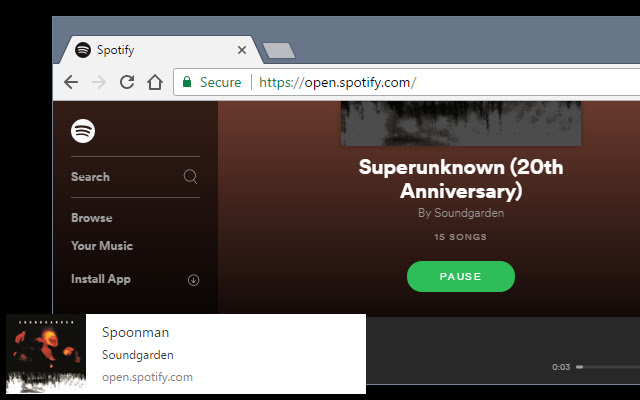
Add notifications and controls to open.spotify.com
Τι είναι το Notifications for Spotify;
Το Notifications for Spotify είναι ένα πρόσθετο Chrome που αναπτύχθηκε από τον Skylark95, και η κύρια λειτουργία του είναι "Add notifications and controls to open.spotify.com".
Στιγμιότυπα Επέκτασης

Λήψη αρχείου CRX της επέκτασης Notifications for Spotify
Λήψη αρχείων επέκτασης Notifications for Spotify σε μορφή crx, εγκατάσταση των επεκτάσεων Chrome μη αυτόματα στον περιηγητή ή κοινοποίηση των αρχείων crx με φίλους για εύκολη εγκατάσταση των επεκτάσεων Chrome.
Οδηγίες Χρήσης της Επέκτασης
                        The browser tab for open.spotify.com must remain open for notifications to appear.

As of version v0.4.0 a browser action icon will also show the currently playing song with track controls when clicked.

=== FEATURES ===

WEB NOTIFICATIONS FOR CURRENT SONG:
• Show web notification with song title, artist, and album art
• Notification is shown when open.spotify.com is opened and when song changes

BROWSER ACTION WITH SONG PREVIEW AND CONTROLS
• Browser action icon will show currently playing song with controls to play/pause/change track
• Clicking links in the browser action popup window will focus the Spotify tab and show the album or artist clicked

KEYBOARD SHORTCUTS
• Ctrl+Shift+S: Show browser action with song preview
• Ctrl+Shift+Space: Toggle Play/Pause for current song from anywhere in the browser
• Ctrl+Shift+X: Show notification for current song from anywhere in the browser
• Keyboard shortcuts may be changed on the chrome://extensions/ page by strolling to the bottom of the page and clicking "Keyboard Shortcuts"

PLEASE REPORT BUGS OR FEATURES REQUESTS ON GITHUB. I don't regularly check comments on the web store.
https://github.com/Skylark95/spotify-notifications

Recent Changes:
v0.4.0:
• Feature: Add track controls to browser action
• Feature: Add links to browser action to jump to album or artist
• Feature: Add browser keyboard shortcut to show browser action (default: Ctrl+Shift+S)
• Feature: Add browser keyboard shortcut play/pause track from any tab (default: Ctrl+Shift+Space)
Feature: Add browser keyboard shortcut show notification from any tab (default: Ctrl+Shift+X)
• Bugfix: Don't show multiple notifications if rapidly changing track
• Bugfix: Fix browser action doesn't work if notifications are not granted

v0.3.1:
• Bugfix: Fix cover art scaling in browser action popup
• Security: Replace innerHTML calls with textContent

v0.3.0:
• Feature: Implement browser action to show currently playing song

v0.2.0:
• Performance: Replace recursive setTimeout call with MutationObserver
Βασικές Πληροφορίες Επέκτασης
| Όνομα |  Notifications for Spotify Notifications for Spotify |
| ID | filocihllcicedfecomcdlilalmcfohi |
| Επίσημο URL | https://chrome.google.com/webstore/detail/notifications-for-spotify/filocihllcicedfecomcdlilalmcfohi |
| Περιγραφή | Add notifications and controls to open.spotify.com |
| Μέγεθος Αρχείου | 15.47 KB |
| Αριθμός Εγκαταστάσεων | 102 |
| Τρέχουσα Έκδοση | 0.4.0 |
| Τελευταία Ενημέρωση | 2017-06-28 |
| Ημερομηνία Δημοσίευσης | 2017-06-28 |
| Αξιολόγηση | 2.67/5 Συνολικά 3 Αξιολογήσεις |
| Προγραμματιστής | Skylark95 |
| Ηλεκτρονικό ταχυδρομείο | [email protected] |
| Τύπος Πληρωμής | free |
| Ιστότοπος Επέκτασης | https://github.com/Skylark95/spotify-notifications |
| Διεύθυνση URL της Σελίδας Βοήθειας | https://github.com/Skylark95/spotify-notifications/blob/master/README.md |
| Υποστηριζόμενες Γλώσσες | en |
| manifest.json | |
{
    "update_url": "https:\/\/clients2.google.com\/service\/update2\/crx",
    "name": "Notifications for Spotify",
    "version": "0.4.0",
    "manifest_version": 2,
    "minimum_chrome_version": "49",
    "description": "Add notifications and controls to open.spotify.com",
    "homepage_url": "https:\/\/github.com\/Skylark95\/spotify-notifications",
    "icons": {
        "16": "icons\/icon16.png",
        "48": "icons\/icon48.png",
        "128": "icons\/icon128.png"
    },
    "permissions": [
        "storage"
    ],
    "content_scripts": [
        {
            "matches": [
                "https:\/\/open.spotify.com\/*"
            ],
            "js": [
                "src\/inject\/spotify-notifications.js"
            ],
            "run_at": "document_end"
        }
    ],
    "background": {
        "scripts": [
            "src\/bg\/background.js"
        ],
        "persistent": false
    },
    "browser_action": {
        "default_icon": "icons\/icon19.png",
        "default_title": "Notifications for Spotify",
        "default_popup": "src\/browser-action\/browser-action.html"
    },
    "commands": {
        "_execute_browser_action": {
            "suggested_key": {
                "default": "Ctrl+Shift+S"
            }
        },
        "spotify-notifications-play-pause": {
            "suggested_key": {
                "default": "Ctrl+Shift+Space"
            },
            "description": "Toggle Play\/Pause track"
        },
        "spotify-notifications-show-notification": {
            "suggested_key": {
                "default": "Ctrl+Shift+X"
            },
            "description": "Show Notification"
        }
    }
} | |
![Now Playing Notifier for Spotify [unofficial]](https://lh3.googleusercontent.com/tWy6Q6dK6DXt5dLvzed-p2oZ1-fRqk-cmE3O0yTSVvvQ5qh8iztGfEcYTTqXr2CV4WGasdR8S6OX2yQz7xGcfv7N)