Journal access through HKU library
A simple chrome extension that let you access journal through HKU library resources (HKU ID needed).
Τι είναι το Journal access through HKU library;
Το Journal access through HKU library είναι ένα πρόσθετο Chrome που αναπτύχθηκε από τον junyichen, και η κύρια λειτουργία του είναι "A simple chrome extension that let you access journal through HKU library resources (HKU ID needed).".
Στιγμιότυπα Επέκτασης


Λήψη αρχείου CRX της επέκτασης Journal access through HKU library
Λήψη αρχείων επέκτασης Journal access through HKU library σε μορφή crx, εγκατάσταση των επεκτάσεων Chrome μη αυτόματα στον περιηγητή ή κοινοποίηση των αρχείων crx με φίλους για εύκολη εγκατάσταση των επεκτάσεων Chrome.
Οδηγίες Χρήσης της Επέκτασης
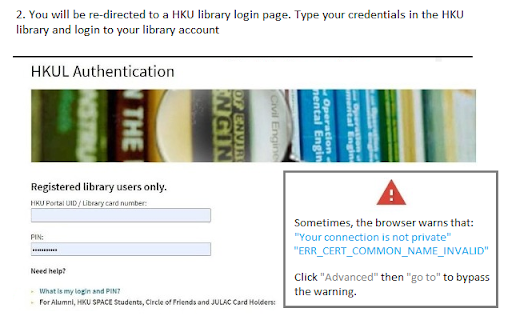
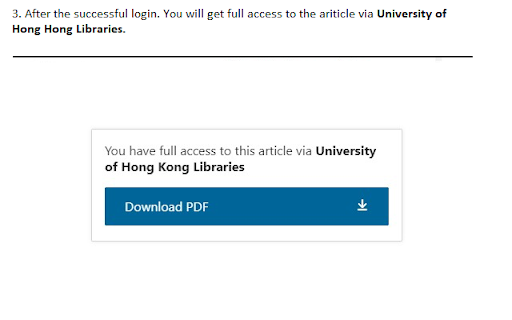
An extension that redirect you from the journal page to the HKU library portal. You need to login the HKU library. The extension will automatically parse the current URL of the current paper page to the HKU library address. Βασικές Πληροφορίες Επέκτασης
| Όνομα |  Journal access through HKU library Journal access through HKU library |
| ID | lcnnijjgcjfpcfjgnahbcpapbmkiceld |
| Επίσημο URL | https://chromewebstore.google.com/detail/journal-access-through-hk/lcnnijjgcjfpcfjgnahbcpapbmkiceld |
| Περιγραφή | A simple chrome extension that let you access journal through HKU library resources (HKU ID needed). |
| Μέγεθος Αρχείου | 47.64 KB |
| Αριθμός Εγκαταστάσεων | 135 |
| Τρέχουσα Έκδοση | 0.0.1 |
| Τελευταία Ενημέρωση | 2021-09-02 |
| Ημερομηνία Δημοσίευσης | 2021-08-04 |
| Προγραμματιστής | junyichen |
| Ηλεκτρονικό ταχυδρομείο | [email protected] |
| Τύπος Πληρωμής | free |
| Υποστηριζόμενες Γλώσσες | en-US |
| manifest.json | |
{
    "update_url": "https:\/\/clients2.google.com\/service\/update2\/crx",
    "manifest_version": 2,
    "name": "Journal access through HKU library",
    "short_name": "HKULibJ",
    "description": "A simple chrome extension that let you access journal through HKU library resources (HKU ID needed).",
    "version": "0.0.1",
    "minimum_chrome_version": "38",
    "permissions": [
        "contextMenus",
        "tabs"
    ],
    "icons": {
        "16": "assets\/icon16.png",
        "128": "assets\/icon128.png"
    },
    "background": {
        "page": "background.html"
    }
} | |