Autosave Text
Save edited text fields to sync storage (available in syncing chrome installations), except for input type password.
Τι είναι το Autosave Text;
Το Autosave Text είναι ένα πρόσθετο Chrome που αναπτύχθηκε από τον [email protected], και η κύρια λειτουργία του είναι "Save edited text fields to sync storage (available in syncing chrome installations), except for input type password.".
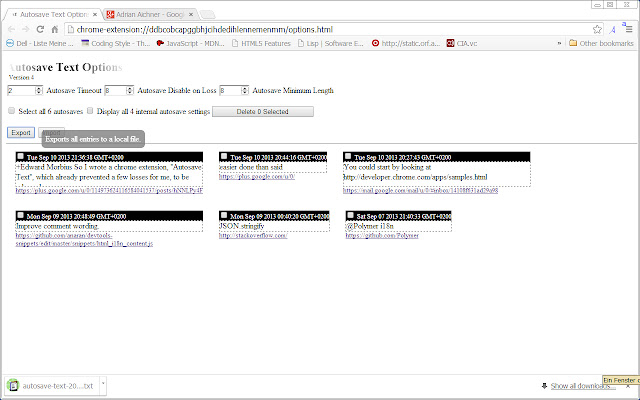
Στιγμιότυπα Επέκτασης



Λήψη αρχείου CRX της επέκτασης Autosave Text
Λήψη αρχείων επέκτασης Autosave Text σε μορφή crx, εγκατάσταση των επεκτάσεων Chrome μη αυτόματα στον περιηγητή ή κοινοποίηση των αρχείων crx με φίλους για εύκολη εγκατάσταση των επεκτάσεων Chrome.
Οδηγίες Χρήσης της Επέκτασης
                        * Text will be saved automatically when no changes to it are made within a timeout period in seconds.
Any change restarts the timeout operation.

* Text will no longer be automatically saved when it shortens by more than the given number of characters from its last autosave length.
Autosaving resumes when it grows within bounds again.

* Text will only be automatically saved when it has at least the given number of characters.
This avoids saving cleartext account numbers and the like.

* All edited and input text fields are automatically saved to sync storage, except for input type password.
The texts are available in all chrome installations you are signed in to when syncing is turned on.
You can still use the extension when offline.
Syncing commences once you go online again.

*Contributing Translations*

Translations of the "message" texts (keep "description" for a reference) of
https://code.google.com/p/autosave-text/source/browse/autoSaveText/_locales/en/messages.json
to other languages (German is already covered) would be greatly appreciated.

Just submit your translation as attachment and specify the name of the language in the *Summary:* line at
https://code.google.com/p/autosave-text/issues/entry?summary=translation%20to%20LANGUAGE
Βασικές Πληροφορίες Επέκτασης
| Όνομα |  Autosave Text Autosave Text |
| ID | omgpghebcjlafeegihofjnhhmllplnie |
| Επίσημο URL | https://chrome.google.com/webstore/detail/autosave-text/omgpghebcjlafeegihofjnhhmllplnie |
| Περιγραφή | Save edited text fields to sync storage (available in syncing chrome installations), except for input type password. |
| Μέγεθος Αρχείου | 22.41 KB |
| Αριθμός Εγκαταστάσεων | 809 |
| Τρέχουσα Έκδοση | 14 |
| Τελευταία Ενημέρωση | 2013-11-11 |
| Ημερομηνία Δημοσίευσης | 2013-11-11 |
| Αξιολόγηση | 2.75/5 Συνολικά 8 Αξιολογήσεις |
| Προγραμματιστής | [email protected] |
| Τύπος Πληρωμής | free |
| Ιστότοπος Επέκτασης | https://code.google.com/p/autosave-text |
| Διεύθυνση URL της Σελίδας Βοήθειας | https://code.google.com/p/autosave-text/issues/list |
| Υποστηριζόμενες Γλώσσες | de,en |
| manifest.json | |
{
"update_url": "https:\/\/clients2.google.com\/service\/update2\/crx",
"manifest_version": 2,
"name": "__MSG_extension_name__",
"version": "14",
"minimum_chrome_version": "29.0.1521.3",
"default_locale": "en",
"description": "__MSG_extension_description__",
"icons": {
"48": "autosave48x48.png",
"128": "autosave2_128x128.png"
},
"web_accessible_resources": [
"autosave48x48.png",
"autosave2_128x128.png"
],
"permissions": [
"activeTab",
"contextMenus",
"storage",
"unlimitedStorage"
],
"background": {
"scripts": [
"autosave_bg.js",
"toast.js"
]
},
"commands": {
"review_autosaves": {
"suggested_key": {
"default": "Alt+Shift+A"
},
"description": "__MSG_review_autosaves__"
},
"capture_tab": {
"suggested_key": {
"default": "Alt+Shift+C"
},
"description": "__MSG_capture_tab__"
}
},
"content_scripts": [
{
"all_frames": true,
"matches": [
" | |