Video Timestamp Jumper
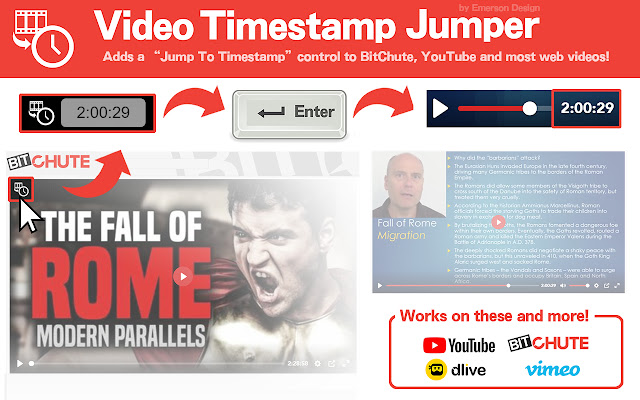
Adds a "Jump to Timestamp" control to BitChute, YouTube and most web videos!
Τι είναι το Video Timestamp Jumper;
Το Video Timestamp Jumper είναι ένα πρόσθετο Chrome που αναπτύχθηκε από τον Emerson Design, και η κύρια λειτουργία του είναι "Adds a "Jump to Timestamp" control to BitChute, YouTube and most web videos!".
Στιγμιότυπα Επέκτασης
Λήψη αρχείου CRX της επέκτασης Video Timestamp Jumper
Λήψη αρχείων επέκτασης Video Timestamp Jumper σε μορφή crx, εγκατάσταση των επεκτάσεων Chrome μη αυτόματα στον περιηγητή ή κοινοποίηση των αρχείων crx με φίλους για εύκολη εγκατάσταση των επεκτάσεων Chrome.
Οδηγίες Χρήσης της Επέκτασης
                        2020111x: FYI this extension is a bit buggy and likely needs work, but development paused for now. Let me know if anyone is interested in this extension being continued though!


This is a simple extension to add a "jump to timestamp" control to almost any web video. So far it works it works well on YouTube, BitChute, DLive, Vimeo and most other sites that feature single-video playback.

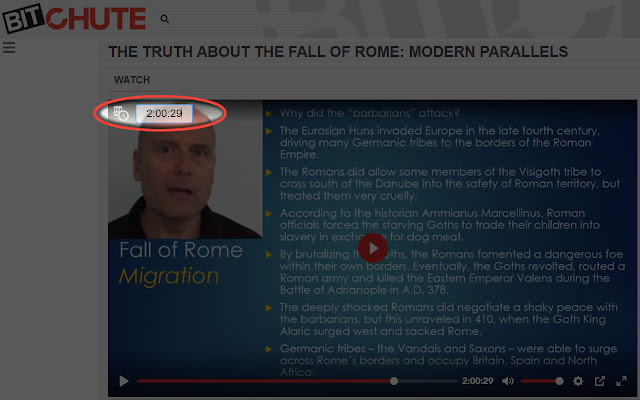
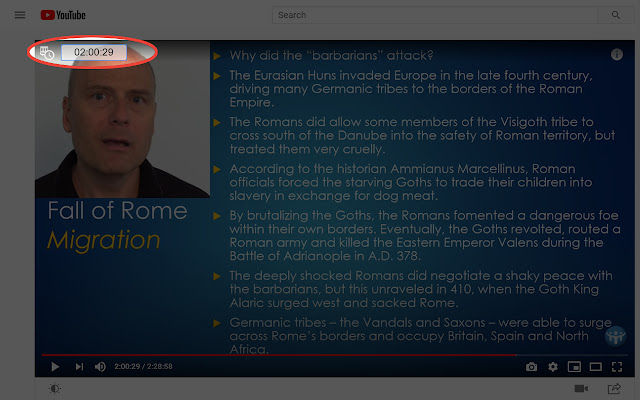
The control will show up in the upper left corner of the video. To use it simply hover over the control (or press "ALT+T") to toggle and use the timestamp control! Pretty basic functionality for now - maybe will expand with custom settings, etc later.

----- NOTES -----
* Does not work on all video sites. It may show up on LIVE stream feeds but likely will be buggy if used there
* Disabled on some sites know to have tons of videos per page (i.e. Twitter)
* If I find an existing/better tool to do this kind of thing I'll likely delete this extension
* If anyone has any issues or suggestions please send a msg on the Facebook page
* REMINDER: All Chrome extensions work on other browser like "Brave" and "Dissenter" and those track your activity far less than Google Chrome.
Βασικές Πληροφορίες Επέκτασης
| Όνομα |  Video Timestamp Jumper Video Timestamp Jumper |
| ID | omnebjacmkdcgnglcfhcfgffondoopgk |
| Επίσημο URL | https://chrome.google.com/webstore/detail/video-timestamp-jumper/omnebjacmkdcgnglcfhcfgffondoopgk |
| Περιγραφή | Adds a "Jump to Timestamp" control to BitChute, YouTube and most web videos! |
| Μέγεθος Αρχείου | 159 KB |
| Αριθμός Εγκαταστάσεων | 62 |
| Τρέχουσα Έκδοση | 20200512075106 |
| Τελευταία Ενημέρωση | 2020-11-18 |
| Ημερομηνία Δημοσίευσης | 2020-06-16 |
| Αξιολόγηση | 5.00/5 Συνολικά 1 Αξιολογήσεις |
| Προγραμματιστής | Emerson Design |
| Ηλεκτρονικό ταχυδρομείο | [email protected] |
| Τύπος Πληρωμής | free |
| Ιστότοπος Επέκτασης | https://emersondesignlog.blogspot.com/2020/06/video-timestamp-jumper.html |
| Διεύθυνση URL της Σελίδας Βοήθειας | https://emersondesignlog.blogspot.com/2020/06/video-timestamp-jumper.html |
| URL της Σελίδας Πολιτικής Απορρήτου | https://emersondesignlog.blogspot.com/p/privacy-policy.html |
| Υποστηριζόμενες Γλώσσες | en-US |
| manifest.json | |
{
    "update_url": "https:\/\/clients2.google.com\/service\/update2\/crx",
    "name": "Video Timestamp Jumper",
    "version": "1.0.009",
    "version_name": "20200512075106",
    "icons": {
        "16": "icons\/icon_16.png",
        "48": "icons\/icon_48.png",
        "128": "icons\/icon_128.png"
    },
    "description": "Adds a \"Jump to Timestamp\" control to BitChute, YouTube and most web videos!",
    "manifest_version": 2,
    "content_security_policy": "script-src 'self' https:\/\/www.google-analytics.com\/; https:\/\/www.youtube.com\/*; object-src 'self'; child-src https:\/\/www.youtube.com\/* https:\/\/s.ytimg.com",
    "permissions": [
        "activeTab",
        "storage"
    ],
    "web_accessible_resources": [
        "*.jpg",
        "*.JPG",
        "*.png",
        "*.PNG",
        "*.woff2",
        "*.ttf",
        "*.woff",
        "vtsj.html",
        "photos.json",
        "*.json"
    ],
    "content_scripts": [
        {
            "matches": [
                "http:\/\/*\/*",
                "https:\/\/*\/*",
                "*:\/\/www.google.com\/*",
                "*:\/\/google.com\/*",
                "*:\/\/bitchute.com\/*"
            ],
            "exclude_matches": [
                "*:\/\/twitter.com\/*",
                "*:\/\/facebook.com\/*",
                "*:\/\/www.facebook.com\/*",
                "*:\/\/www.twitter.com\/*"
            ],
            "js": [
                "jquery2.js",
                "vtsj.js"
            ],
            "css": [
                "vtsj.css",
                "vtsj_fonts.css"
            ],
            "all_frames": false,
            "run_at": "document_end"
        }
    ]
} | |