Multiple File Download
This extension enables the user to select all the documents present in the web page for download.
Τι είναι το Multiple File Download;
Το Multiple File Download είναι ένα πρόσθετο Chrome που αναπτύχθηκε από τον prabhushan, και η κύρια λειτουργία του είναι "This extension enables the user to select all the documents present in the web page for download.".
Στιγμιότυπα Επέκτασης

Λήψη αρχείου CRX της επέκτασης Multiple File Download
Λήψη αρχείων επέκτασης Multiple File Download σε μορφή crx, εγκατάσταση των επεκτάσεων Chrome μη αυτόματα στον περιηγητή ή κοινοποίηση των αρχείων crx με φίλους για εύκολη εγκατάσταση των επεκτάσεων Chrome.
Οδηγίες Χρήσης της Επέκτασης
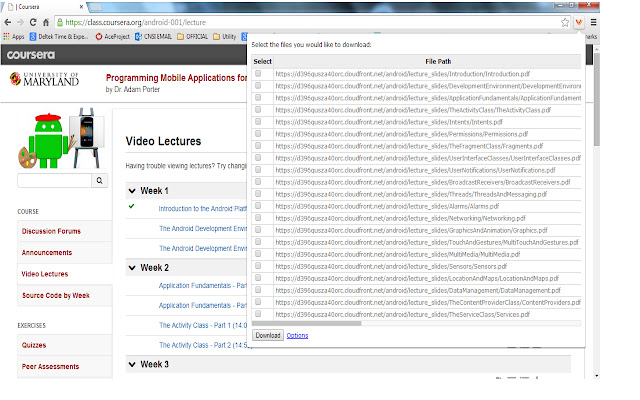
                        Many times we encounter situations where multiple files need to be downloaded from a web page. For example, user can download all the files in Coursera lessons in one shot. This would save lot of time.

Multiple file downloader facilitates the same. It scans through the web page and displays all the files, which user can download. User can select multiple files and click download.
It allows user to customize what file extensions should be downloaded in the web page.The user can also add custom extensions using the options page. User can also decide whether files need to be downloaded to default folder set in Chrome browser or prompt for each file.
BENEFITS FOR END USERS
1) Multi Select files in one go
2) Customise and also add your own extensions to download
KNOWN ISSUE
The extension scans for hyperlink across the web page. As per the design of the page, the hyperlink can be a button or image or both. So there are chances that duplicate links can appear on the extension.
Βασικές Πληροφορίες Επέκτασης
| Όνομα |  Multiple File Download Multiple File Download |
| ID | opncjdadngnekakilfcgjlgbmekljdbm |
| Επίσημο URL | https://chrome.google.com/webstore/detail/multiple-file-download/opncjdadngnekakilfcgjlgbmekljdbm |
| Περιγραφή | This extension enables the user to select all the documents present in the web page for download. |
| Μέγεθος Αρχείου | 154 KB |
| Αριθμός Εγκαταστάσεων | 10,000 |
| Τρέχουσα Έκδοση | 1.3 |
| Τελευταία Ενημέρωση | 2014-09-09 |
| Ημερομηνία Δημοσίευσης | 2014-09-09 |
| Αξιολόγηση | 2.56/5 Συνολικά 55 Αξιολογήσεις |
| Προγραμματιστής | prabhushan |
| Τύπος Πληρωμής | free |
| Υποστηριζόμενες Γλώσσες | en-US |
| manifest.json | |
{
"update_url": "https:\/\/clients2.google.com\/service\/update2\/crx",
"manifest_version": 2,
"name": "Multiple File Download",
"description": "This extension enables the user to select all the documents present in the web page for download. ",
"short_name": "File download",
"version": "1.3",
"background": {
"page": "popup.html"
},
"icons": {
"16": "sonicdownload.png",
"48": "sonicdownload.png",
"128": "sonicdownload.png"
},
"permissions": [
"tabs",
" | |